目录
这篇博客文章整理自 2026 年 11 月 13 日 MFCP 开源实践分享《Humanize:让 AI Agent 从单次任务走向复杂工程协作》。
我是张子健,清华大学人工智能学院博士研究生,NVIDIA Research Singapore 的 Research Intern,也是 Humanfia 核心开发者与 Humanize 2.0 主要代码实现者。这篇文章系统梳理 Humanize 一年来的演进脉络、统一 Agent Flow 运行时的底层实现、我们在 Flow 科学上的实验发现,以及面向大规模并发基础设施的探索。
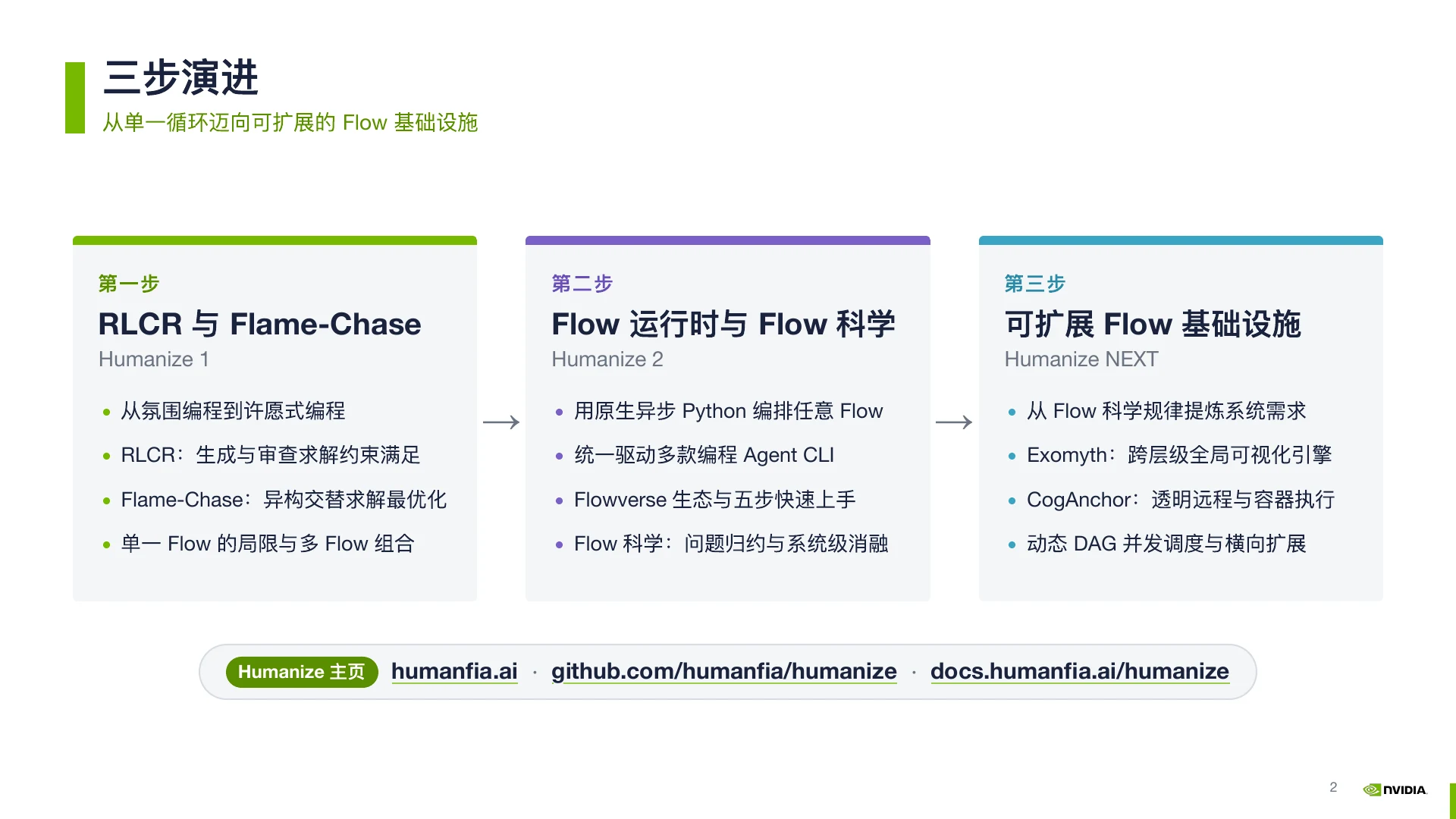
整篇内容我按三个阶段来展开:第一步讲今年年初我们设计第一版 Humanize——也就是把 Humanize 当作一个具体 Flow 时是怎么做的;第二步讲现在的 Humanize 2——也就是作为统一 Flow Runtime 是如何实现的,以及在这个平台上催生出的 Flow 科学;第三步聊一聊我们目前正在探索的、面向更大规模的 Flow 基础设施,以及分享后大家讨论的几个一线工程问题。
从 Session 到 Flow
从年初到现在,大家在深度使用各种编程 Agent 的过程中都会有一个共同的感受:很多时候我们直接敲一个 /goal,或者丢给它一句话,它并不一定能把事情做好。哪怕我们现在已经用上了像 Claude Opus 5、Claude Fable 5、GPT-5.6 Sol 这样非常先进的模型,可一旦碰到动辄要跑上好几天的复杂任务,仅仅写一段 prompt,模型很难始终按照我们的想法一直稳步推进下去。
这时候就需要引入 Flow 的概念——我们需要一个显式的工作流,去调度一个或多个不同的 Agent 进行合作或者竞争,共同完成足够庞大的任务。
拿年初 Anthropic 公布的那道 original_performance_takehome 面试题来说,这道题要求面试者在模拟的 VLIW + SIMD 机器上优化一个批量树遍历(tree-walk)CPU 内核,评测标准很直接:算法跑完所花的时钟周期数越少越好。因为 VLIW + SIMD 架构非常少见,模型的训练数据里几乎没有现成套路,这道题专门用来测试 AI 在陌生环境里搭建 harness、持续试错的能力。Anthropic 给出的面试及格线是 1,487 周期(Claude Opus 4.5 在自家 harness 里跑了 11.5 小时)。
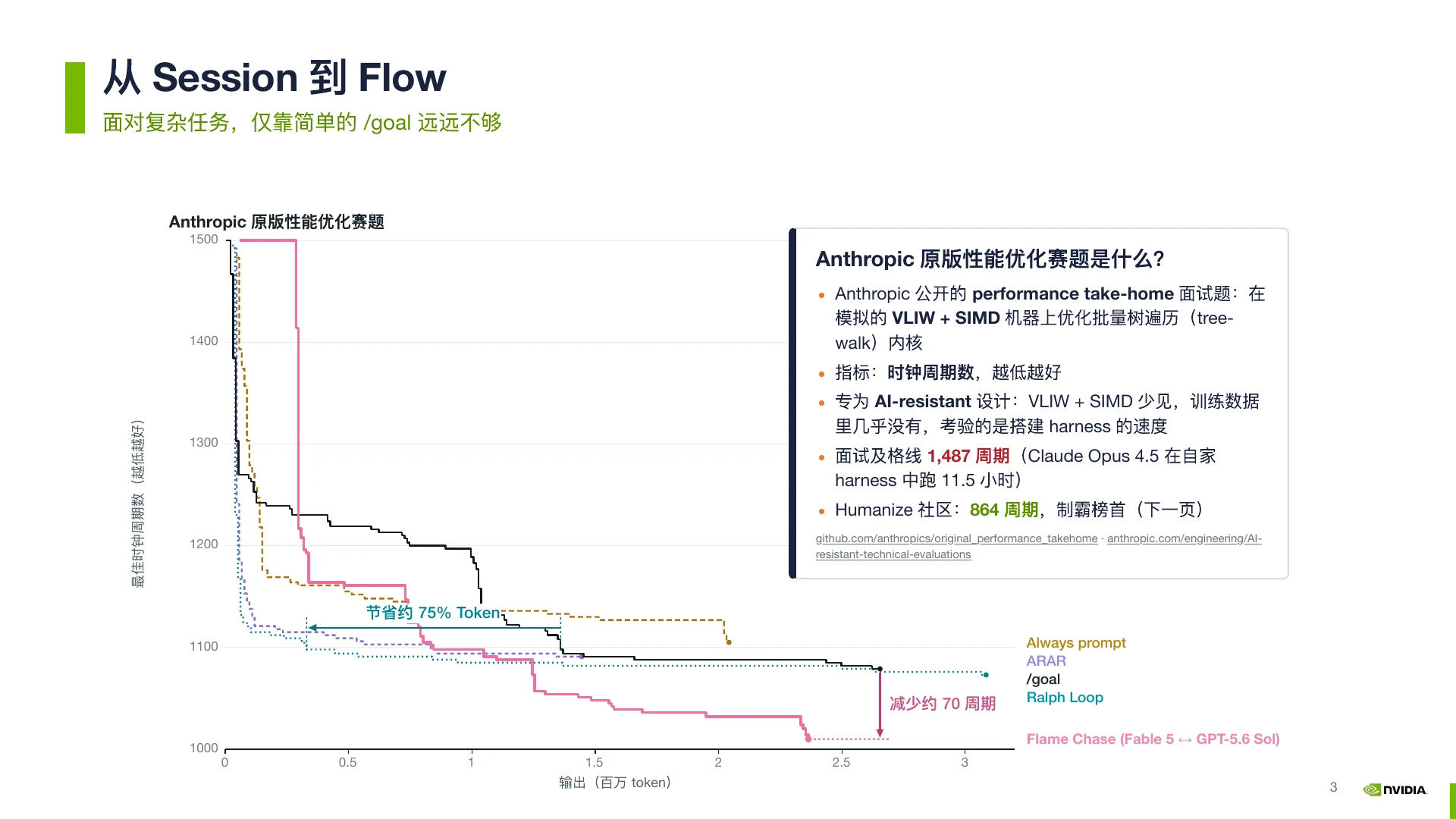
看上面这张曲线对比图:baseline 就是没有任何工作流、直接输入 /goal 让它“帮我完成这道题目”。相比直接 /goal,只要我们在 Flow 层面稍作优化,比如引入 Ralph Loop 或者 ARAR,在跑出相同周期数的前提下就能节省将近 75% 的 token;如果进一步用上 Flame-Chase 这样的工作流,在同样的预算和时间里还能把周期数再往下压约 70 个周期。
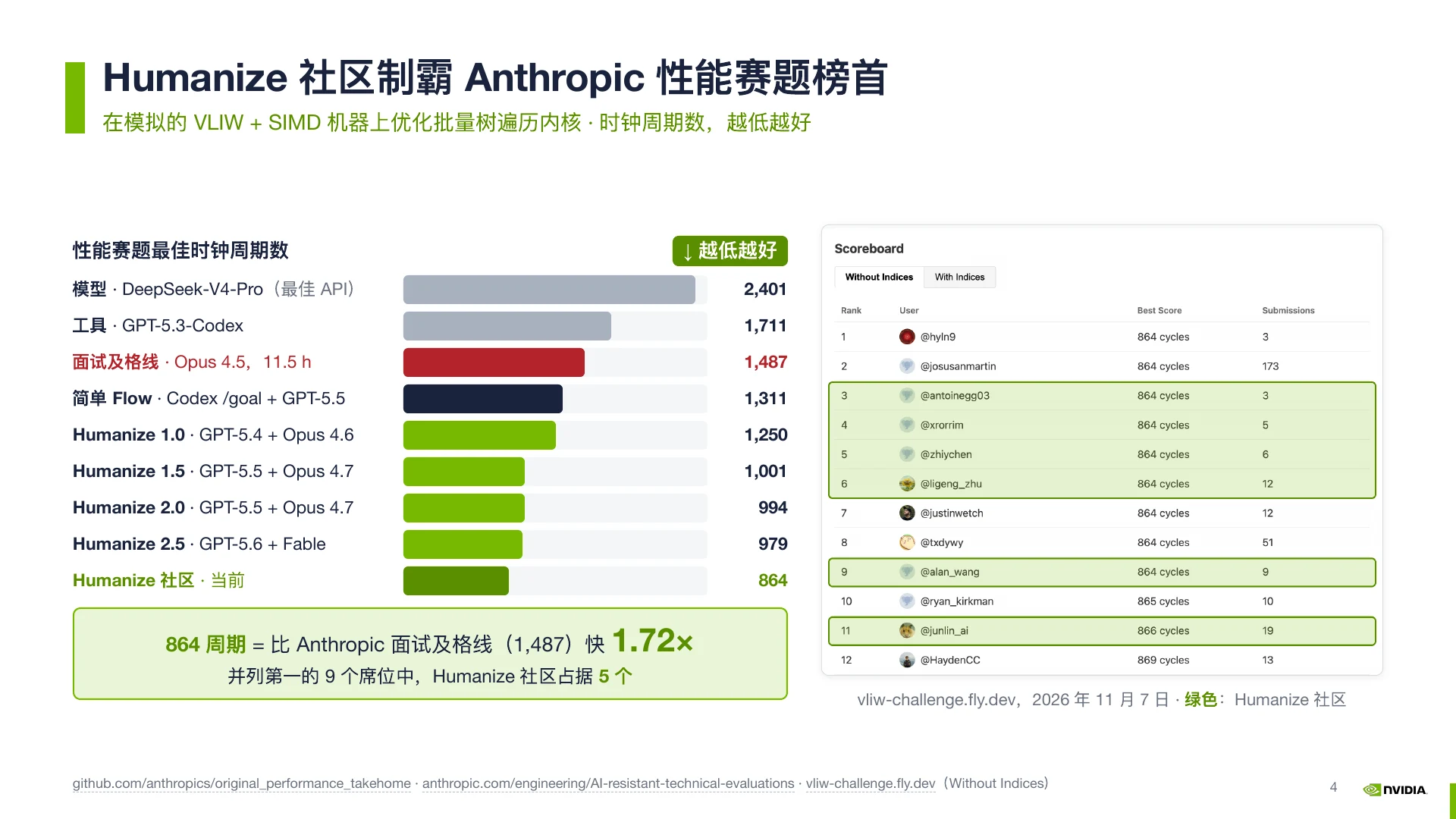
而且上面那张图还是比较早期的结果。从纯 API 调用的 DeepSeek-V4-Pro(2,401 周期)、单工具 GPT-5.3-Codex(1,711 周期)、1,487 的面试及格线、简单 /goal(1,311 周期),到我们一路迭代的 Humanize 1.0(1,250)、1.5(1,001)、2.0(994)、2.5(979),大约一个月前我们已经跑到了 864 周期,比面试及格线快了 1.72×。截至 2026 年 11 月 7 日,在 vliw-challenge.fly.dev(Without Indices)榜单并列第一的 9 个席位里,Humanize 社区成员占据了 5 个。这就是为什么我们必须研究 Flow——如果一直死磕单次 /goal,周期数永远下不去,还会白白烧掉海量 token。
Humanize 1:双范式演进
最初的 Humanize 1 是刘思皓(Sihao Liu,现在已经是 NVIDIA 的 Research Scientist)做的,相关工作总结在我们的论文 Humanize: Judgement Engineering for Agentic Coding 里。严格来说,Humanize 1 当时还算不上一个通用的 Flow 系统,它瞄准的是一个很具体的问题:如何在今年年初模型还比较弱的条件下,实现许愿式编程(Wishful Coding)。
RLCR 与许愿式编程
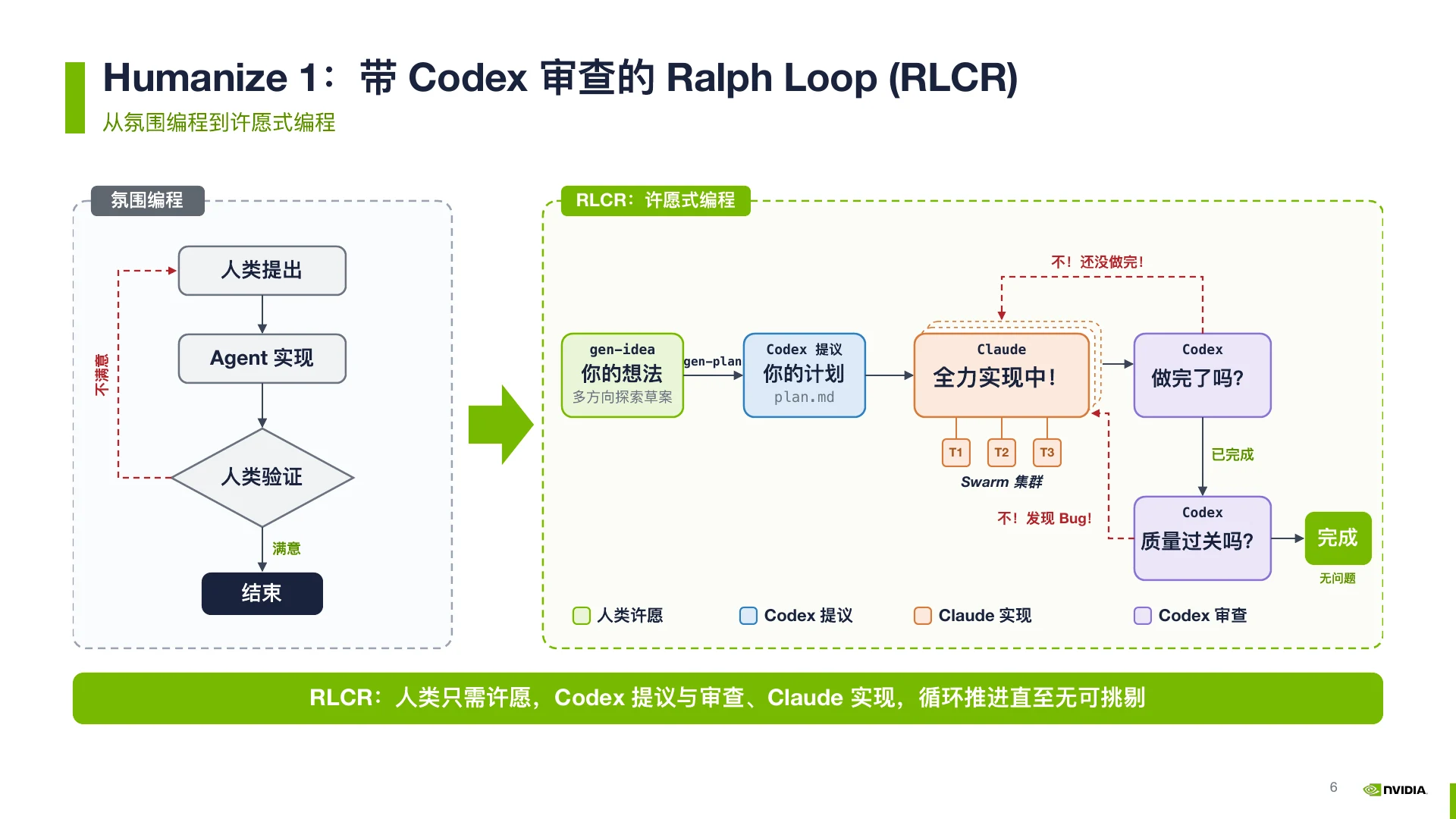
“许愿式编程”这个词最近很火。以前大家做 Vibe Coding(氛围编程),流程往往是人类提出一个需求、Agent 去实现、人类自己看有没有问题、不满意再提一轮。而我们年初设计的 RLCR(Ralph Loop with Codex Review,带 Codex 审查的 Ralph Loop),就是想把人工反复验收的环节自动化,让你只需要“许一个愿望”,系统自己循环推进直到把愿望实现:
- 用户提出一个想法,先由
gen-idea结合代码库拓展出多方向草案; - 进入
gen-plan阶段,多个 Agent 进行多轮辩论,打磨出一份相对靠谱的执行计划plan.md; - 拿到计划后,交给 Claude 与大量子 Agent 组成的 Swarm,分别实现计划里的不同模块;
- 最关键的一步:实现完以后,不能让 Claude 自己判定“我写好了”,必须交给独立的 Codex 去验证到底做得好不好。
社区里经常把两款工具混着用的朋友肯定深有体会:虽然 Codex 从零写大段代码的能力远不如 Claude,但它在代码审查、挑刺、找 Bug 这件事上,很多时候比 Claude 强得多。我们当时就是抓住这个特性,专门用 Codex 去查缺陷、把关目标有没有真正完成;只要 Codex 报出 Bug 或者认为还没做完,就打回继续修改,直到彻底通过。
单一 Flow 的局限
在 RLCR 这套工作流下,我们已经基本实现了相对顺手的许愿式编程。可后来把这套东西推广到其他类型任务时,我们很快就撞墙了——天底下没有免费的午餐,RLCR 这一套单一 Flow 解决不了所有问题。
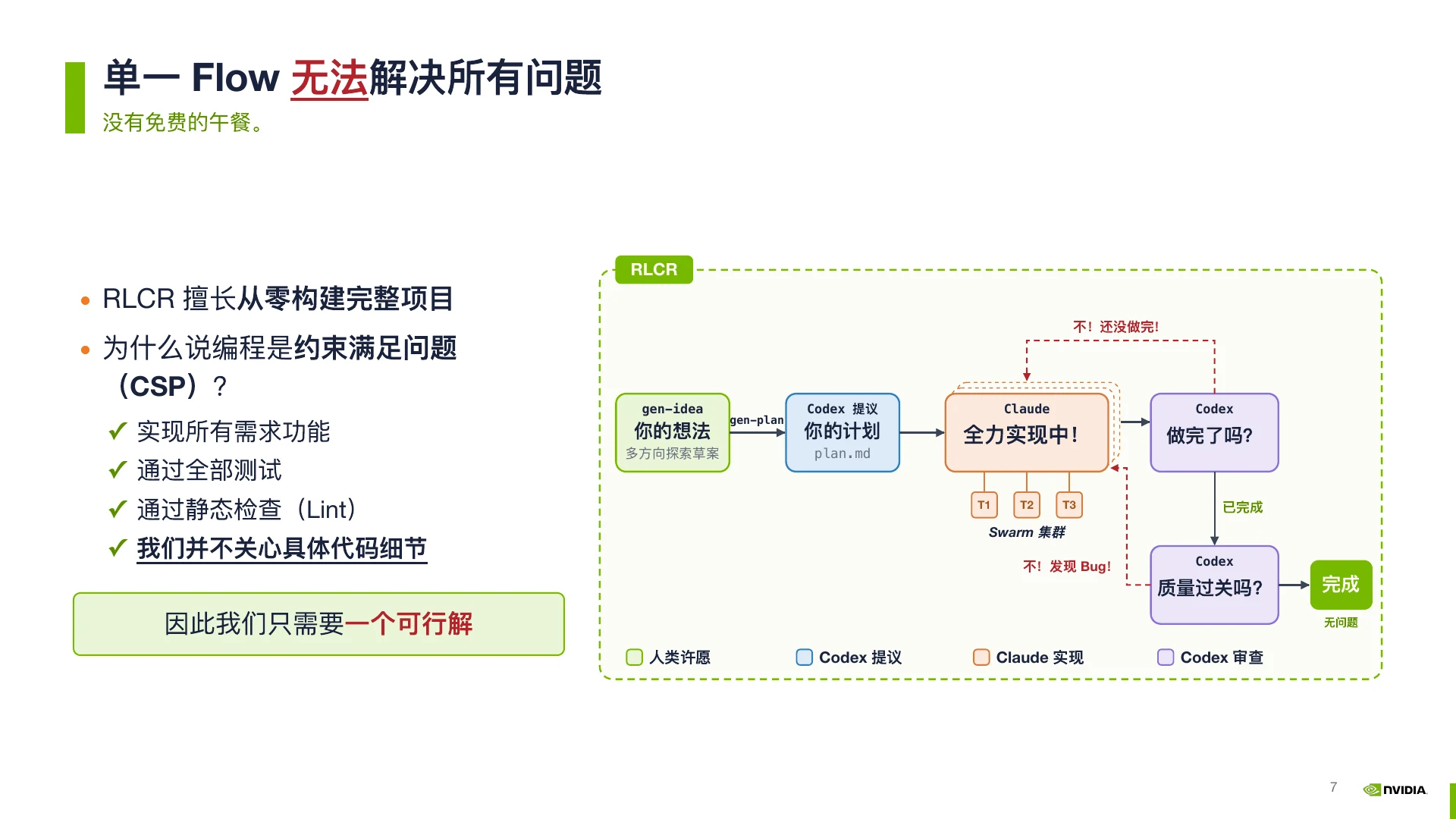
RLCR 最初就是为“从零搭建一个完整项目”设计的。常规软件项目从数学上看是一个约束满足问题(CSP):我们列出一堆功能需求,要求它把所有功能都做出来,通过全部测试和静态检查(Lint)。至于代码内部写得够不够精炼、跑得有多快,很多时候我们其实没那么计较——哪怕它写出来的是一份带着冗余开销的 “AI Slop”,只要能跑通、符合所有需求,作为一个可行解就已经达标了。
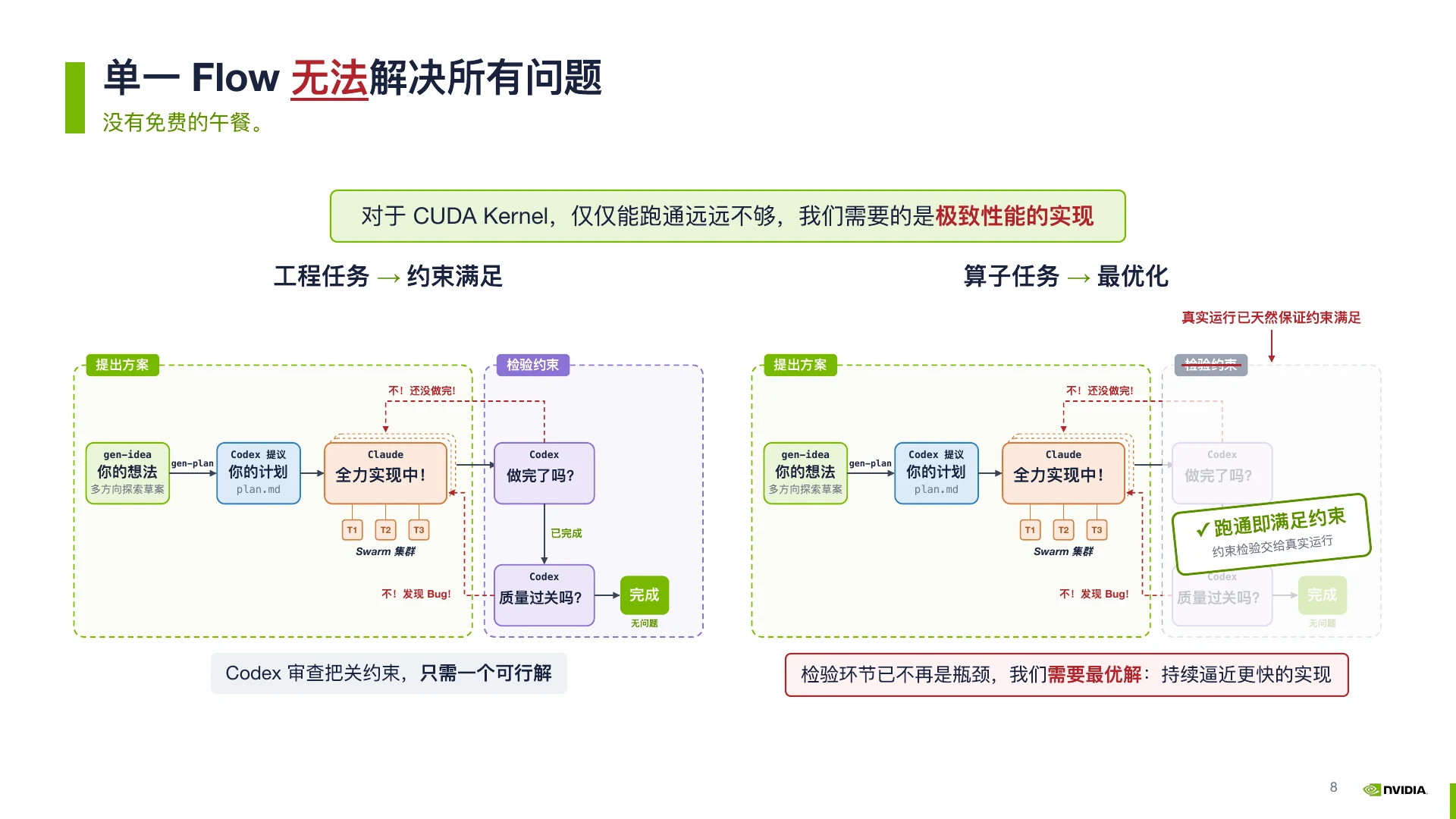
一旦把任务切换到写 CUDA Kernel 或者底层算子,AI Slop 绝对行不通,因为冗余实现会带来惨重的性能开销。而且还有两个根本区别:
第一,算子优化是个最优化问题,我们根本不知道它的性能下界在哪里,不可能对 Agent 说“你优化到 1,000 cycles 就收工”,必须不停地往下探底。
第二,检验约束的代价完全不同。写普通业务代码时,有没有隐蔽 Bug 很难用纯机械化的判定器查出来,所以需要 Codex 当 reviewer;可写算子完全不用这样——把算子丢到 GPU 上编译一下、真实跑一遍,结果对不对、跑得多快立刻就出来了。既然真实硬件运行已经天然保证了约束满足,再花大把时间让 Codex 做文本审查就纯属浪费,我们需要果断抛弃 reviewer,把全部精力压在“如何更快逼近更快实现”上。
Flame-Chase 与异构接力
今年大概 4 月份,我针对算子优化提出了另一个工作流——逐火循环(Flame-Chase)。这个名字的灵感来自游戏《崩坏:星穹铁道》里的“逐火之旅”:在游戏里,13 位黄金裔完成各自的试炼,依次提交火种。
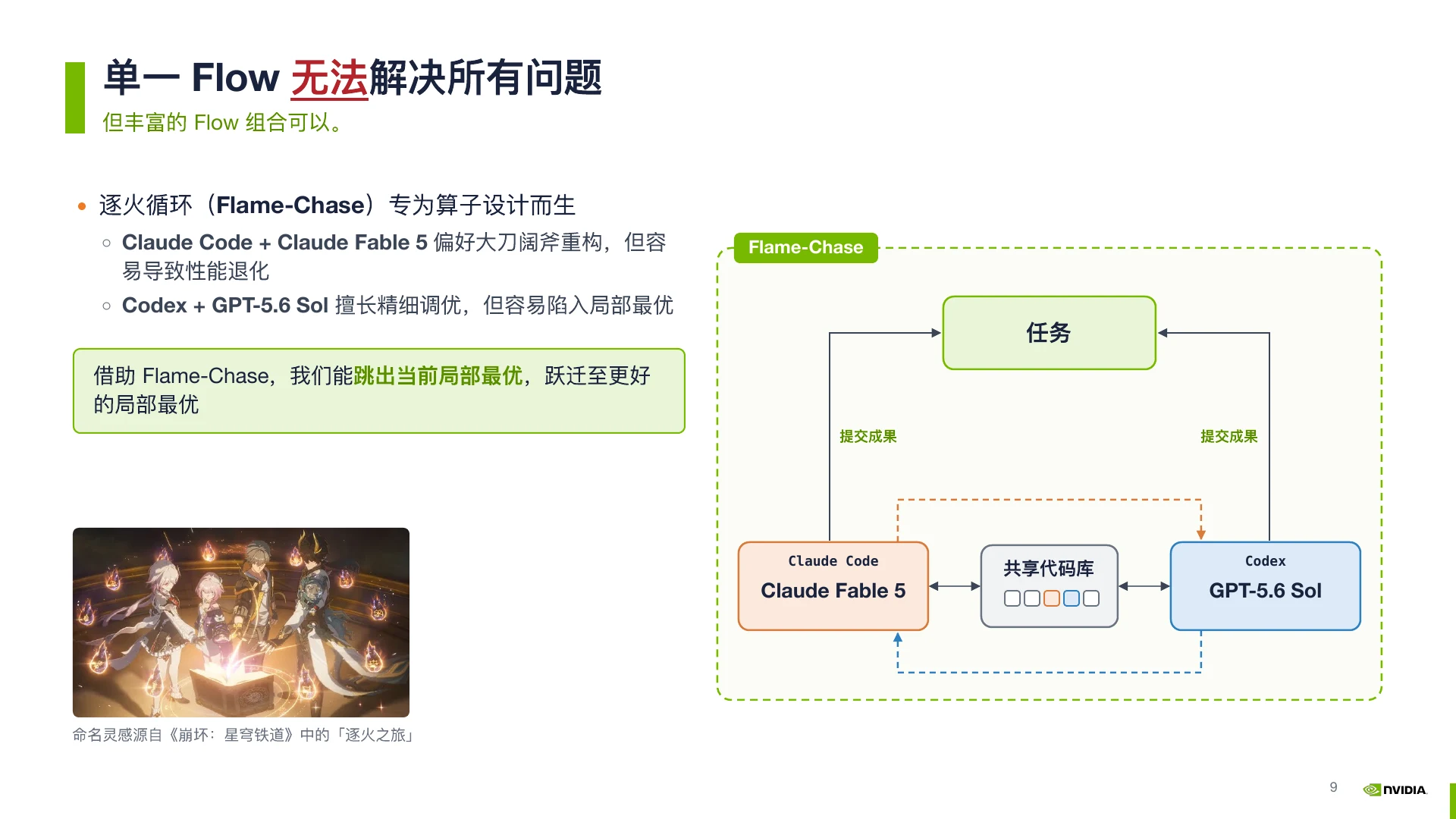
放到算子优化里,我们把不同性格的模型和 CLI 组合到一起(比如 Claude Code + Claude Fable 5 搭档 Codex + GPT-5.6 Sol,也可以加入 Kimi K3 等其他模型),让他们轮流在同一个共享代码库上优化算子:
Claude Code + Claude Fable 5偏好大刀阔斧的重构,能跳出原有结构,但也容易把性能改退化;Codex + GPT-5.6 Sol擅长精细调优,能一点点扣出周期,但也容易死守在局部最优里出不来。
每当某一轮跑出了更好的实测结果,就把成果提交到任务清单里,始终保留当前最好的版本。我们很快观察到一个很清晰的规律:单个模型的多样性终究是有限的,很容易陷在局部最优里打转;一旦引入不同的模型,它们推理时的输出分布不同、行为分布也不同,整体多样性一拉高,我们就能去赌“跳出当前局部最优”的概率,从而更快跃迁到更优的结果上。
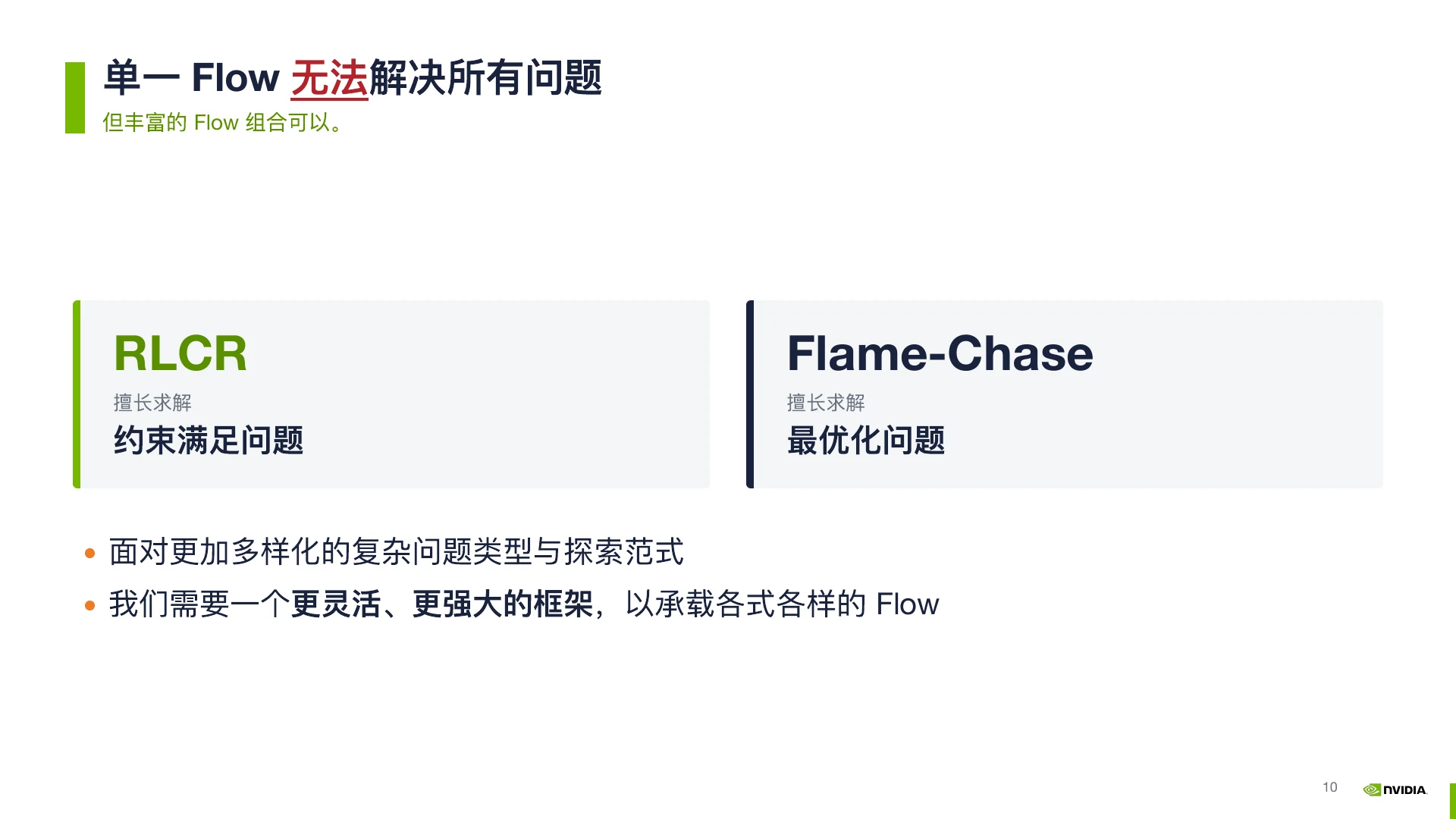
走到这里,我们手里就有了两套截然不同的 Flow:擅长求解约束满足问题的 RLCR,和擅长求解最优化问题的 Flame-Chase。很自然地,我们开始想:既然已经有了两个 Flow,未来肯定还会有第三个、第四个甚至成百上千个 Flow,那我们是不是该做一个统一的底层系统,把各式各样的 Flow 全部承载起来?
Humanize 2:统一运行时
今年暑假,我们完成了从“作为单个 Flow 的 Humanize 1”到“作为统一 Flow Runtime 的 Humanize 2”的迁移。Humanize 2 开源在 github.com/humanfia/humanize(Apache-2.0),可以运行任意用原生异步 Python 编排出来的 Flow,并配套建设了 Flowverse 生态。也正是有了这个顺手的运行时平台,我们随后才能系统开展 Flow 科学的研究。
三层架构与原生 CLI
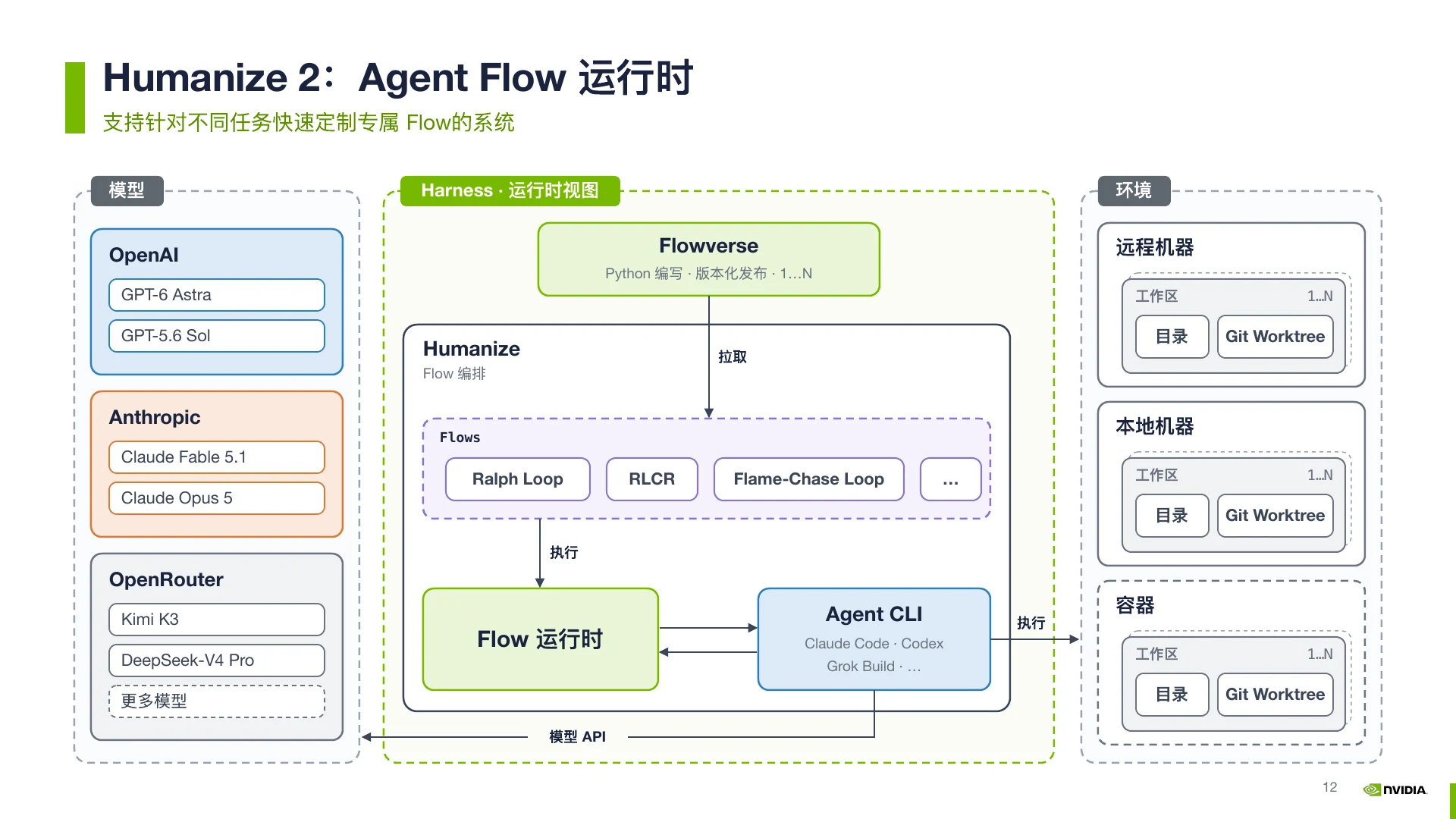
Humanize 2 的整体架构很清晰,我们把整个 Agent 运行过程抽象成三层:
- 模型层:也就是各个 Token Provider(如 OpenAI 的 GPT-6 Astra、GPT-5.6 Sol,Anthropic 的 Claude Fable 5.1、Claude Opus 5,以及 OpenRouter 下的 Kimi K3、DeepSeek-V4 Pro 等);
- Harness 与 Flow 运行时层:由 Humanize 负责拉取
Flowverse或本地编写的 Flow,再调度具体节点执行; - 环境层:Agent 实际执行命令、读写文件的物理环境,包括本地机器、远程机器以及容器里的目录和 Git Worktree。
Humanize 负责把这三层连接起来。和市面上很多其他 Harness 有一个很大的区别:许多框架都会直接调底层大模型接口、从头实现自己的工具调用循环;但我们在 Humanize 2 里刻意不重造底层循环。我们的想法很朴素——既然每一家模型厂商都在自己的 Harness 上专门训练和打磨过自家模型,直接用他们原生的 Harness 往往是个稳妥的选择,同时还能省下大量精力去研究更大规模、更顶层、更抽象的编排问题。
因此,我们把每一款不同的 Agent CLI(Claude Code、Codex、Grok Build 等)当作一个黑箱运行节点,只从外部去调度和控制这个黑箱;而在环境侧,我们实现了一套把 Agent CLI 映射到不同执行环境的机制(后面讲 CogAnchor 时会展开)。
内置 Flow 与 Flowverse
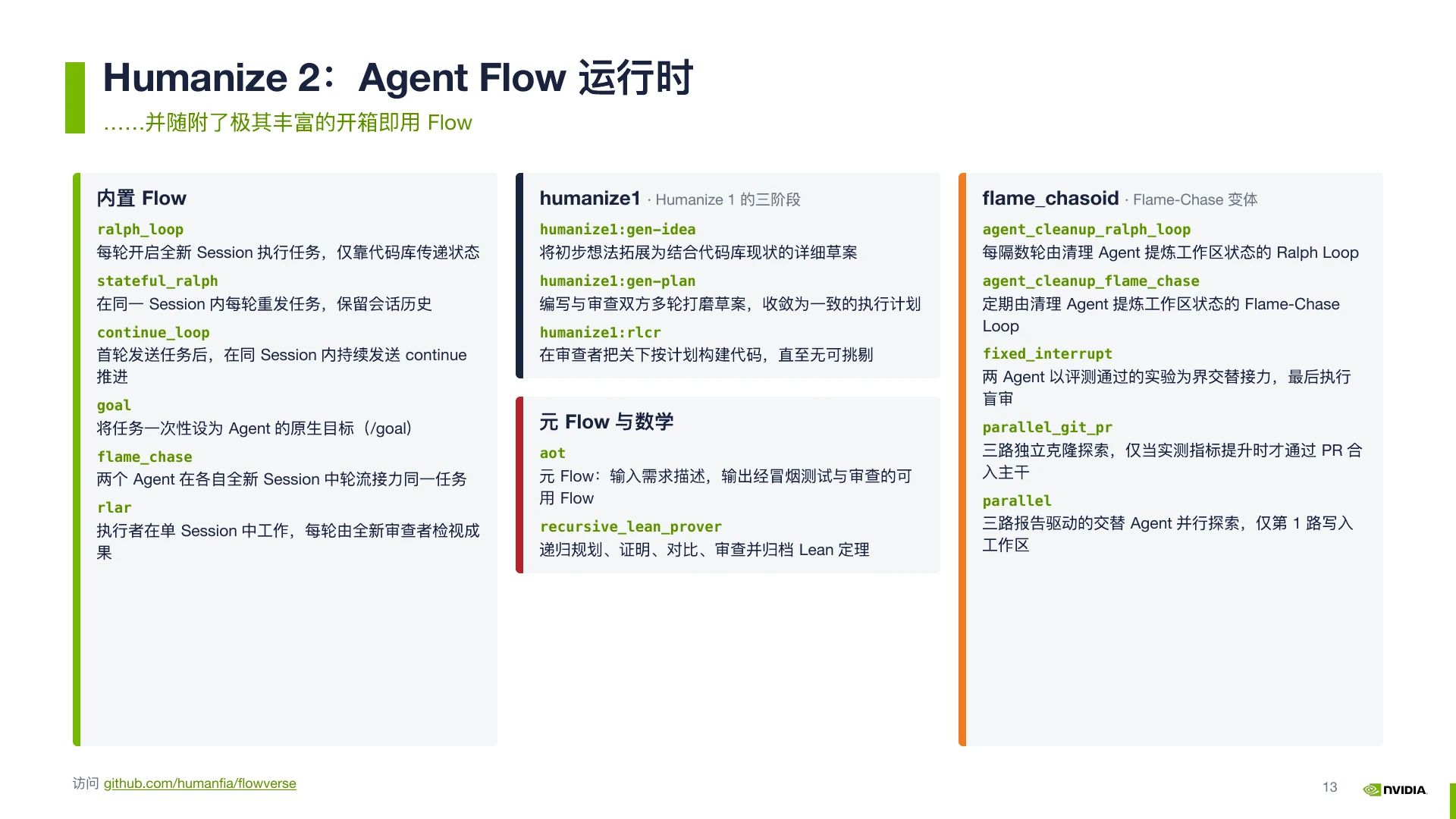
有了 Humanize 2 这么一个平台,我们这几个月做各种实验、跑消融变得极快,顺手就积累出了非常丰富的内置 Flow 与社区 Flow(全部索引在 github.com/humanfia/flowverse):
| 类别 | 代表 Flow | 核心机制 |
|---|---|---|
| 内置基础 Flow | ralph_loop、stateful_ralph、continue_loop、goal、flame_chase、rlar | 涵盖经典的每轮重置会话、带状态保留会话、持续 continue、异构接力与独立审查 |
| Humanize 1 三阶段 | humanize1:gen-idea、humanize1:gen-plan、humanize1:rlcr | 按 Humanize 2 新格式完整重写的草案拓展、计划辩论与审查把关开发流程 |
| Flame-Chase 变体 | agent_cleanup_ralph_loop、agent_cleanup_flame_chase、fixed_interrupt、parallel_git_pr、parallel | 探索定期压缩清理工作区状态、固定轮数/时长打断、三路并行与 Git PR 门控合入 |
| 元 Flow 与数学证明 | aot、recursive_lean_prover | 元 Flow(用 Flow 去写、冒烟测试并审查新的 Flow);递归规划与证明 Lean 定理 |
五步快速上手
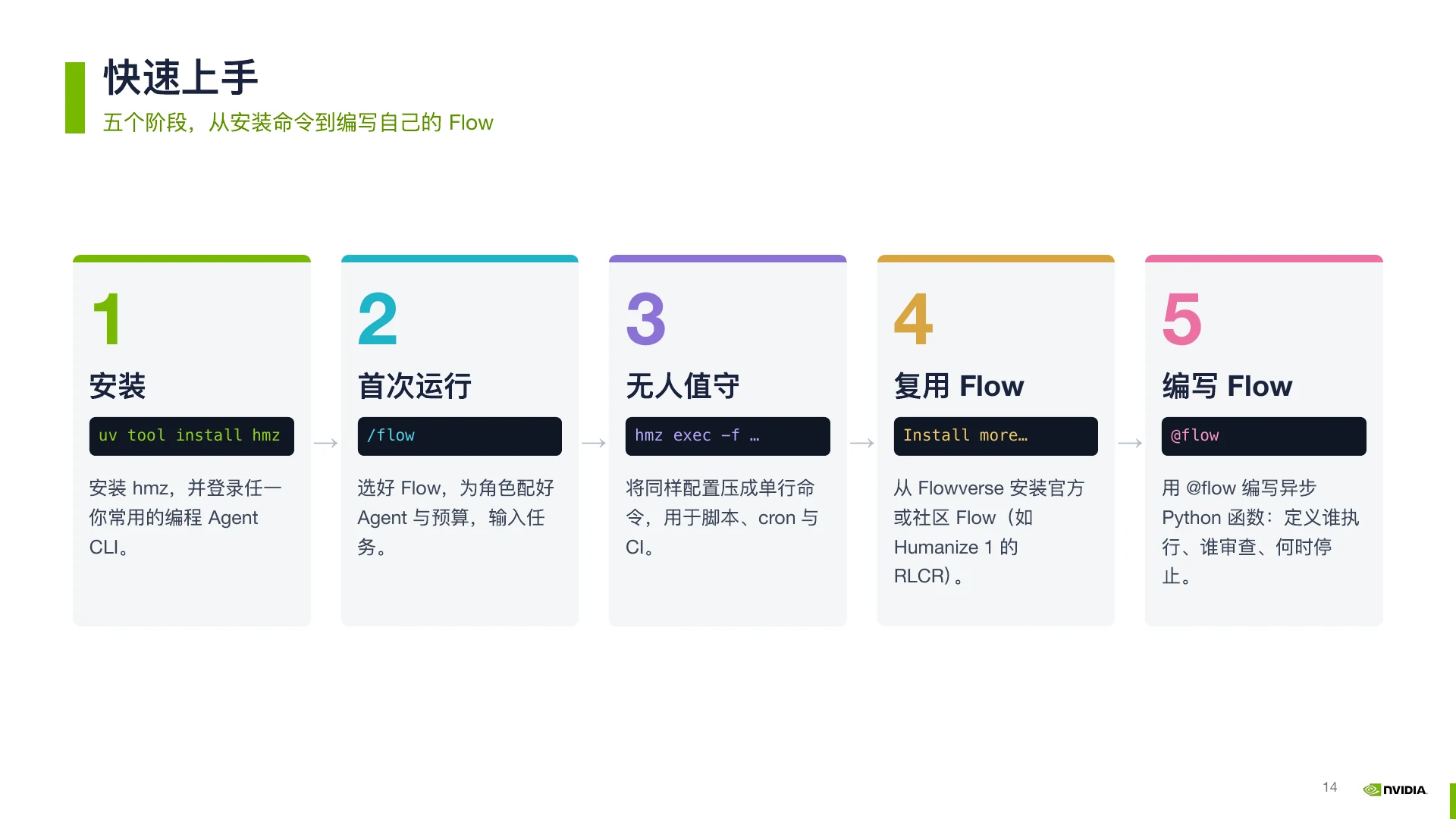
我们能这么快长出这么多 Flow,很大程度上是因为 Humanize 2 的使用门槛非常低。整体上手分成五个阶段:安装、首次运行、无人值守、复用社区 Flow,以及编写自己的 Flow。
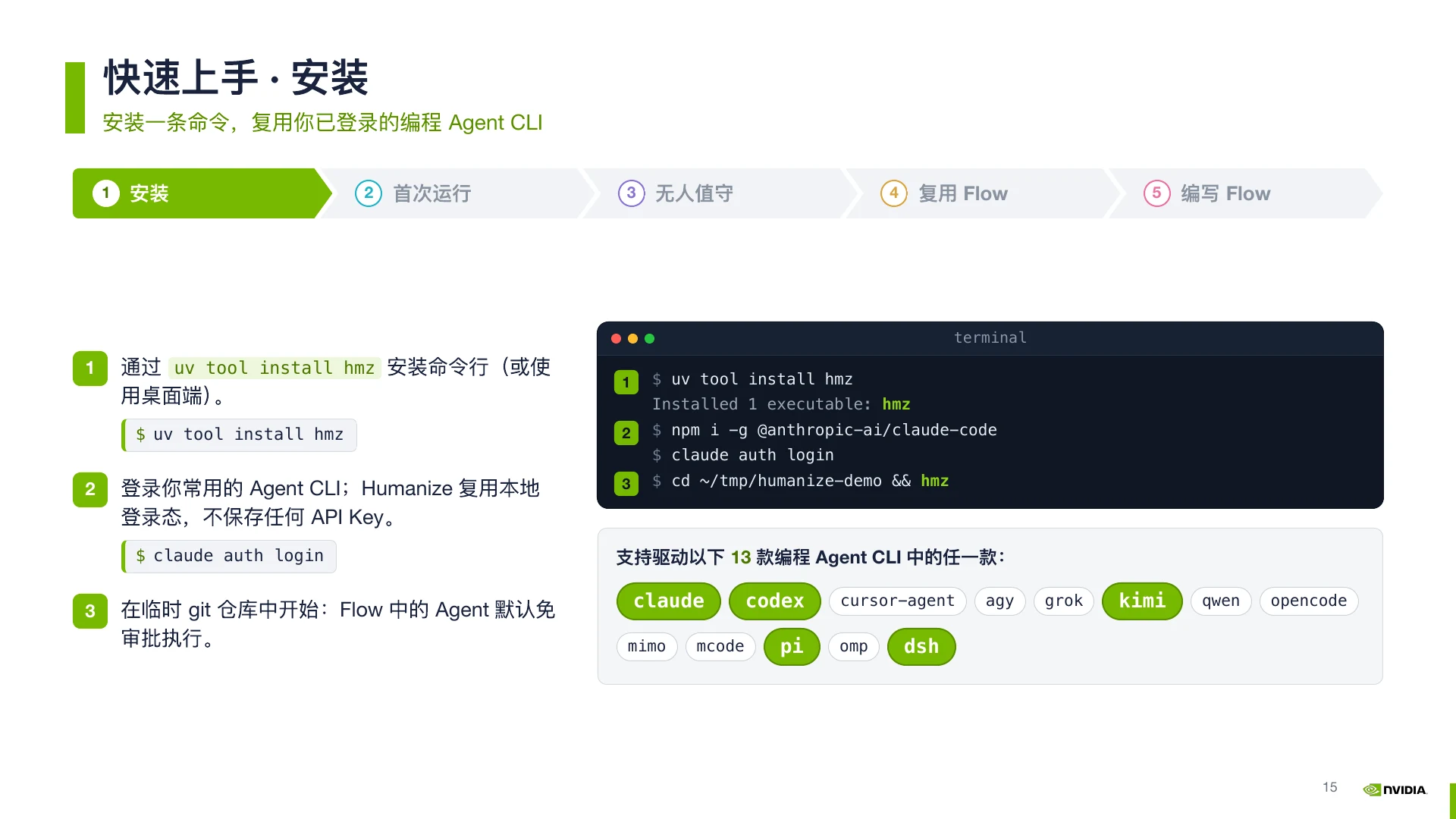
第一步是安装。 我们已经把 hmz 发布到了 PyPI,一条 uv tool install hmz 就能装好命令行(仓库里也有桌面端应用可以直接下载)。Humanize 2 有一个特别省心的特点:它原生复用你本机各个编程 Agent CLI 自己的登录态,不保存 API Key,也不像不少其他 Harness 那样去劫持别的工具的登录。这样一来,就不会出现因为违规代理登录而被厂商判定违规、惨遭封号的问题。目前我们已经支持驱动 13 款 编程 Agent CLI:claude、codex、cursor-agent、agy、grok、kimi、qwen、opencode、dsh、mimo、mcode、pi 和 omp。
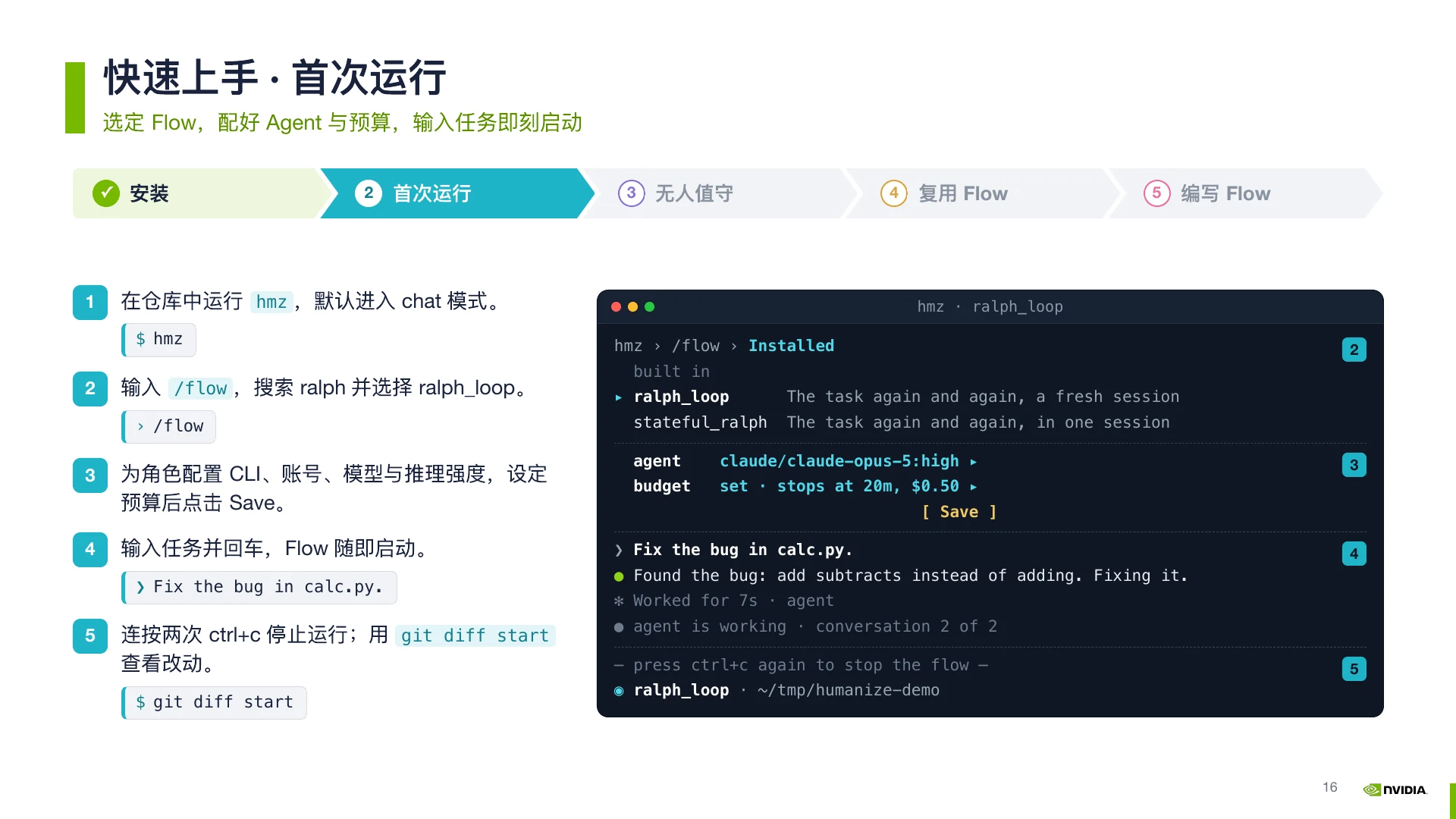
第二步是首次运行。 我们既提供了 CLI 界面,也在仓库里做了 GUI 界面(Humanize Desktop),两边操作逻辑非常一致。在项目目录里执行 hmz,输入 /flow 选一个工作流(比如 ralph_loop),然后给里面的每一个角色配好具体用哪个 Harness、哪个模型、什么推理档位(例如 claude/claude-opus-5:high),再顺手设一个预算(如 20m, $0.50)防止单个任务烧超。保存配置,输入任务回车,它就会自己吭哧吭哧一直跑下去,把任务解决好;想停的时候连按两次 ctrl+c,再用 git diff start 查看改动即可。
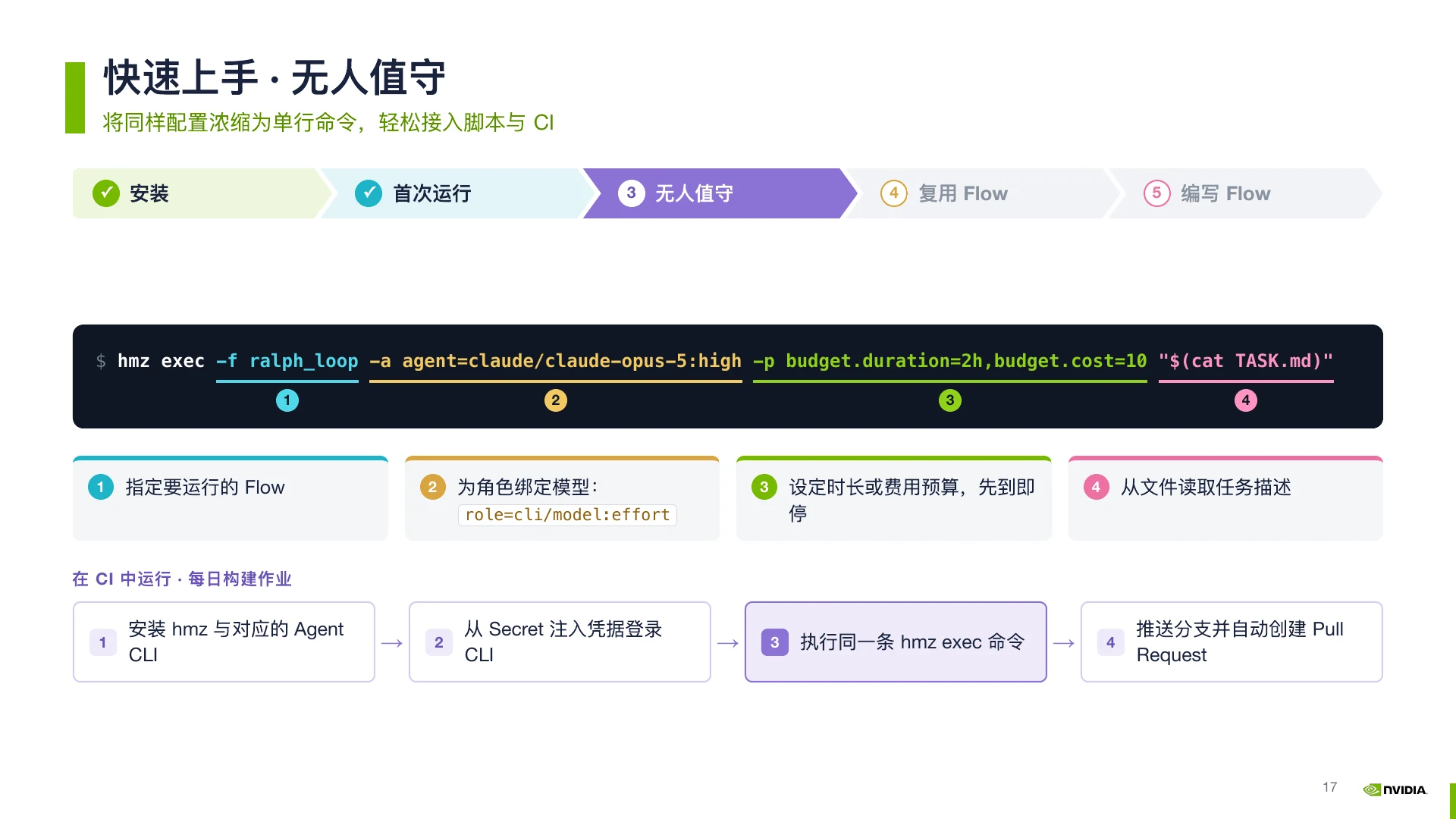
第三步是无人值守模式。 大家都知道,现在哪还有人愿意一台台登录远程服务器自己敲交互命令?引入 hmz exec 无人值守模式,一方面方便接入脚本、cron 和 CI 每日构建,另一方面大家完全可以在自己本机开一个 Claude 之类的 Agent,让它自己连上远程服务器去批量跑各种 Flow:
hmz exec -f ralph_loop \
  -a agent=claude/claude-opus-5:high \
  -p budget.duration=2h,budget.cost=10 \
  "$(cat TASK.md)"
在 CI 流水线里也是同样四步:安装 hmz 和对应 Agent CLI → 从 Secret 注入凭据 → 运行上面这条 hmz exec 命令 → 推送分支并自动提 Pull Request。
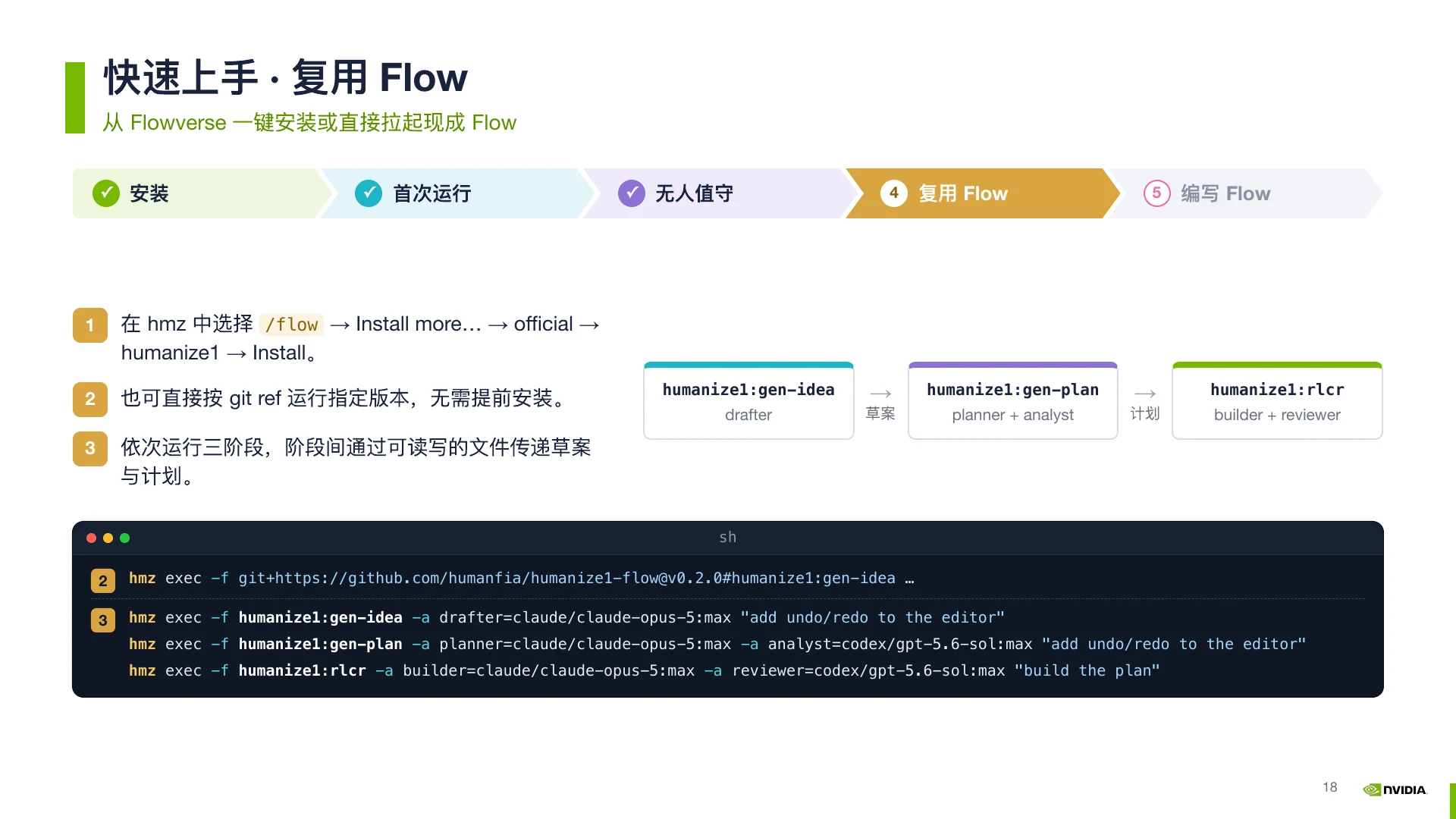
第四步是复用 Flow。 前面提到的那些官方和社区工作流我们都放到了 Flowverse 上,在 hmz 里选 /flow → Install more… 就能装下来直接跑,也可以不提前安装,直接按 git ref 指定版本拉起(比如 git+https://github.com/humanfia/humanize1-flow@v0.2.0#humanize1:gen-idea)。我们以前的 Humanize 1 也已经按新格式重写成了 gen-idea、gen-plan、rlcr 三个阶段,阶段之间直接通过工作区里的文件传递草案和计划。
从 118 个文件到 7 个文件
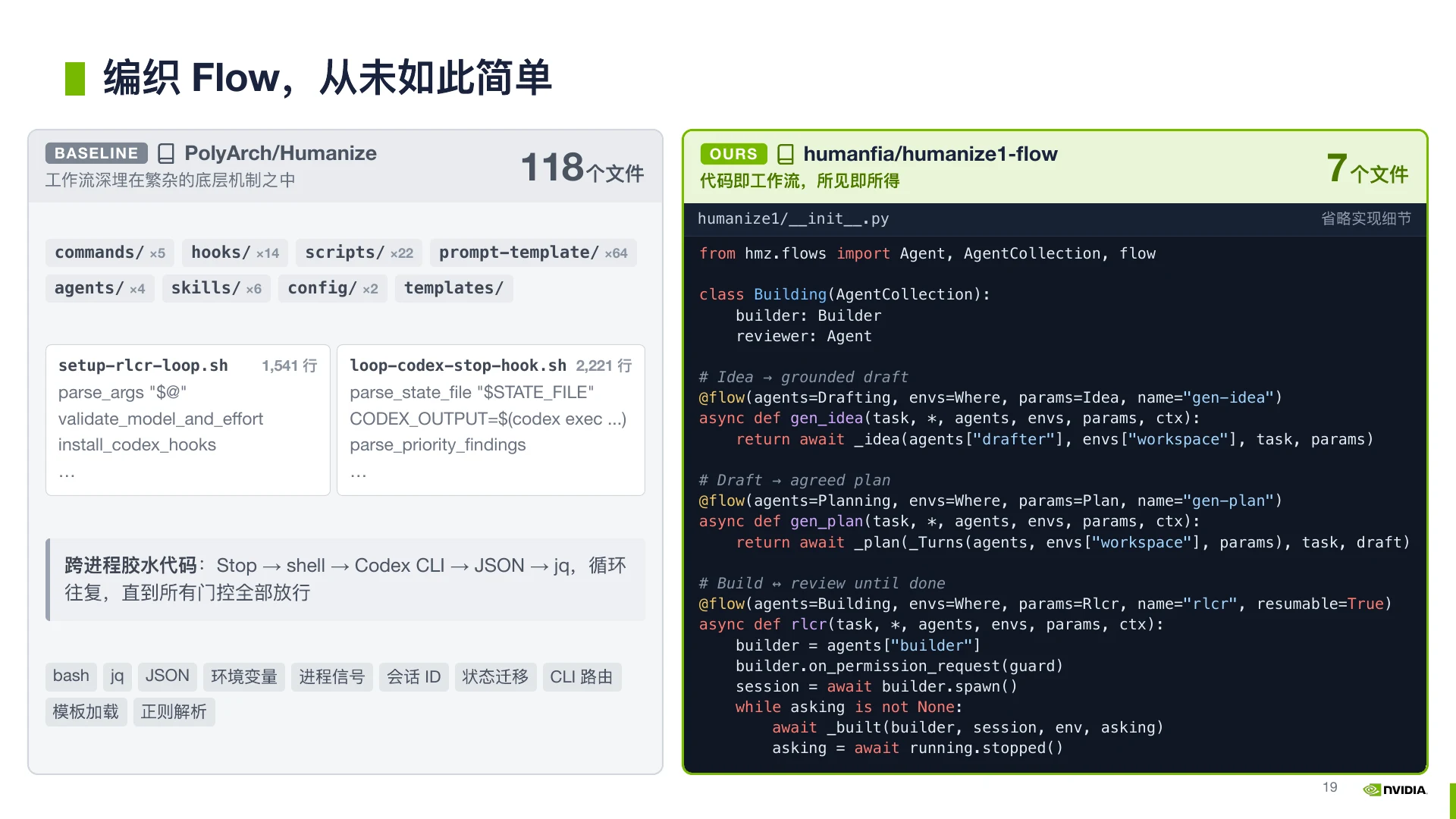
写一个 Flow 到底有多简单?看下面这组前后对比最直观。以前没有 Humanize 2 的时候,为了在 PolyArch/Humanize 里实现一套 Humanize 1,我们整整写了 118 个文件——包括 14 个 hook、22 个脚本、4 个 agents 配置、5 个命令、6 个 skills、2 个配置文件和 64 个 prompt 模板文件。单是 setup-rlcr-loop.sh 就写了 1,541 行,loop-codex-stop-hook.sh 写了 2,221 行,到处是 bash、jq、JSON、正则解析、环境变量和进程信号拼出来的跨进程胶水代码。
换成 Humanize 2 之后,完全相同的一套 humanfia/humanize1-flow 只需要 7 个文件:1 个 Flow 代码文件加 6 个 prompt 文件。原来费劲巴拉写进 shell hook 里的拦截逻辑,现在直接调 Python API 里的 hook(比如 builder.on_permission_request(guard))一行就搞定了,代码即工作流,所见即所得。
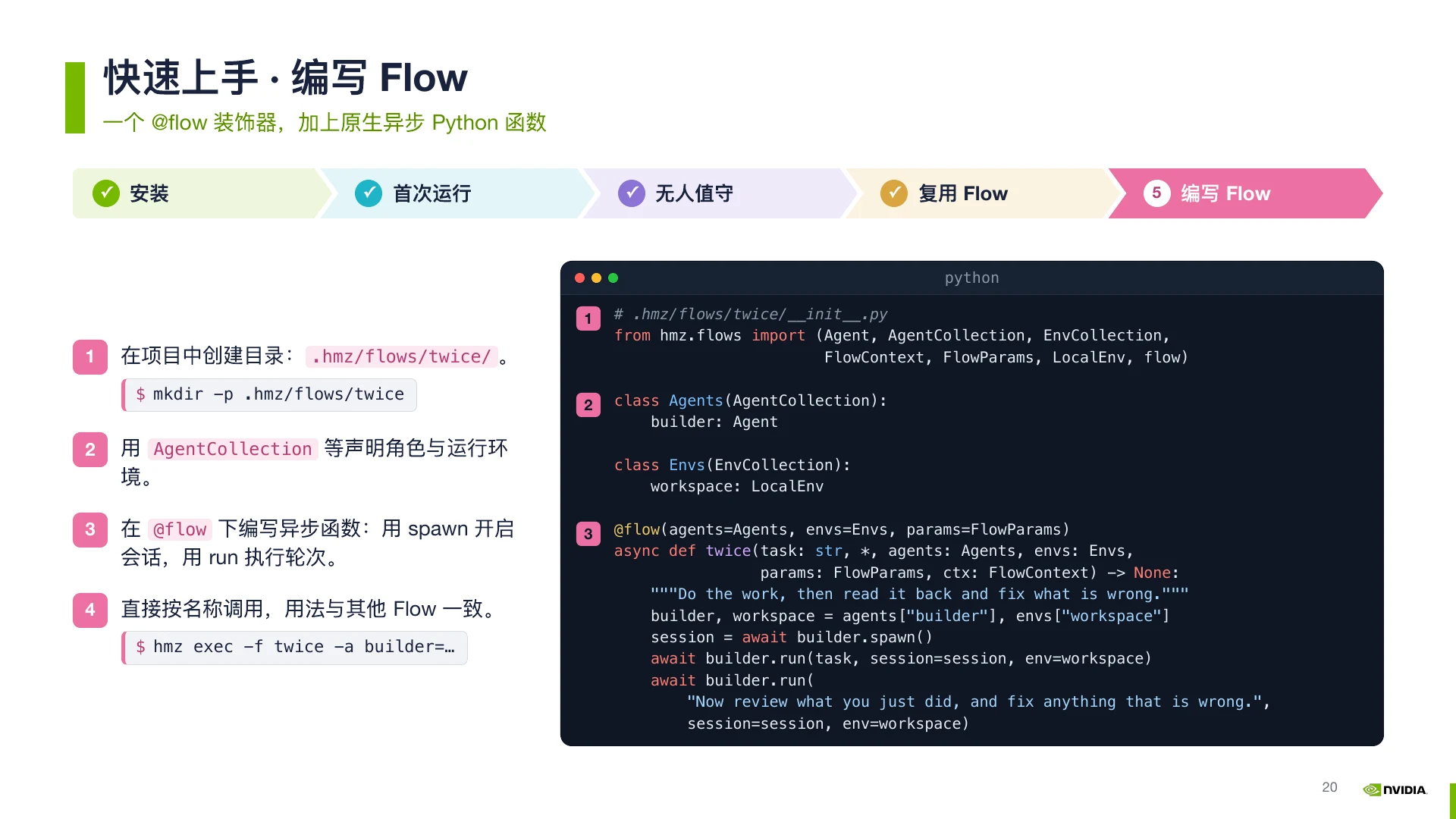
第五步就是写自己的 Flow。 看这个叫 twice 的小例子:在 .hmz/flows/twice/__init__.py 里声明好 AgentCollection 和 EnvCollection,写一个挂上 @flow 装饰器的异步 Python 函数——拿到 builder 和 workspace,调 await builder.spawn() 开启会话,先 await builder.run(task, ...) 做实现,再 await builder.run("Now review what you just did...", ...) 让它自己做一遍审查和修复。十几行代码就搭好了一个先实现再审查的工作流,比以前在 Claude 里折腾一堆 hook 或 skill 痛快得多。
四大领域实绩
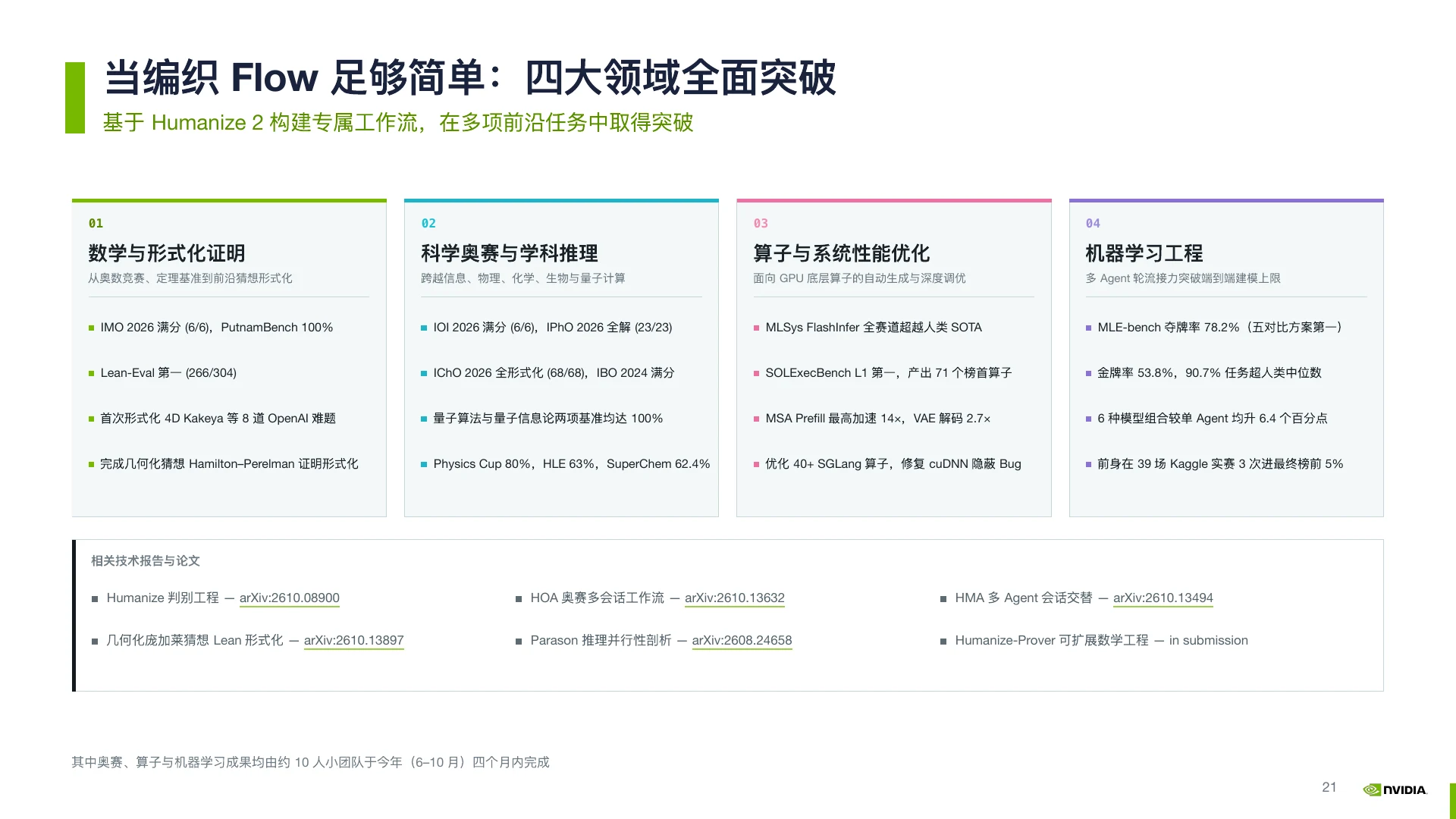
当把写一个 Flow 的成本打下来之后,我们就能专心致志去“拿大结果”了。今年 6 月到 10 月,我们大约 10 人的小团队在四个月里基于 Humanize 2 在四个领域拿到了相当亮眼的成绩:
- 数学与形式化证明:
Lean-Eval刷到第一(266/304),PutnamBench刷满 100%,IMO 2026 满分(6/6),首次形式化四维挂谷猜想(4D Kakeya)等 8 道 OpenAI 难题,还完成了几何化猜想 Hamilton–Perelman 证明的形式化; - 科学奥赛与学科推理:奥赛这一块基本就是平推满分——IOI 2026 满分(6/6)、IPhO 2026 全解(23/23)、IChO 2026 全形式化(68/68)、IBO 2024 满分,量子算法与量子信息论两项基准双双 100%,Physics Cup 80%,HLE 63%,SuperChem 62.4%;
- 算子与系统性能优化:CUDA 算子方向迁移到 Humanize 2 之后,在 MLSys FlashInfer 全赛道超越人类 SOTA,SOLExecBench L1 登顶并产出 71 个榜首算子,MSA Prefill 最高加速 14×、VAE 解码 2.7×,还优化了 40 多个 SGLang 算子、顺手修掉了 cuDNN 里的隐蔽 Bug;
- 机器学习工程:在偏科研的
MLE-bench上取得 78.2% 夺牌率(五种对比方案第一)和 53.8% 金牌率,90.7% 任务超过人类中位数,6 种模型组合相比单 Agent 平均高出 6.4 个百分点,前身在 39 场 Kaggle 实赛里 3 次冲进最终榜前 5%。
Flow 科学:实验规律与发现
前面展示了这么多工作流,大家肯定会冒出一个很自然的疑问:这些 Flow 到底是不是 case by case 的脏活累活?难道每换一个任务就得从头手工写一套,还是里面藏着可以抽象出来的共性?说白了,Flow 到底只是一种工程技巧,还是一门科学?
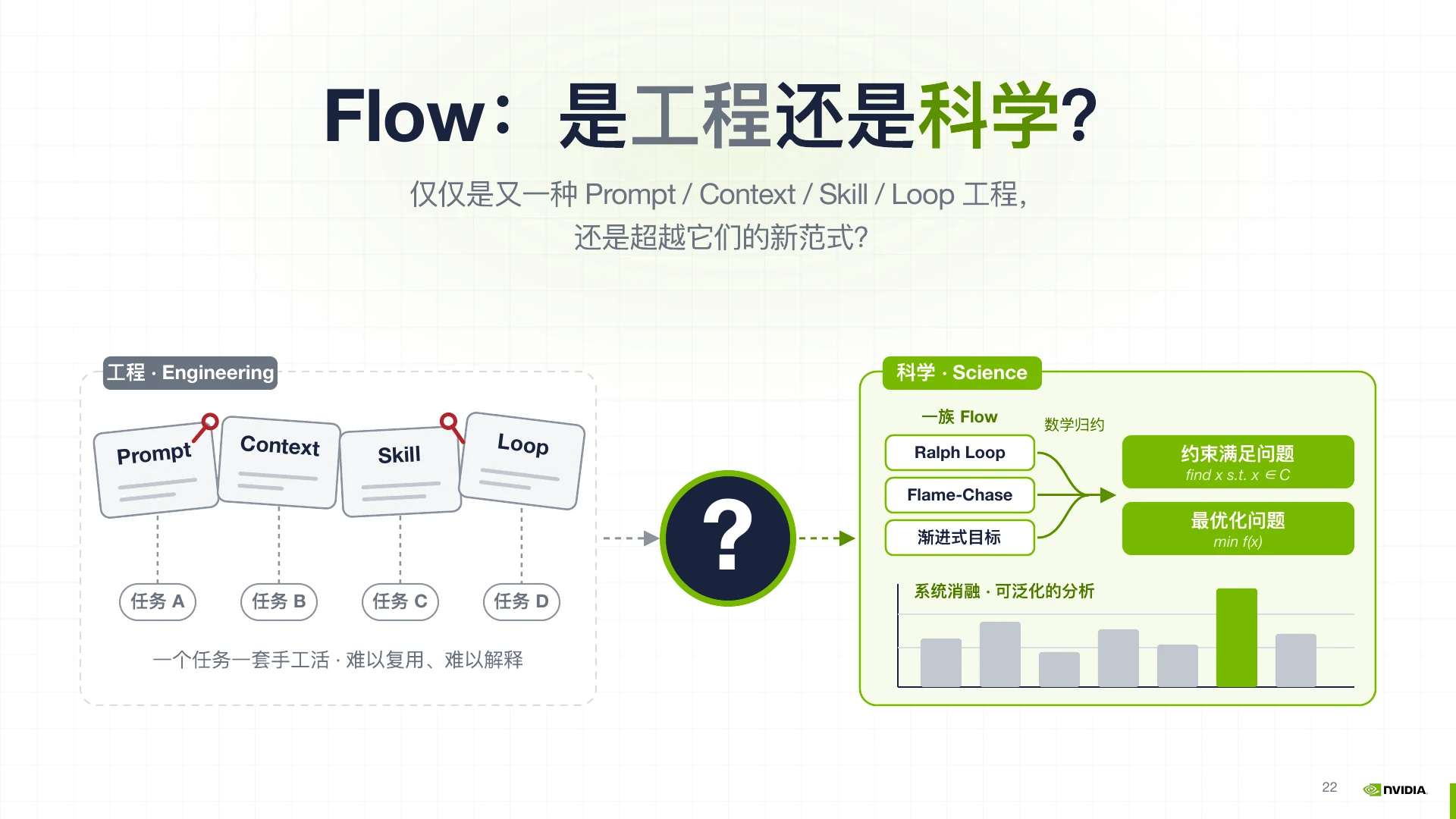
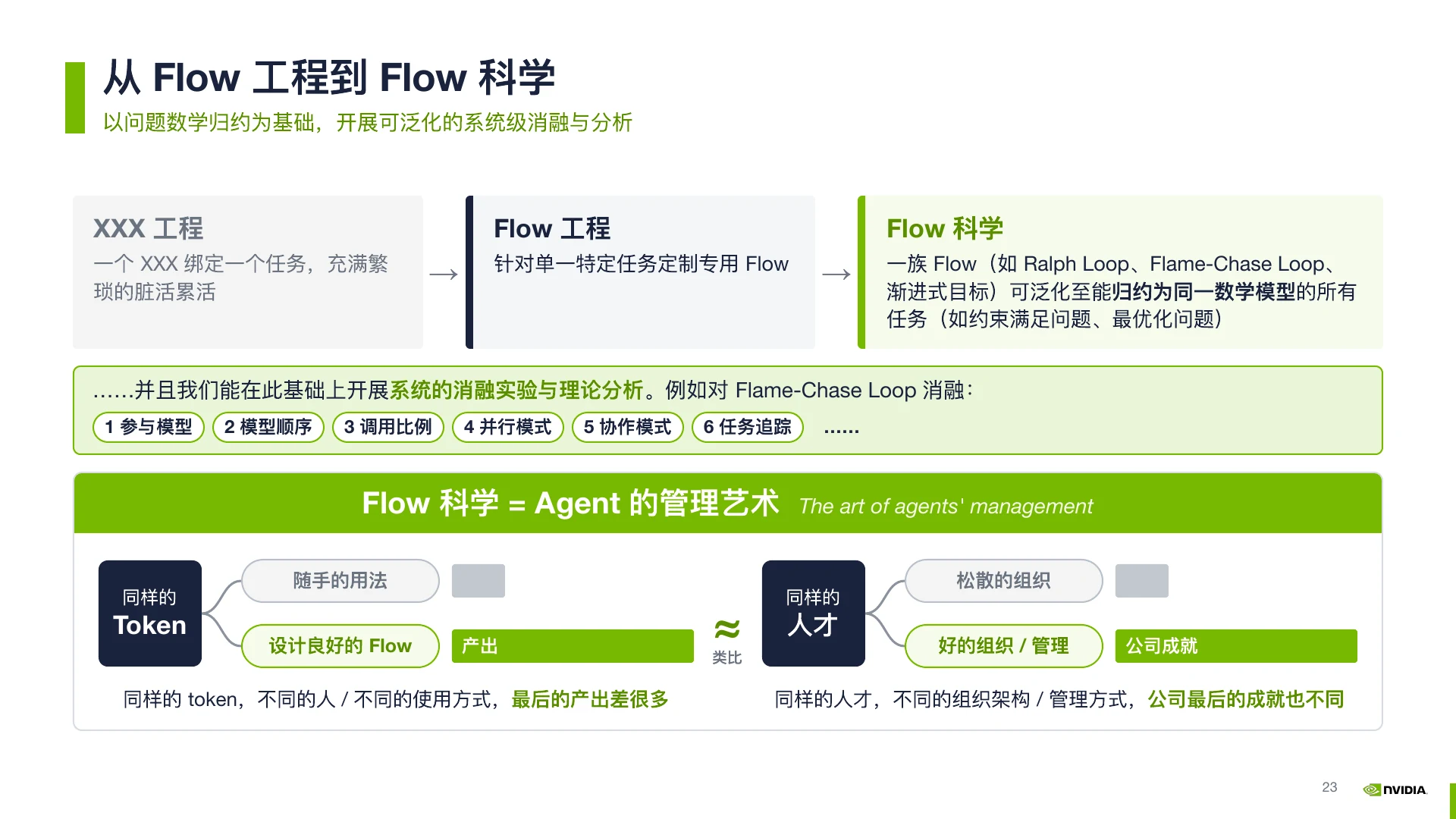
既然把这个问题摆上台面,我们的结论也很明确:Flow 既是工程,更是一门科学(Flow Science)。很多时候我们可以把具体任务归约到共通的数学模型上——例如软件工程归约为约束满足问题 find x s.t. x ∈ C,算子优化归约为最优化问题 min f(x)——于是像 Ralph Loop、Flame-Chase、渐进式目标这样的一族 Flow 就能跨任务泛化,让我们得以开展系统的消融实验和理论分析。
我觉得 Flow 科学的本质其实就是 Agent 的管理学(The art of agents' management)。你可以把每一个前沿 Agent 想象成一位非常聪明的人才,而 Harness 就是他的办公桌。在人类社会里,光靠一个人和一张办公桌肯定干不成大事,我们必须组建一家公司、设计好组织架构与协作机制,才能把事情做好做大。Flow 研究的正是同一件事:同样数量的 token,随手用和用一套好 Flow 去管理,最后的产出完全是两个世界。拿 Flame-Chase 来说,我们可以沿着参与模型、模型顺序、调用比例、并行模式、协作模式、任务追踪这六个维度系统做消融。
下面分享我们在大量消融实验里提炼出的五个核心发现。
不同问题匹配不同 Flow
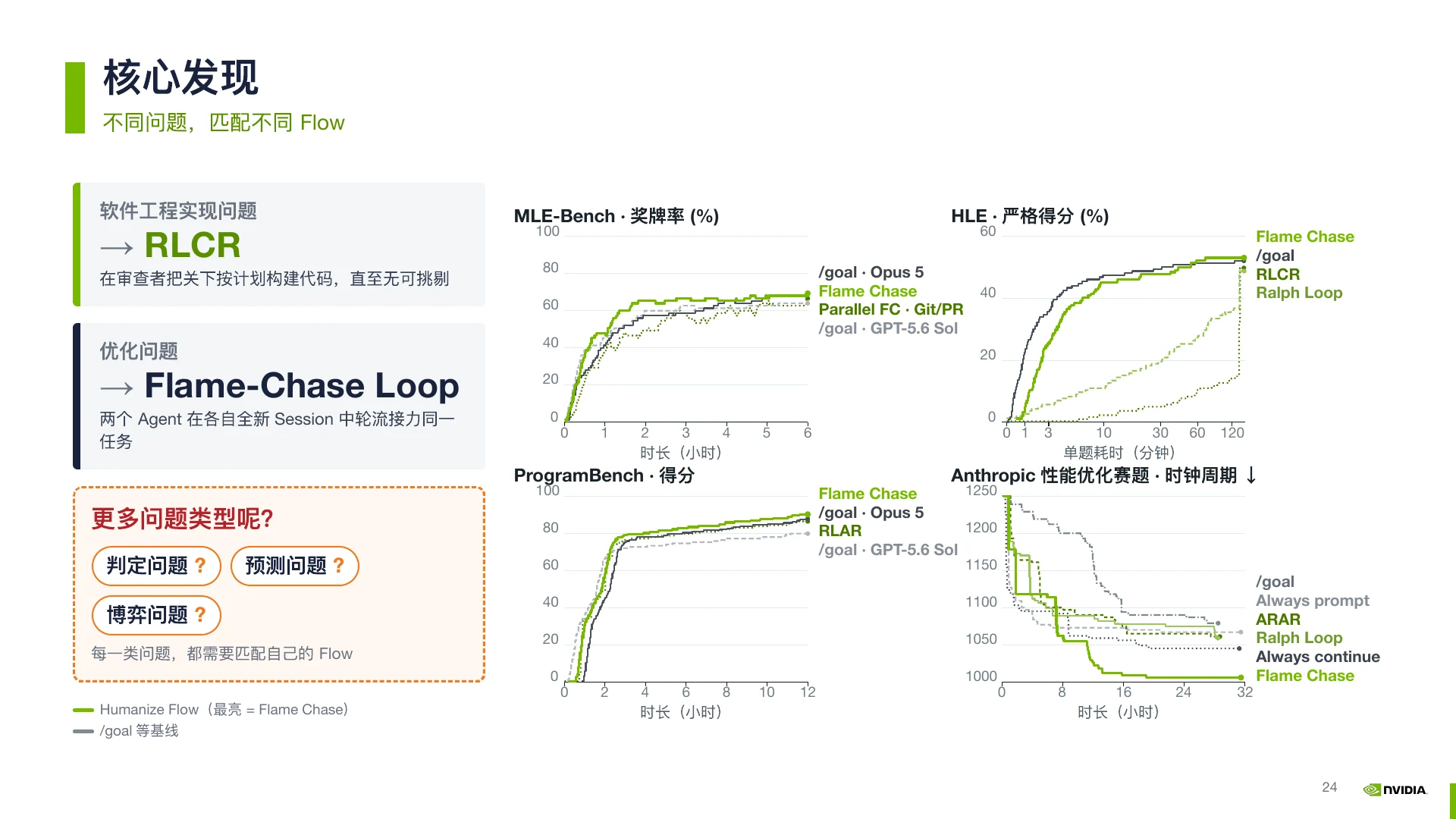
这一点从头到尾反复被实验证实——天底下没有免费的午餐。我们在 MLE-Bench、HLE、ProgramBench 和 Anthropic 性能优化赛题四个基准上做了横向拉通测试:软件工程实现问题适合在审查者把关下逐步打磨的 RLCR,最优化问题适合异构交替的 Flame-Chase 及其变体;至于未来更多的抽象问题类型——判定问题、预测问题、博弈问题——每一类都需要匹配它自己的 Flow。
多样性带来更高得分
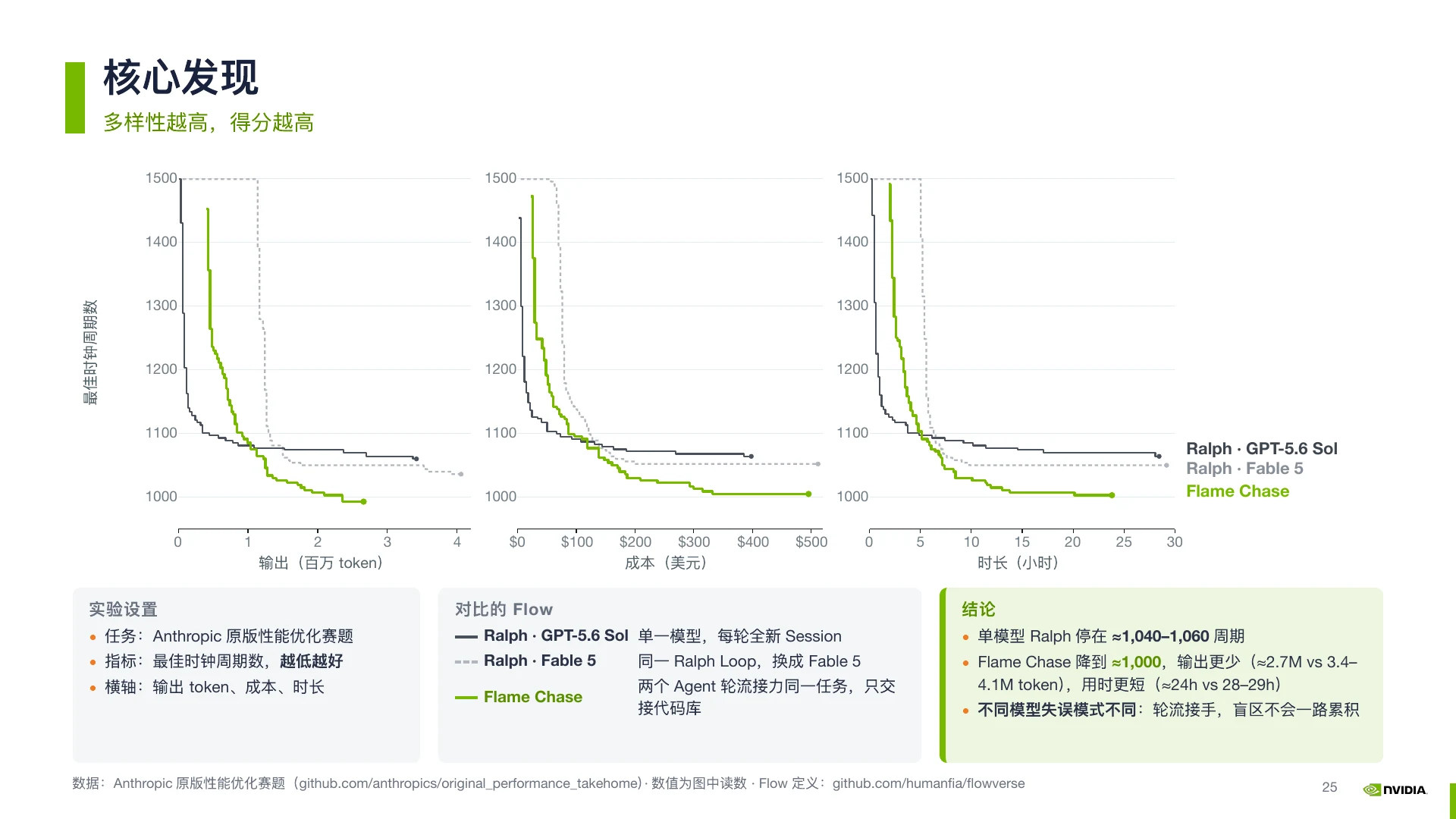
这是 Flame-Chase 最核心的论断。其实 Flame-Chase 最简形式简单到不可思议:把 Ralph Loop 里每轮都跑同一个模型,改成每轮换不同的模型和 Harness(只交接代码库)。就这么一个极小的改动,在 Anthropic 性能优化赛题上立刻带来巨大跃升:
- 单模型的
Ralph · GPT-5.6 Sol和Ralph · Fable 5分别停在约 1,040–1,060 周期; Flame-Chase一举降到约 1,000 周期,而且输出 token 更少(约 2.7M vs 3.4–4.1M),耗时更短(约 24 小时 vs 28–29 小时)。
本质原因在于不同模型的失误模式和探索习惯各不相同:混合交替让多样性拉高,单一模型的认知盲区就不会一路累积下去。
高效协作优于朴素并行
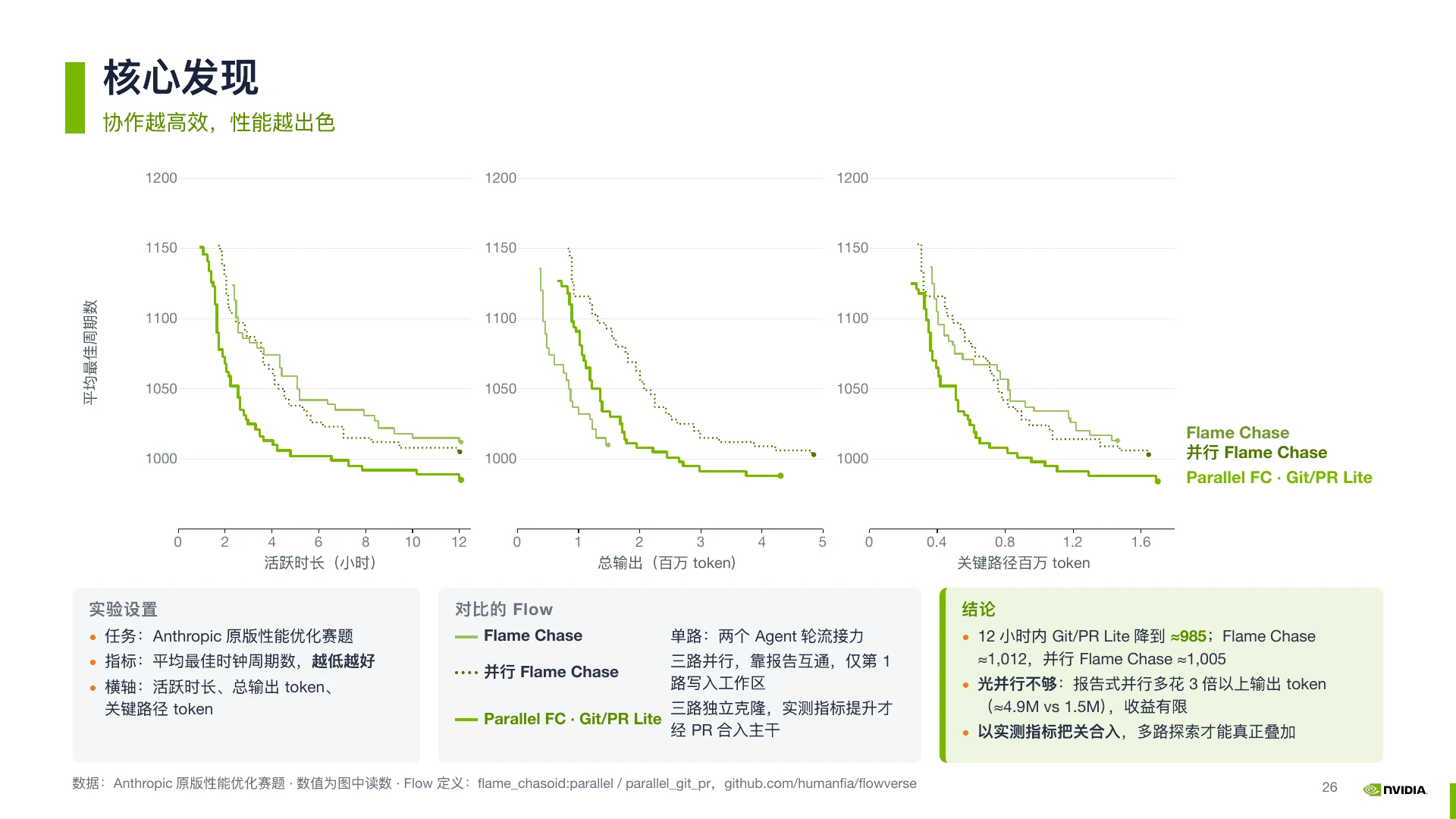
我们在 12 小时窗口内对比了三种不同协作模式的 Flame-Chase:
- 传统单路 Flame-Chase:两个 Agent 轮流接力,平均最佳约 1,012 周期;
- 并行 Flame-Chase:让多路一起跑,靠文本报告互通,仅第 1 路写入工作区(或者做完后粗暴合并选优)。结果出人意料——多消耗了 3 倍以上 的输出 token(约 4.9M vs 1.5M),成绩只勉强走到约 1,005 周期,相比单路并没有多大提升;
- Parallel FC · Git/PR Lite:我们只改了一个小机制——三路各自在独立克隆里探索,不直接粗暴覆盖工作区,而是只有实测指标真正提升时,才以 Git PR 的形式提上来合入主干,让后续的 Agent 能够查阅这些 PR。仅仅这么一个改动,12 小时内平均最佳直接下探到约 985 周期。
光堆并行路数是不够的,只有用实测指标把关合入,多路探索的收益才能真正叠加。
渐进式目标防止跑偏
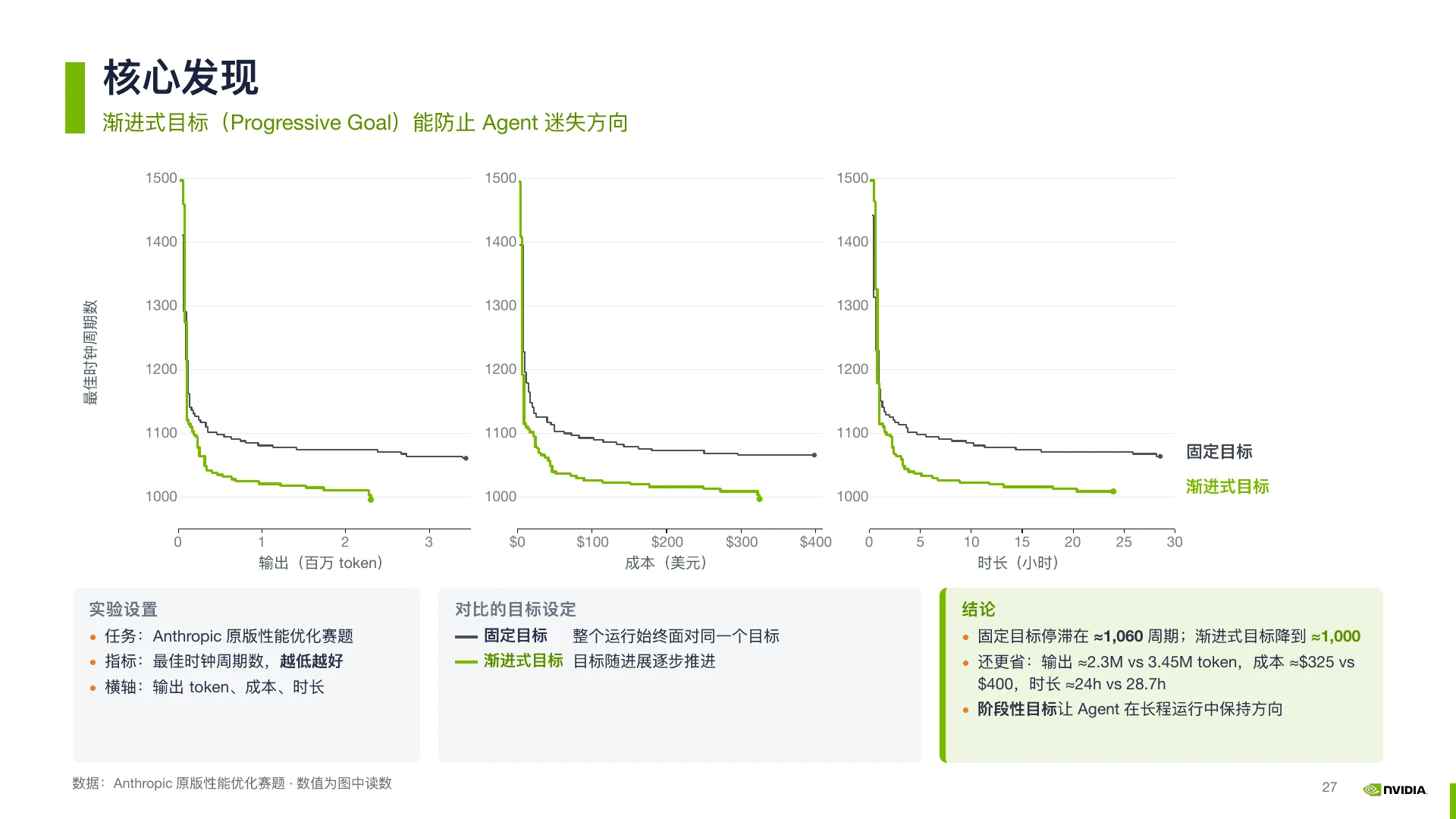
这是我们在 Ralph Loop 上做的一个很有意思的对比。一种方式是给一个固定目标——从头到尾一直告诉它“冲到 1,000 周期”;另一种是渐进式目标——当前 1,500 周期时让它先刷到 1,300,到了 1,300 再让它刷到 1,200,到了 1,200 再刷到 1,100,依此类推。
为什么渐进式目标效果好得多?我们观察发现,设固定大目标时,Agent 很容易把那些方向正确、但单步提升不够显著的改动自己否定掉——它试出一个方案能降 100 周期,觉得离 1,000 还差得远,于是干脆放弃了。可参数优化里的梯度下降本来就是要一步一步慢慢往下走,不可能一口气直接跳到终点。实验结果非常清楚:固定目标停在约 1,060 周期(耗费约 3.45M token、$400、28.7 小时),渐进式目标不仅降到了约 1,000 周期,还更省钱更省时(输出约 2.3M token、成本约 $325、时长约 24 小时)。
长程会话的思考预算缩水
这是我们最重磅的一个发现(详见论文 Humanize MLE Agents: Multi-Agent Session Alternation Beyond Single-Agent Limits):为什么直接用一个 /goal 效果会那么差?其实不止 /goal,只要单个会话拉得太长,各种 Flow 都会出现**“逐步变笨”**的趋势——当任务执行到小时级别以后,Agent 每一轮的思考输出长度会变得越来越短。
我们在 6 款模型(GPT-5.6-sol、Claude Opus 5、DeepSeek V4 Flash、Kimi K3、GLM-5.3、DeepSeek V4.1 Flash)上测量了 30 分钟滑动窗口内的单次回复平均输出 token,发现在 0–2 小时到 3–5 小时之间,普遍缩水了 29.8% 到 45.0%。再看右侧 Claude Fable 5 的长程实验,把上面的“单次回复输出 token”和下面的“最佳时钟周期数”一一对应起来就能发现:一旦单次回复缩到 100 token 左右,下方的性能曲线立刻彻底持平,往后再跑多少小时几乎都不会有任何提升了。
相比单会话 /goal 仅保留 60.7% 的单次回复 token,重置上下文的 HMA 策略保留了 86.4%,而 Flame-Chase 靠不断注入多样性和随机性,也大幅延缓了思考预算的衰减。所以我们的经验原则非常干脆:别死拉一个会话——果断结束它,把代码成果留在工作区里,重新开启新会话继续跑。

Humanize NEXT:可扩展基础设施
讲完 Flow 科学,最后聊聊 Humanize 接下来往哪走。现在大家用最新一代前沿模型,很多时候直接就能做许愿式编程了——原因很简单,新一代模型已经把我们年初摸索出来的各种单机 Flow 技巧蒸馏进自己的模型能力里了。将来很多单机任务,也许真的一个 prompt 就能解决。
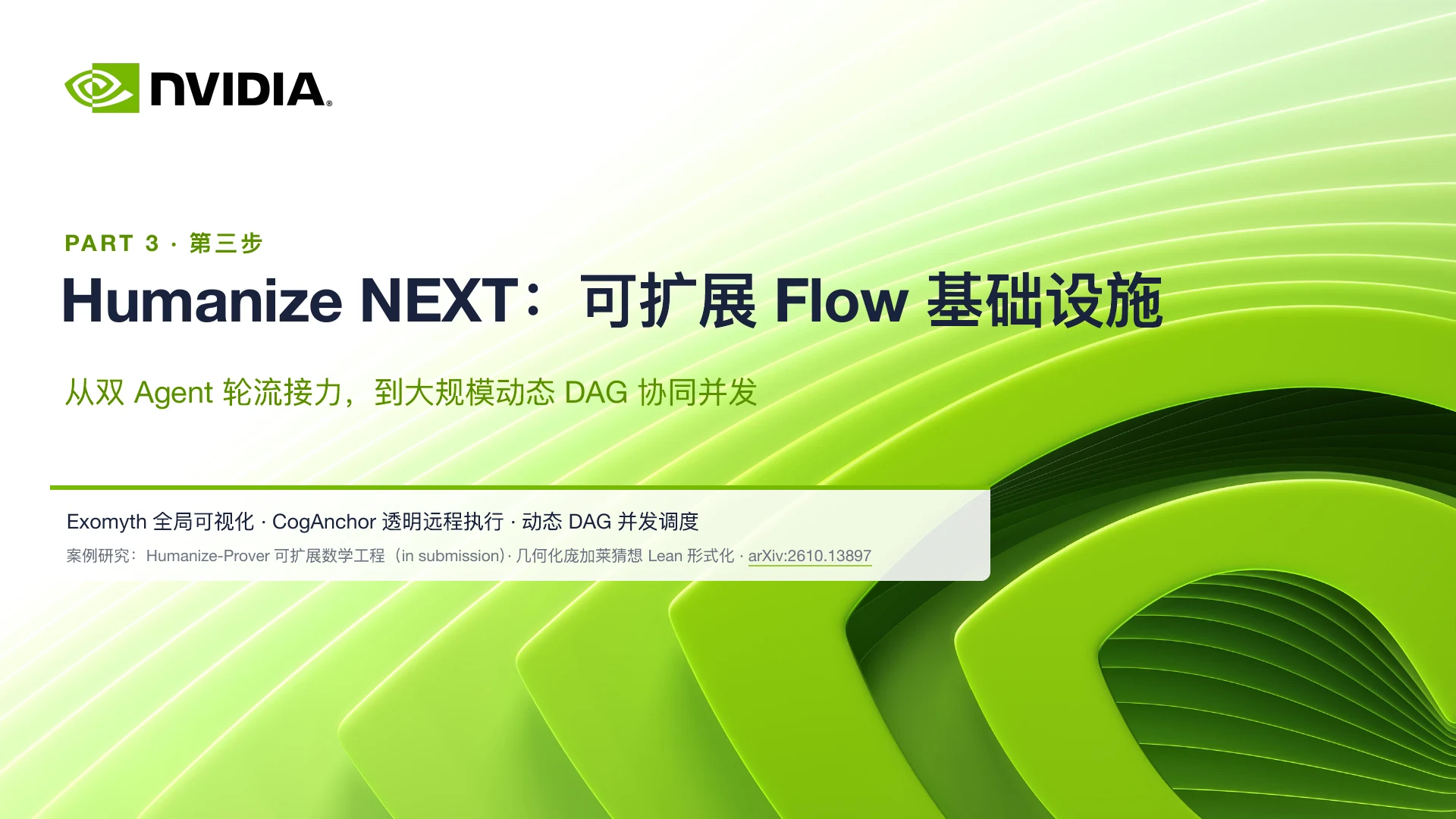
那 Humanize 还有没有存在的必要?当然有,而且空间大得多:我们要做可扩展的大规模 Flow 基础设施。现在大家一提 AI Infra,满口都是 Serving Infra,都在研究怎么更快地推理一个模型;却几乎没什么人在想怎么高效地 host 一个超大规模的 Agent Flow。OpenAI 做 Navier–Stokes 方程用了 10,000 个 Agent,Anthropic 做费马大定理形式化用了 1,000 个 Agent。借鉴这些前沿实践,我们正在推进 Humanize NEXT,从双 Agent 轮流接力走向大规模动态 DAG 协同并发。
四大系统级需求
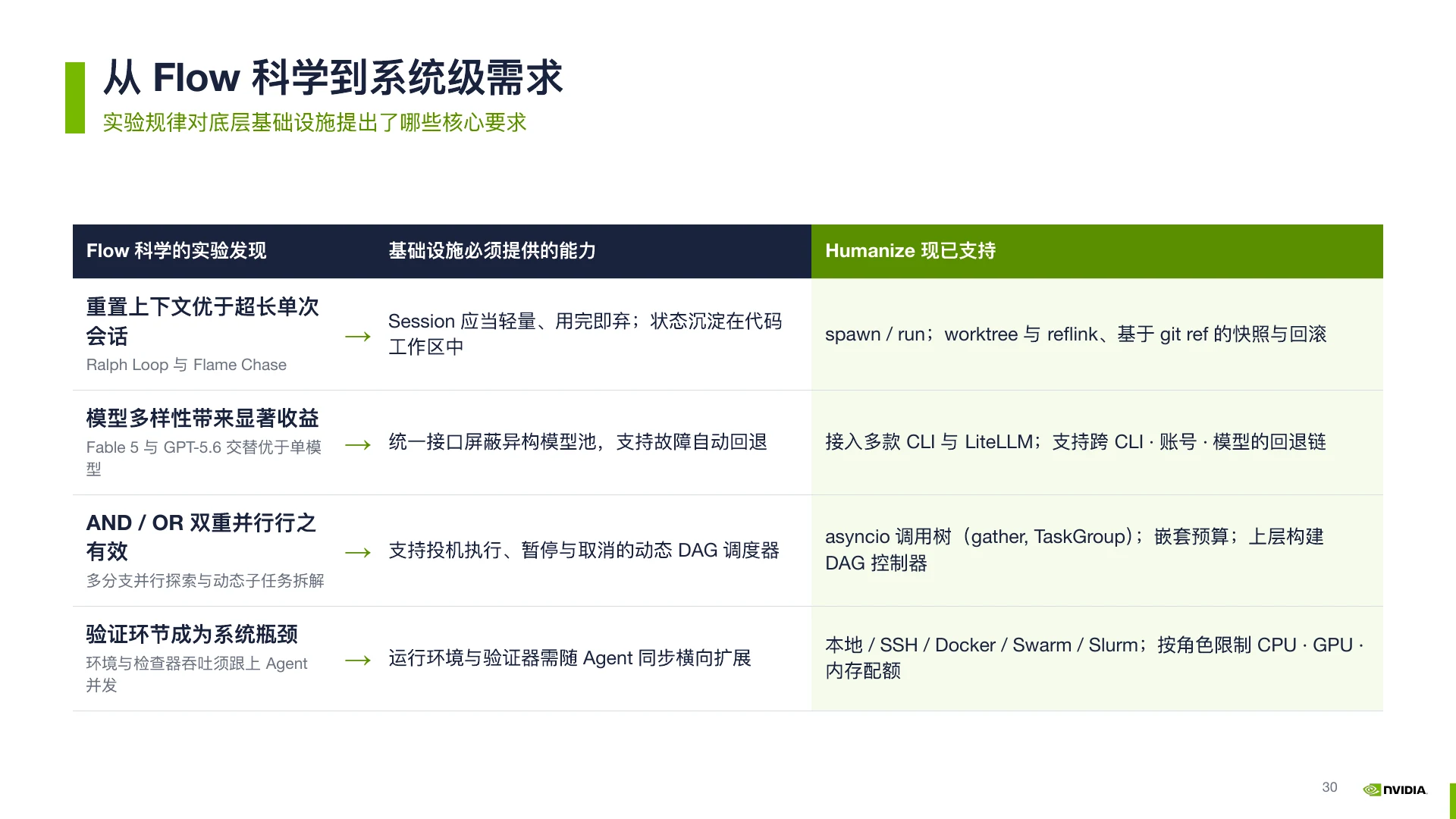
前面总结的每一条 Flow 科学规律,都直接变成了对底层基础设施的硬需求:
- 重置上下文优于超长单次会话 → Session 必须足够轻量、用完即弃,状态全部沉淀在代码工作区里。Humanize 现已支持
spawn / run、Gitworktree与reflink,以及基于git ref的快照与回滚机制,方便在大规模并行探索失败时随时回退; - 模型多样性带来显著收益 → 需要统一接口屏蔽异构模型池,并支持故障自动回退。我们已接入多款 CLI 和
LiteLLM,支持跨 CLI、跨账号、跨模型的回退链; - AND / OR 双重并行行之有效 → 需要支持投机执行、暂停与取消的动态 DAG 调度器。我们用
asyncio调用树(gather、TaskGroup)、嵌套预算和上层 DAG 控制器搭起了这套调度能力; - 验证环节成为系统瓶颈 → 运行环境和检查器的吞吐必须随 Agent 并发规模同步横向扩展。目前我们支持本地、SSH、Docker、Swarm、Slurm,并能按角色限制 CPU、GPU 和内存配额。
Exomyth 全局可视化
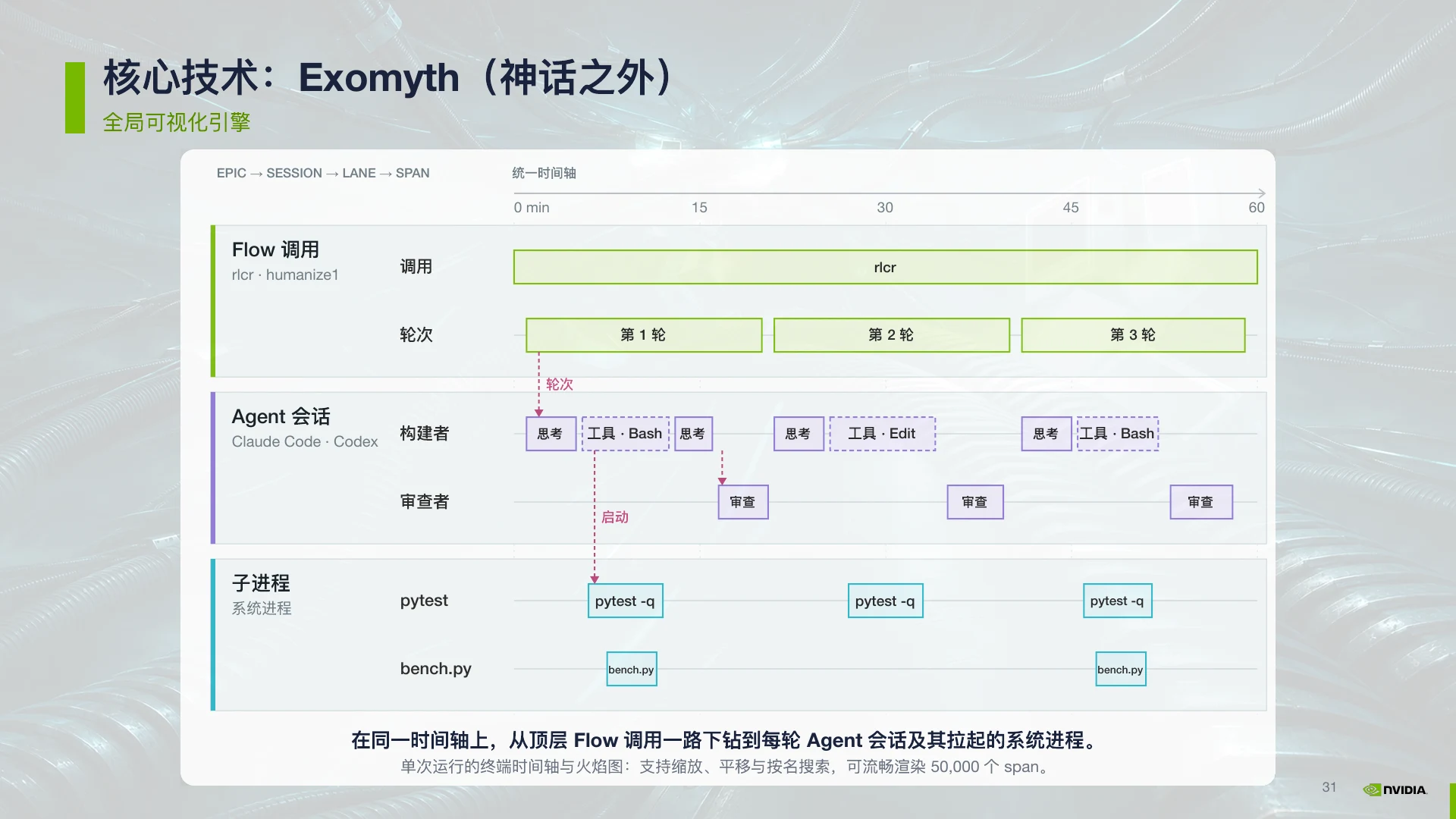
这里重点介绍我们最核心的两项底层技术。第一项叫 Exomyth(神话之外)。后来 DeepSeek Harness 里也出现过一个跟它很像的东西,不过我们这套工具做得比他们早非常多。
思路其实非常直接:Agent 的执行过程本身不就是一个程序吗?只要是程序,就能做 profiling。我们把整条执行链路放在同一根时间轴上(EPIC → SESSION → LANE → SPAN):顶层 Flow 调用是一个函数,里面的子 Flow 和每一轮次也是函数;下钻到每个 Agent(构建者 Claude Code、审查者 Codex),思考是一个函数,工具调用(Bash、Edit)是一个函数;而工具调用内部拉起的真实系统子进程——比如 pytest -q 跑了多久、bench.py 跑了多久、程序内部又执行了什么——全都一清二楚地呈现在同一张终端时间轴与火焰图里,支持缩放、平移和按名搜索,可以流畅渲染 50,000 个 span。分析超大规模 Flow 时,一眼就能看出它卡在哪个环节、哪些环境在白白空转。
CogAnchor 透明远程执行
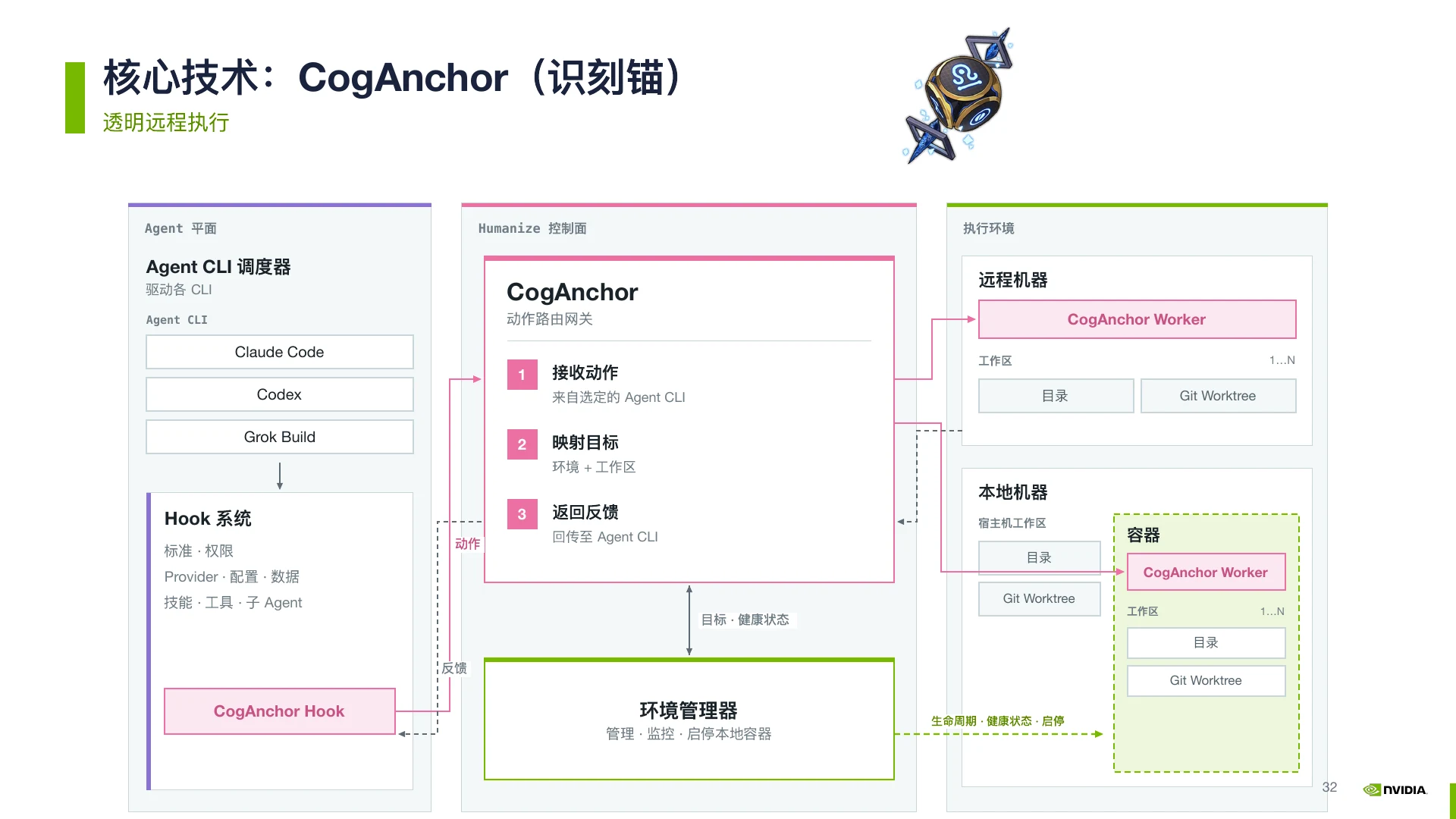
第二项核心技术叫 CogAnchor(识刻锚),也就是前面架构图里埋下伏笔的环境抽象机制。它会通过 CogAnchor Hook 把 Agent CLI 的所有行为和观测全部接管下来,再转发给远程机器或容器上的 CogAnchor Worker 去执行,最后把反馈原样回传给 Agent CLI,从而实现 Harness 跑在一台机器上、执行环境跑在另一台机器上。
这种解耦有两个非常实用的好处:
第一,很多时候我们的目标执行环境是内网机器,或者 FPGA 这类根本不方便直接装 Harness 的机器。通过 CogAnchor 把行为映射过去,就能让 Agent 以为自己正坐在目标机器上直接调试。
第二,我们可以让同一个 Session 在不同的环境之间“飞”起来。举个很具体的例子:Agent 想构建并测试一个 FPGA 工程,它可以先在多核大机器上把工程编译构建好,然后把会话无缝挪到 FPGA 小机器上跑实测,跑完拿到反馈再挪回大机器继续分析修改。
Humanize-Prover 案例研究
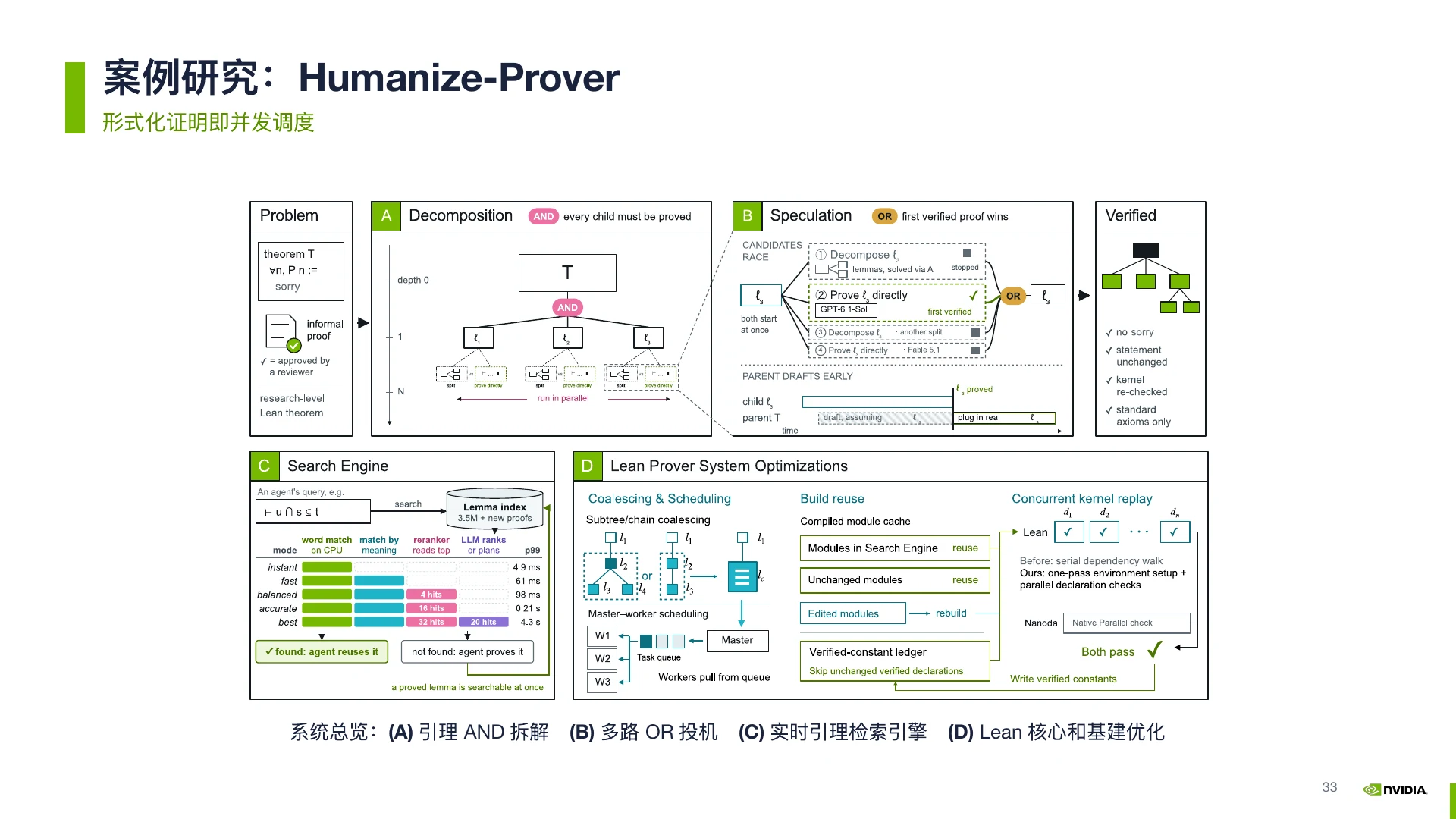
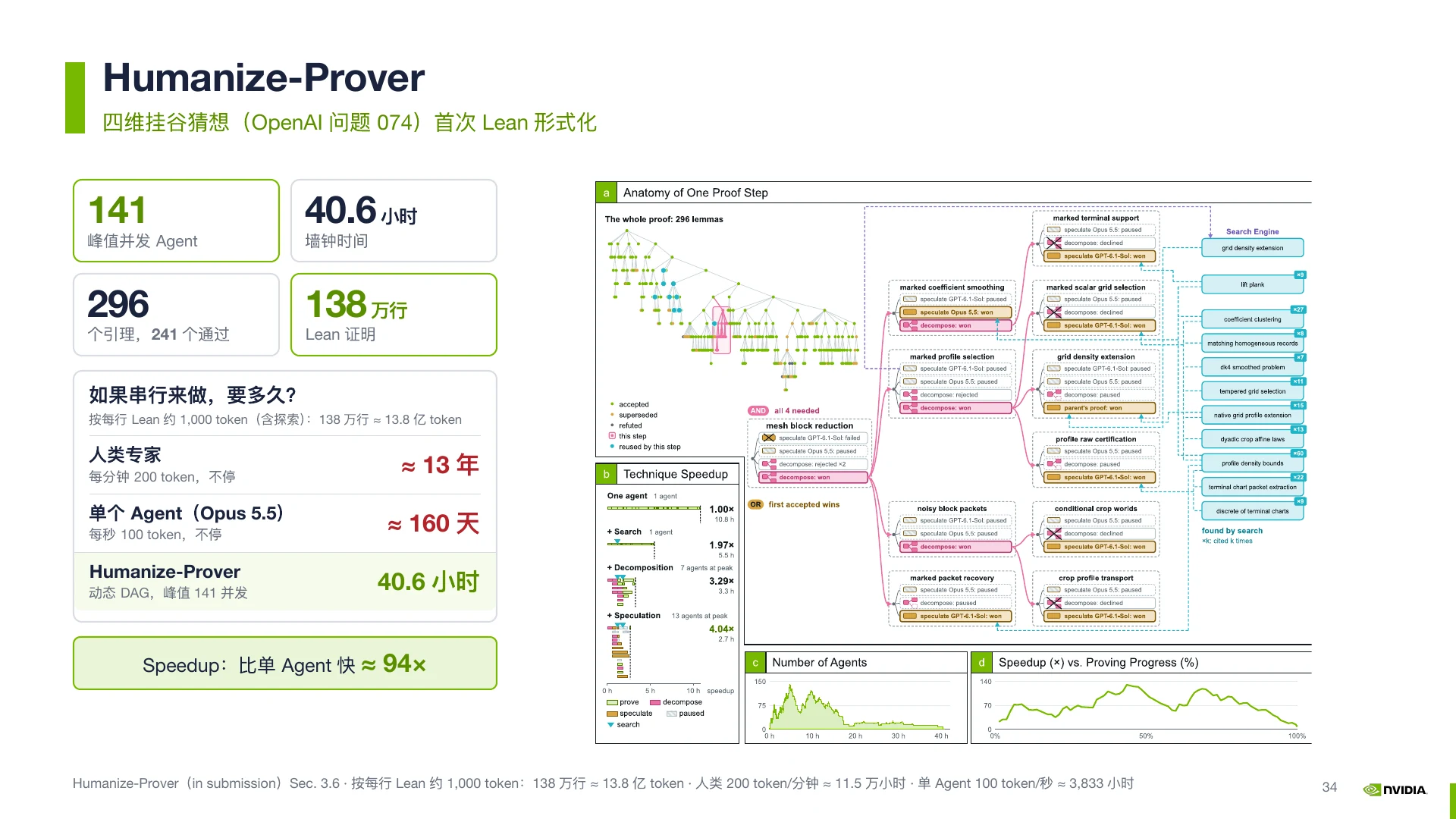
把上述基础设施串起来,我们做出了第一个超大规模并发案例研究——Humanize-Prover。这是一个用于形式化数学证明的大型 Flow,目前已经能驱动数百个 Session 同时运行去攻克一道前沿大定理,核心由四个模块协同:
- (A) 引理 AND 拆解:把主定理递归拆成子引理树,所有必需分支并发推进;
- (B) 多路 OR 投机:对同一引理同时并行启动“继续拆解”和“由 GPT-6.1-Sol、Fable 5.1 等模型直接证明”多路竞速,谁先通过内核验证谁胜出,其余分支立刻取消;同时父定理还可以先假设子引理已成立提前起草;
- (C) 实时引理检索引擎:索引超过 350 万条既有引理与新证成果,支持从 4.9 ms(
instant)到 4.3 s(best)五档检索,任何刚证出的引理立即可被全局搜索复用; - (D) Lean 核心与基建优化:包括子树/链式合并与 Master–Worker 队列调度、编译模块缓存与已验证常量账本,以及 Lean 与 Nanoda 的单次环境装载并发内核重放。
在这套系统上,我们完成了四维挂谷猜想(OpenAI 问题 074)的首次 Lean 形式化:
- 峰值并发 141 个 Agent,墙钟时间仅 40.6 小时;
- 共拆解处理 296 个引理(其中 241 个通过),生成 138 万行 Lean 证明;
- 把所有生成的 token 反推回来(按每行含探索约 1,000 token 折算,总计约 13.8 亿 token):按照人类专家每分钟 200 token 不停歇书写,需要大约 13 年;按照单个 Opus 5.5 Agent 每秒 100 token 不停歇生成,也要花大约 160 天。Humanize-Prover 比单个 Agent 快了大约 94 倍。
演进路线
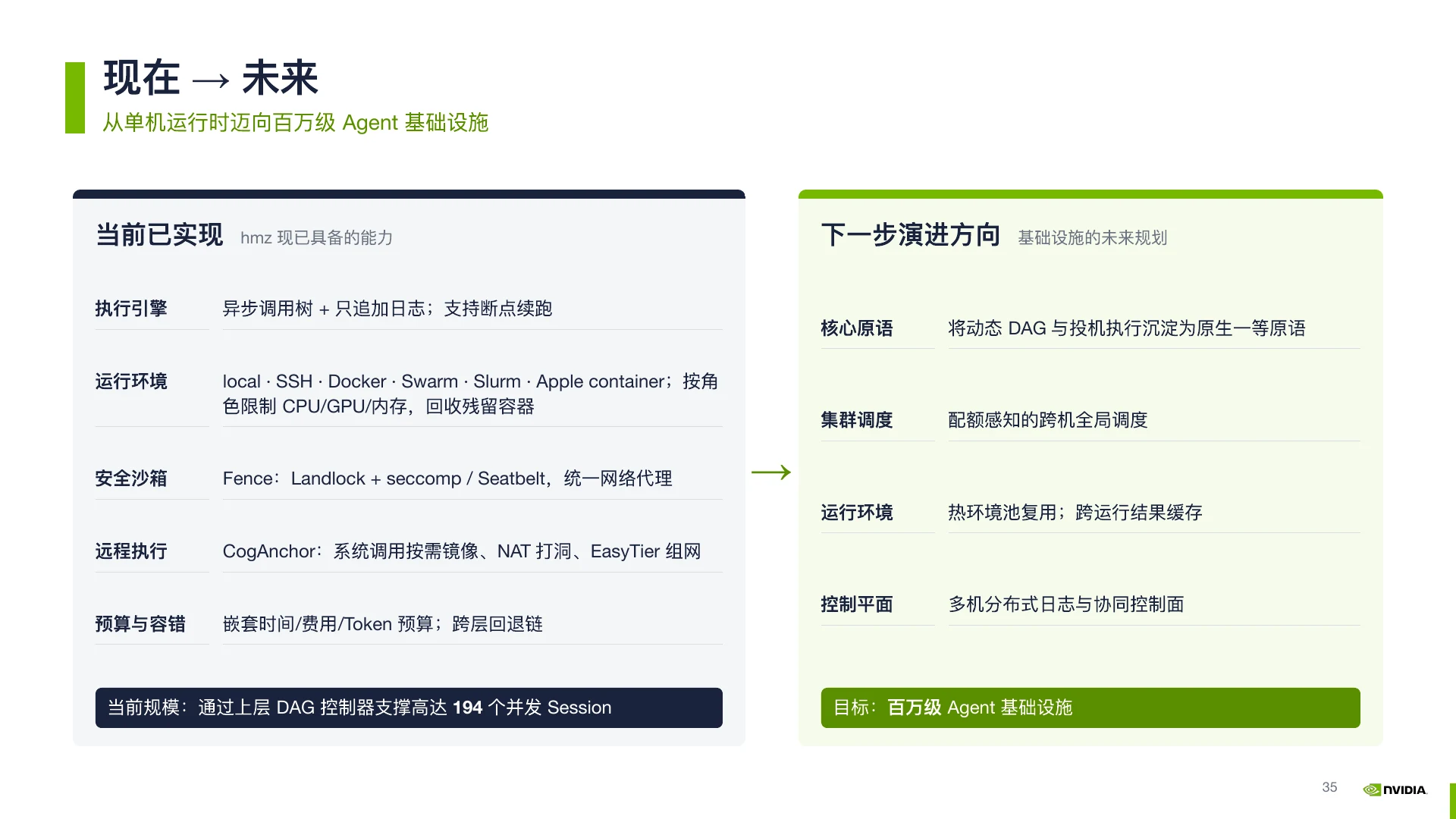
回到当下,hmz 已经具备异步调用树、只追加日志与断点续跑,支持 local、SSH、Docker、Swarm、Slurm 和 Apple container,可按角色限制 CPU/GPU/内存配额并自动回收残留容器;安全层面内置了基于 Landlock + seccomp / Seatbelt 的 Fence 沙箱与统一网络代理;远程执行通过 CogAnchor 支持系统调用按需镜像、NAT 打洞和 EasyTier 组网。借助上层 DAG 控制器,当前单机运行时已实测支撑高达 194 个并发 Session。
往后看,我们的核心目标就是怎么做到更大、更稳——做出 Flow 层面的 Scaling Law:把动态 DAG 和投机执行沉淀为原生一等原语,实现配额感知的跨机、甚至跨数据中心全局调度;在运行环境侧像云原生服务一样做热环境池复用和跨运行缓存;并构建多机分布式日志与跨集群控制平面,真正迈向百万级 Agent 基础设施。
共建生态与愿景
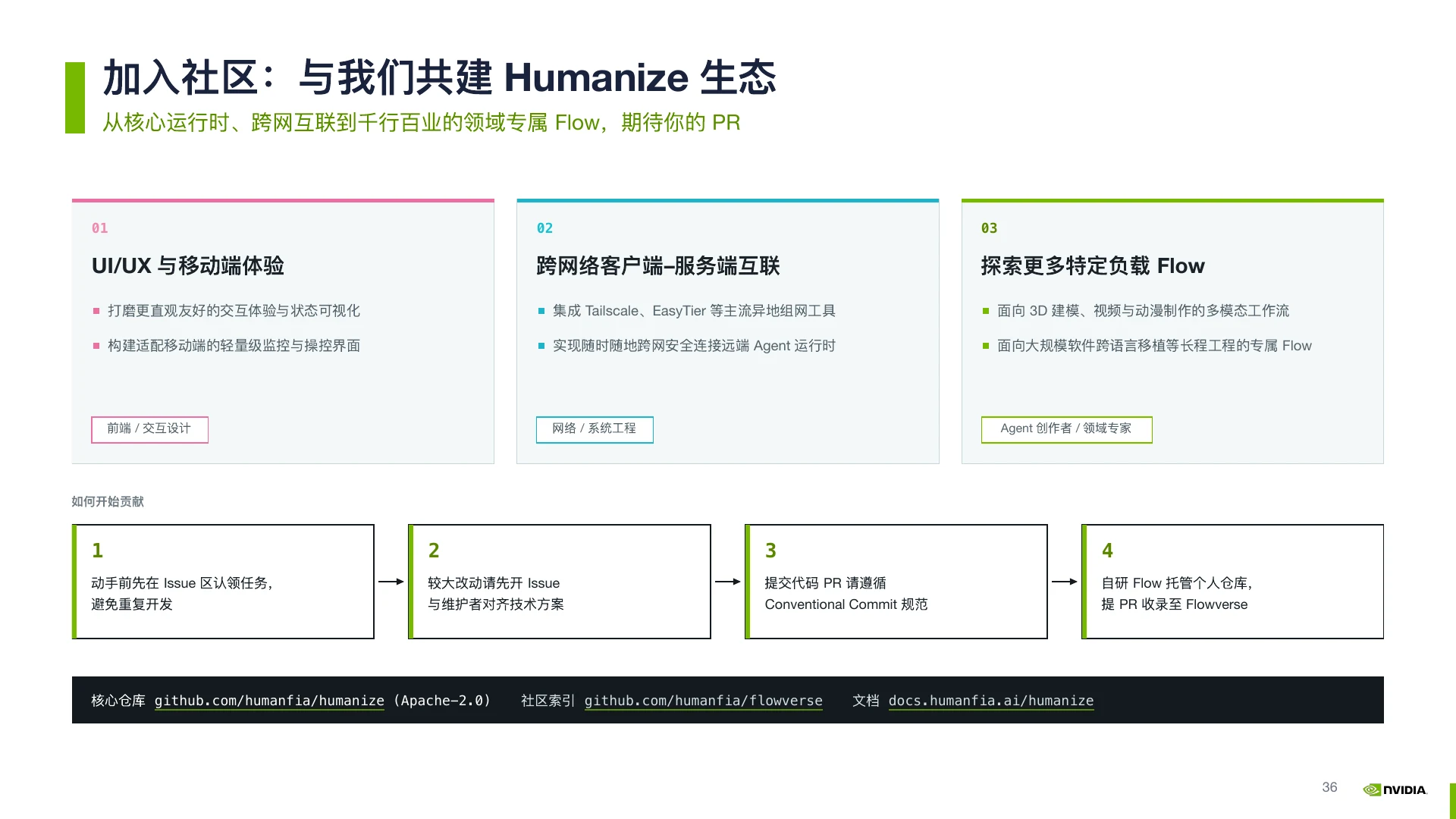
现在我们也非常欢迎社区里的大家一起来共建 Humanize 生态。当下最值得投入的有三个方向:
- UI/UX 与移动端体验:大家肯定都希望在健身房里掏出手机,就能一眼看到自己跑的实验和程序写得怎么样了,所以我们急需把交互可视化和轻量移动端监控操控体验打磨好;
- 跨网络客户端–服务端互联:集成 Tailscale、EasyTier 等主流异地组网工具,随时随地安全连上远端 Agent 运行时,同时也是为未来大规模集群做准备;
- 探索更多特定负载的 Flow:现在像前沿模型已经具备很强的 3D 建模、做视频、做动漫的多模态能力,以及大规模软件跨语言移植等长程工程场景,这些方向的专属 Flow 我们都还没来得及做完。
非常欢迎大家来 github.com/humanfia/humanize 给咱们开 PR,或者提个 Issue 也可以——其实今天提 Issue 和开 PR 差不多,反正提了 Issue 我这边调 Agent 也可以做!如果你写了有意思的自研 Flow,也可以托管在自己的仓库里,再提 PR 收录进 github.com/humanfia/flowverse;当然也可以直接从 MFCP 任务广场里认领拆解好的实践任务入手。
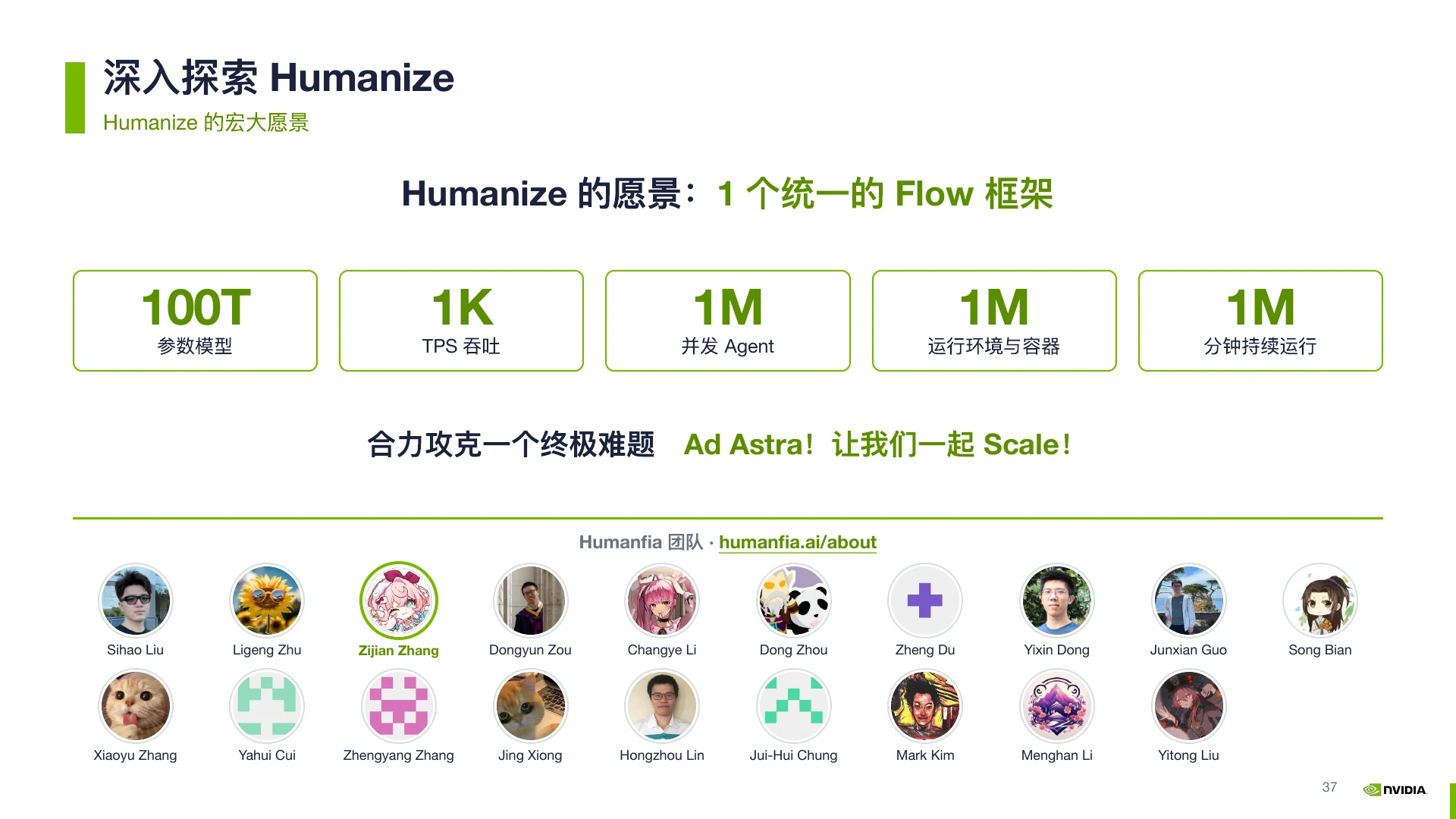
最后分享一下我们的宏大愿景:希望在 5 到 10 年之后,我们能在一个统一的 Flow 框架里,运行 100T 参数模型、达到 1K TPS 吞吐、调度 100 万个并发 Agent 在 100 万个运行环境与容器 上持续运行 100 万分钟,以这样的规模合力攻克一个人类终极难题——比如可控核聚变,或者攻克癌症。Ad Astra,让我们一起 Scale,奔赴星辰!
现场问答
分享结束后,主持人泽文和线上的刘恺老师围绕科研工作流、操作系统研发、现有工具迁移以及长程任务防跑偏提出了几个非常切中要害的问题,这里一并整理保留下来:
Auto-Research 工作流
背景(泽文):用 Humanize 2.0 写代码、做规划已经很顺畅了,但很多高校同学想拿它做科研(Research),这种情况大概应该设计一个怎样的 Flow?
我的回答:这是个很好的问题。从两三个月前开始,Auto-Research 就在整个社区和学术界火得一塌糊涂——你看今年 ICLR 收到 6 万篇投稿,里面恐怕相当大一部分都有 Auto-Research 的影子。我们一开始也想过自己做 Auto-Research,不过受限于人手,还是优先聚焦在了核心运行时、算子和数学证明上。
完整的 Auto-Research 除了中间跑实验,还有前置的文献调研和后置的论文撰写,这几段我们目前确实还没做,但我非常认可这是一个极有价值的 Flow 方向,也很期待社区能一起贡献;我自己也是在读博士生,有时间肯定也想把这一块做出来。不过这里有个比较难受的痛点:现在的模型写学术文本还是不太“说人话”,即便最新的模型好了一些,很多时候拿到结果还是得再过一遍专门的润色改写。
复杂系统开发与 Outworlder
背景(泽文、刘恺):在操作系统、编译器或者 Kubernetes 后端服务(同时涉及 controller、数据库和多后端服务协作)开发中,虽然用 Flame-Chase 做单点优化、分析和 Debug 非常强,可一旦扩展到整个系统设计,一方面功能繁杂、涉及任务调度与外部中断信号处理,很难有一个清晰收敛的 benchmark;另一方面我们对底层代码的可读性、可维护性和架构合理性有很高要求。往往一开始只能给一个比较粗的蓝图,模型跑着跑着就会突然“开脑洞”,跑到另一个完全意想不到的方向去实现——虽说勉强能达到功能效果,但在工程师看来特别别扭。泽文也分享了自己目前的实用做法:用外层 Agent 间接驱动 Humanize 编写 Flame-Chase 变种,前期先并行探索多轮实现,人工做 diff 挑出最好的一版架构,再用 Flame-Chase 做深度迭代。
我的回答:软件工程,尤其是操作系统和复杂系统 Infra 这一块,确实缺少一个纯粹客观的指标去衡量好坏,因此更需要一个顺手的人机协作体验。这里可以透露一个我 PPT 里还没来得及讲的新功能:大概一个月前,我们在 Humanize 底层做了一个改动,把人类的地位提升到了和 Agent 一样的层级。过去我们一直觉得人类就该是站在外面的观测者,盯着 Agent 怎么跑;现在我们加了一个叫 Outworlder(世界之外的人) 的组件,它在 Flow 内部直接以一个标准 Agent 的形式存在。
有了这个底座,后面就可以写出各种 RLCR 变种:在遇到架构选择、方案分歧或者关键阶段审查时,直接调用 Outworlder 问一问人类、请人类参与讨论和审查,防止它一路偏离我们的想法。目前基础设施已经做好了,只是受人手限制,基于 Outworlder 的具体上层 Flow 还没来得及写出来。同时我们也在打磨 Humanize Desktop,并在里面引入了类似“by-the-way Agent”的思路——你不用挨个去盯 Flow 里的每一个节点,直接问一个总代理 Agent,它替你去问各个具体执行的 Agent,汇总完再交给你审阅。
至于现场聊到的另一个槽点——“为什么现在很多 Agent 的弹窗提问功能,总在该问的时候不问、不该问的时候瞎问?”——第一位肯定还是模型本身的问题。理论上最理想的模型,在每一个你觉得它应该请示确认的节点上都该主动开口提问;在 Harness 和 Flow 这一层,我们能做的就是先把交互通道和原语赋予出来,再期待下一代模型把这种直觉真正训进去。
现有控制器迁移
背景(刘恺):我们内部已经有一套确定性的 Code Review 控制器,接收事件、做确定性判断后再唤起 Agent 跑提示词做审查并返回结果。如果迁移到 Humanize 上,Humanize 是不是只负责中间多 Agent 数据流转,外部数据库接入、API 处理还得靠外面的工具来做?
我的回答:其实可以回头看那页写自定义 Flow 的代码——Humanize 的一个 Flow 本质上就是一个普通的 Python 文件,一切能用 Python 实现的东西都可以直接写在 Humanize 里面。不管你外面是 MySQL 数据库,还是别的业务 API 或内部 SDK,直接在 Flow 里 import 进来照常写就行。它就是一个正常的 Python 程序,只不过我们把 Agent CLI 的执行以及运行环境的分配,也抽象成了普通的参数和异步函数,所以完全可以直接把 Flow 当作你整个审查系统的核心主流程。
防止长程运行跑偏
背景(刘恺):之前试过不少 CLI 的 loop 或 /goal,给了终极目标之后,模型跑到一半经常自己开脑洞跑偏到完全没想过的方向,用 Humanize Flow 能限制住吗?还是必须靠渐进式目标?
我的回答:这事要分两层来看。第一层先看模型——现场一问,果然当时用的是 GPT 系列的某个版本,长程跑偏很大程度上确实是特定模型本身的行为缺陷,Flow 只能尽量纠正,没办法百分之百根治。
第二层在 Flow 机制上,除了前面讲的渐进式目标,我们还有一个特别管用的机制叫做 fixed_interrupt(固定打断)。比如让它执行 30 分钟之后强行打断,然后带着同一个清晰的目标开启新会话继续做。因为在一个真实工程任务里,前面冗长的对话上下文其实没那么重要,真正重要的进展全都沉淀在代码工作区里了;定时强行打断并重置上下文,就能不断把它拉回“只盯着当前代码现状和原始目标”的清醒状态,很大程度上遏制跑偏。
当然,渐进式目标在算子优化这种有明确周期数的任务里非常好设,但换成复杂系统开发就不一定容易划出清晰的量化台阶。到了那种规模,就需要先让强模型把大目标拆成很多子任务分头执行——这就回到了 Humanize-Prover 的思路:一边拆解子目标(AND),一边做投机执行(OR,同时尝试直接解大目标和继续往下拆小目标),双管齐下推进。
相关资源
- 本次分享完整回放(B 站):Humanize:让 AI Agent 从单次任务走向复杂工程协作
- Humanize 核心仓库:github.com/humanfia/humanize(Apache-2.0)
- Flowverse 工作流生态索引:github.com/humanfia/flowverse
- 官方文档与主页:docs.humanfia.ai/humanize · humanfia.ai
- 相关技术报告与论文:
- Humanize: Judgement Engineering for Agentic Coding
- A Lean Formalization of the Hamilton–Perelman Proof of Thurston's Geometrization Conjecture
- Humanize Olympiad Agents: A Multi-Session Workflow for Olympiad Problem Solving with Solve, Review, Wiki, Verify
- Parason: Revealing Subtask and Trial Parallelism in LLM Reasoning
- Humanize MLE Agents: Multi-Agent Session Alternation Beyond Single-Agent Limits
- Humanize-Prover(in submission)
This post is adapted from my November 13, 2026 talk at the MFCP Open-Source Practice Sharing session, Humanize: Moving AI Agents from Single Tasks to Complex Engineering Collaboration.
I'm Zijian Zhang, a PhD student at the College of AI at Tsinghua University, a Research Intern at NVIDIA Research Singapore, and a core developer at Humanfia, where I wrote most of Humanize 2.0. In this post, I walk through how Humanize evolved over the past year, how our Agent Flow runtime works under the hood, what we have uncovered through Flow Science, and where we are heading next with scalable infrastructure.
I'll break the story into three stages: first, Humanize 1, back when Humanize itself was a single workflow; second, Humanize 2, where we generalized it into a unified Flow runtime and began studying Flow Science systematically; and third, Humanize NEXT, our push toward large-scale, distributed Flow infrastructure—followed by a few candid engineering questions that came up during the live Q&A.
From Session to Flow
Anyone who has pushed modern coding agents hard over the past year has run into the same wall. Even with frontier models like Claude Opus 5, Claude Fable 5, or GPT-5.6 Sol, handing an agent a single prompt—or firing off /goal—often falls apart once a task stretches across hours or days. Left in one long session, a model rarely stays locked onto your intent all the way to the finish line.
That is why we introduce Flows: explicit workflows that orchestrate one or more agents—working either cooperatively or competitively—to tackle problems far larger than any single session can handle.
Take Anthropic's original_performance_takehome interview benchmark, released earlier this year. The task is to optimize a batched tree-walk CPU kernel on a simulated VLIW + SIMD machine, scored purely by clock cycles (lower is better). Because VLIW + SIMD architectures barely exist in model training corpora, it is deliberately AI-resistant and tests how quickly an agent can build a harness and iterate in unfamiliar territory. Anthropic's hiring bar is 1,487 cycles—measured by running Claude Opus 4.5 in Anthropic's own harness for 11.5 hours.
Look at the comparison curve above. The baseline is a bare /goal with no workflow orchestration at all. Simply adding a structured loop like Ralph Loop or ARAR reaches the same cycle count while cutting token consumption by nearly 75%. Switching to Flame-Chase—alternating Claude Fable 5 and GPT-5.6 Sol—shaves off another ~70 cycles within the same budget.
And those curves were just our early results. Across the full progression—from DeepSeek-V4-Pro via raw API (2,401 cycles), standalone GPT-5.3-Codex (1,711), the 1,487 hiring bar, and a plain /goal (1,311), down through Humanize 1.0 (1,250), 1.5 (1,001), 2.0 (994), and 2.5 (979)—our community reached 864 cycles about a month ago, 1.72× faster than Anthropic's hiring bar. As of November 7, 2026, Humanize community members hold 5 of the 9 tied first-place slots on vliw-challenge.fly.dev (Without Indices). Without a well-designed Flow, you stay stuck above a performance floor while burning through tokens.
Humanize 1
Humanize 1 was originally created by Sihao Liu (now a Research Scientist at NVIDIA), and we documented that work in Humanize: Judgement Engineering for Agentic Coding. At the time, we weren't trying to build a general Flow platform; we just wanted to see whether we could achieve wishful coding on top of the weaker models available at the beginning of the year.
RLCR and Wishful Coding
In classic vibe coding, a human states an idea, an agent writes code, the human inspects it, spots issues, and nudges it again. With RLCR (Ralph Loop with Codex Review), we aimed to automate that review loop so you could simply state a wish and let agents drive the implementation all the way to completion:
- You describe an idea, and
gen-ideaexpands it into a grounded multi-direction draft based on the codebase. - In
gen-plan, multiple agents debate back and forth across several rounds until they converge on a solidplan.md. - A swarm of Claude sub-agents implements the different components of the plan in parallel.
- Crucially, Claude never signs off on its own work. Everything goes to an independent Codex reviewer to judge whether the implementation actually meets the bar.
Anyone who uses both tools heavily knows their strengths complement each other: Codex lags behind Claude at writing large swaths of code from scratch, yet it is consistently sharper at finding subtle bugs and spotting incomplete work. RLCR leans directly into that asymmetry—Codex keeps rejecting drafts until every requirement passes scrutiny.
Limits of a Single Flow
RLCR got us remarkably close to wishful coding for full software projects. Then we tried carrying it over to other domains and immediately hit a wall: there is no free lunch, and a single Flow cannot solve every class of problem.
RLCR shines at building applications from scratch because conventional software engineering is fundamentally a constraint satisfaction problem (CSP). You specify features, tests, and static lint checks; once all constraints pass, you have a valid feasible solution. Even if the generated code has rough edges—a bit of "AI slop"—as long as it runs reliably and satisfies every requirement, it gets the job done.
Move over to writing CUDA kernels or low-level operators, and AI slop is dead on arrival because any extra overhead wrecks performance. Two deeper differences come into play:
First, kernel optimization is an optimization problem with an unknown lower bound. You cannot tell an agent, "stop once you hit 1,000 cycles"—you have to keep probing downward for faster implementations.
Second, verification changes completely. For general software, no mechanical checker can catch every logic bug, which is why a Codex reviewer pays off. For kernels, you compile the code and run it on an actual GPU: numerical correctness and runtime pop out immediately. Hardware execution itself guarantees constraint satisfaction. Spending budget on a text-based Codex reviewer becomes pure drag; every ounce of compute should go toward discovering faster implementations.
Flame-Chase and Model Diversity
Around April, I designed a new Flow specifically for optimization problems and named it Flame-Chase, inspired by the Flame-Chase Journey in Honkai: Star Rail, where thirteen Chrysos Heirs each undergo trials to pass on their coreflames.
In our workflow, heterogeneous agents—such as Claude Code + Claude Fable 5 paired with Codex + GPT-5.6 Sol (or additional models like Kimi K3)—take turns optimizing the same shared codebase:
Claude Code + Claude Fable 5favors bold structural rewrites—great for unlocking new territory, though prone to temporary regressions.Codex + GPT-5.6 Solexcels at fine-grained micro-tuning—steady gains, though prone to getting trapped in local optima.
Whenever a round beats the current best benchmark, its result is committed to the shared state so the best version is always preserved. A single model has limited behavioral diversity and quickly settles into a local optimum. Mixing distinct models introduces genuinely different reasoning and output distributions, steadily raising the odds of jumping out of the current basin into a much better one.
At that point we had two distinct Flows: RLCR for constraint satisfaction, and Flame-Chase for optimization. The next question was obvious—if we already had two, there would soon be three, four, and dozens more. We needed a clean, general runtime to host all of them.
Humanize 2 Runtime
Over the summer, we rebuilt Humanize from a single workflow into a unified Flow runtime: Humanize 2, open-sourced under Apache-2.0 at github.com/humanfia/humanize alongside the community Flow registry Flowverse. Having this runtime is also what made our later Flow Science experiments fast enough to run at scale.
Three-Layer Architecture
Humanize 2 separates the entire agent lifecycle into three clean layers:
- Models: token providers such as OpenAI (GPT-6 Astra, GPT-5.6 Sol), Anthropic (Claude Fable 5.1, Claude Opus 5), and OpenRouter (Kimi K3, DeepSeek-V4 Pro, and more).
- Harness & Flow Runtime: Humanize pulls Flows from
Flowverseor your local project and schedules individual coding Agent CLI nodes. - Environments: where commands run and files live—local machines, remote servers, or containers, isolated via directories and Git worktrees.
Unlike many agent frameworks that talk directly to raw LLM APIs and re-implement tool loops from scratch, we deliberately avoid rebuilding the underlying harness. Every model lab trains and tunes its models specifically for its own native CLI harness. Treating each CLI (Claude Code, Codex, Grok Build, and others) as a black-box execution node gives us strong single-agent performance out of the box and frees us to focus on higher-level orchestration, scheduling, and environment mapping.
Built-in Flows and Flowverse
With Humanize 2 in place, running ablations became effortless, and we quickly built out a rich set of built-in and community Flows indexed at github.com/humanfia/flowverse:
| Category | Representative Flows | Core Mechanism |
|---|---|---|
| Built-in Loops | ralph_loop, stateful_ralph, continue_loop, goal, flame_chase, rlar | Fresh-session loops, stateful continuation, heterogeneous alternation, and per-round review |
| Humanize 1 Stages | humanize1:gen-idea, humanize1:gen-plan, humanize1:rlcr | The full three-stage Humanize 1 workflow rewritten in Humanize 2's native format |
| Flame-Chase Variants | agent_cleanup_ralph_loop, agent_cleanup_flame_chase, fixed_interrupt, parallel_git_pr, parallel | Workspace compaction, timed session resets, multi-branch parallelism, and metric-gated Git PR merges |
| Meta & Math Flows | aot, recursive_lean_prover | A meta-Flow that writes, smoke-tests, and reviews new Flows; recursive Lean theorem proving |
Getting Started in Five Steps
The reason we could iterate on so many Flows is how little friction Humanize 2 imposes. Onboarding takes five quick stages: install, first run, unattended execution, reusing Flows, and writing your own.
1. Install. hmz is published on PyPI—one command (uv tool install hmz) gets the CLI running, and a desktop GUI is also available in the repo. Importantly, Humanize 2 natively reuses your existing local logins for each coding Agent CLI without storing API keys or hijacking third-party auth sessions, so you avoid policy violations and account bans. Today we support 13 coding Agent CLIs: claude, codex, cursor-agent, agy, grok, kimi, qwen, opencode, dsh, mimo, mcode, pi, and omp.
2. First Run. Launch hmz inside a repository (both the CLI and the GUI follow the same layout), type /flow to pick a workflow such as ralph_loop, assign a harness, model, and reasoning effort to each role (e.g., claude/claude-opus-5:high), and set time/cost budgets (e.g., 20m, $0.50) so nothing runs away with your wallet. Hit Save, type your task, press Enter, and let it work. Double-tap ctrl+c anytime to stop and inspect changes with git diff start.
3. Unattended Mode. Realistically, nobody wants to SSH into a fleet of remote machines and drive interactive prompts by hand. With hmz exec, the exact same configuration collapses into a single command ready for scripts, cron jobs, CI pipelines—or for a local Claude agent on your laptop to dispatch jobs onto remote servers:
hmz exec -f ralph_loop \
  -a agent=claude/claude-opus-5:high \
  -p budget.duration=2h,budget.cost=10 \
  "$(cat TASK.md)"
In a nightly CI job, it is the same four steps: install hmz and the target CLI, inject credentials from Secrets, run hmz exec, and push the resulting branch as a Pull Request.
4. Reuse Flows. Open /flow → Install more… to pull official or community Flows from Flowverse, or run any pinned git ref directly without pre-installing (for example, git+https://github.com/humanfia/humanize1-flow@v0.2.0#humanize1:gen-idea). Our rewritten Humanize 1 pipeline runs as three clean stages—gen-idea, gen-plan, and rlcr—passing human-readable drafts and plans through files in the workspace.
From 118 Files Down to 7
To appreciate how much complexity the runtime strips away, compare our old implementation against the new one. In PolyArch/Humanize, implementing Humanize 1 took 118 files: 14 hooks, 22 scripts, 4 agent configs, 5 commands, 6 skills, 2 config files, and 64 prompt templates. setup-rlcr-loop.sh alone ran 1,541 lines, and loop-codex-stop-hook.sh hit 2,221 lines—a tangle of bash, jq, JSON parsing, regexes, environment variables, and process signals gluing stop hooks to Codex CLI.
In Humanize 2, the exact same humanfia/humanize1-flow takes 7 files: one Flow Python file and six prompt files. Permission guards and stop hooks are first-class Python APIs (builder.on_permission_request(guard)), so the code is the workflow—what you read is what runs.
5. Write Your Own Flow. Create .hmz/flows/twice/__init__.py, declare your AgentCollection and EnvCollection, and decorate an async Python function with @flow. Call await builder.spawn() to create a session, run the task once with await builder.run(...), then run a second pass asking the agent to review and fix its own work. In roughly twenty lines of standard async Python, you have a reusable implement-then-review Flow—far cleaner than wiring bespoke CLI hooks by hand.
Results Across Four Domains
Once writing and iterating on Flows stops being a chore, you can focus entirely on pushing frontiers. Between June and October this year, a small team of around ten people used Humanize 2 to deliver major results across four areas:
- Mathematics & Formal Verification: #1 on
Lean-Eval(266/304), 100% onPutnamBench, perfect score on IMO 2026 (6/6), the first Lean formalizations of 8 OpenAI research problems including the 4D Kakeya conjecture, and a Lean formalization of the Hamilton–Perelman proof of Thurston's Geometrization Conjecture. - Science Olympiads & Reasoning: Perfect scores on IOI 2026 (6/6), IPhO 2026 (23/23), IChO 2026 full formalization (68/68), and IBO 2024; 100% on both quantum algorithms and quantum information theory benchmarks; 80% on Physics Cup, 63% on HLE, and 62.4% on SuperChem.
- GPU Kernels & Systems Performance: Surpassed human SOTA across all tracks of MLSys FlashInfer; #1 on SOLExecBench L1 with 71 leaderboard-topping kernels; up to 14× speedup on MSA Prefill and 2.7× on VAE decoding; optimized 40+ SGLang kernels and uncovered a subtle cuDNN bug along the way.
- Machine Learning Engineering: 78.2% medal rate on
MLE-bench(#1 among five baselines), 53.8% gold medal rate, beating the human median on 90.7% of tasks; +6.4 percentage points average gain across six model combinations over single agents; and three top-5% finishes across 39 live Kaggle competitions with its predecessor.
Flow Science and Key Findings
After seeing so many task-specific Flows, a fair question naturally comes up: are Flows just another round of case-by-case glue work—like ad-hoc prompt, context, or skill tweaking—or are there underlying principles that generalize? Put simply: is Flow purely engineering, or is it also a science?
Our answer is clear: Flow is both engineering and science (Flow Science). Once you reduce concrete tasks to shared mathematical formulations—constraint satisfaction (find x s.t. x ∈ C) for software engineering, optimization (min f(x)) for kernel tuning—an entire family of Flows generalizes across every task sharing that structure, opening the door to controlled ablations and theory.
At its core, Flow Science is the management science of agents (the art of agents' management). Picture each frontier agent as a brilliant engineer, and the harness as their desk. In the real world, one person and one desk can only carry you so far—to build something ambitious, you form a company with structure, handoffs, and review processes. The same token budget produces dramatically different outcomes depending on how you organize the agents spending it. Taking Flame-Chase as a case study, we can systematically ablate six dimensions: participating models, model ordering, invocation ratios, parallelism, collaboration protocols, and progress tracking.
Here are the five core findings that emerged from our experiments.
Matching Flows to Problems
Across four diverse benchmarks—MLE-Bench, HLE, ProgramBench, and Anthropic's performance take-home—no single workflow wins everywhere. Software implementation tasks benefit from RLCR's reviewer-gated loop, while open-ended optimization tasks strongly favor Flame-Chase and its parallel variants. Looking ahead to decision, prediction, and game-theoretic problems, each problem class will call for its own Flow family.
Higher Diversity, Better Scores
This is the central claim of Flame-Chase. Its simplest form changes just one thing in a Ralph Loop: instead of invoking the same model every round, alternate between two different models and harnesses while handing off only the codebase. On Anthropic's performance take-home:
- Single-model
Ralph · GPT-5.6 SolandRalph · Fable 5both plateau around 1,040–1,060 cycles. - Alternating them in
Flame-Chasedrives the score down to ~1,000 cycles while using fewer output tokens (~2.7M vs. 3.4–4.1M) and less wall-clock time (~24h vs. 28–29h).
Different models fail in different ways; handing off across distinct models stops any single blind spot from compounding round after round.
Collaboration Over Raw Parallelism
We compared three Flame-Chase setups over a 12-hour window:
- Single-track Flame-Chase: two agents alternating on one workspace, averaging ~1,012 cycles.
- Parallel Flame-Chase: three parallel tracks exchanging text reports while only Track 1 writes to the workspace. Despite burning more than 3× the output tokens (~4.9M vs. 1.5M), it barely nudged the average to ~1,005 cycles.
- Parallel FC · Git/PR Lite: one tiny protocol change—each of the three tracks explores in its own isolated clone, and changes merge into main via a Git PR only when measured performance strictly improves, allowing subsequent agents to read past winning PRs. Within the same 12 hours, the average dropped sharply to ~985 cycles.
Throwing more parallel workers at a problem isn't enough; multi-branch exploration only compounds when merges are gated by real measurements.
Progressive Goals
We also tested fixed goals against progressive goals on Ralph Loop. When your kernel sits at 1,500 cycles and you only ever tell the agent "reach 1,000 cycles," it frequently discards genuinely helpful ideas simply because a single step only saves 100 cycles and looks far short of 1,000.
Just like gradient descent moves step by step rather than teleporting to the minimum, Progressive Goal ratchets the target downward as the agent improves: 1,500 → 1,300 → 1,200 → 1,100 → 1,000. In our experiments, fixed goals stalled around 1,060 cycles (~3.45M output tokens, ~$400, ~28.7h), whereas progressive goals reached ~1,000 cycles while spending less across every axis (~2.3M tokens, ~$325, ~24h).
Shrinking Thinking Budgets
Our most striking empirical result—detailed in Humanize MLE Agents: Multi-Agent Session Alternation Beyond Single-Agent Limits—explains why long single sessions perform so poorly. Across models and workflows, running a single session for hours causes agents to progressively "go shallow": the average output tokens per turn steadily shrink.
Tracking six models (GPT-5.6-sol, Claude Opus 5, DeepSeek V4 Flash, Kimi K3, GLM-5.3, and DeepSeek V4.1 Flash) with a 30-minute sliding window, mean output per response dropped 29.8% to 45.0% between hours 0–2 and hours 3–5. Line up Claude Fable 5's per-turn output directly above its benchmark curve, and the correlation jumps off the page: the moment single-turn output collapses toward ~100 tokens, performance flatlines completely.
Resetting context (HMA) retains 86.4% of per-turn output compared to just 60.7% under single-session /goal, and Flame-Chase markedly slows this decay by refreshing diversity. The takeaway is blunt: don't stretch a single session forever—end it, keep the artifacts in the workspace, and start fresh.
Humanize NEXT
As frontier labs distill early single-machine workflows directly into newer models, simpler local tasks will increasingly work from a single prompt. Does Humanize still matter in that world?
More than ever—because the real frontier is scalable Flow infrastructure. When people talk about AI Infra today, they almost exclusively mean Serving Infra: pushing more tokens per second out of a model. Almost no one is building the runtime to reliably host massive Agent Flows. OpenAI spun up 10,000 agents on Navier–Stokes equations; Anthropic ran 1,000 agents on Fermat's Last Theorem formalization. Humanize NEXT is our push from two-agent alternation to large-scale, dynamic DAG concurrency.
Four System Requirements
Every empirical law from Flow Science maps directly onto an infrastructure requirement:
- Context resets beat marathon sessions → Sessions must be lightweight and disposable, with state anchored in the workspace. Humanize already provides
spawn / run, Gitworktreeandreflink, plusgit ref-based snapshotting and rollback for safe recovery during massive parallel exploration. - Model diversity pays off → A unified interface must abstract heterogeneous model pools with automatic fallback. We integrate multiple CLIs and
LiteLLMwith cross-CLI, cross-account, and cross-model fallback chains. - AND/OR parallelism works → We need a dynamic DAG scheduler supporting speculation, pausing, and cancellation, built today on
asynciocall trees (gather,TaskGroup), nested budgets, and an upper-layer DAG controller. - Verification becomes the bottleneck → Execution environments and verifiers must scale horizontally alongside agents. Humanize supports local, SSH, Docker, Swarm, and Slurm backends with per-role CPU, GPU, and memory quotas.
Exomyth Global Profiling
An Agent Flow is just a program—and any program deserves a proper profiler. Well before similar trace viewers showed up elsewhere in the ecosystem, we built Exomyth to unify the full execution trace on one timeline (EPIC → SESSION → LANE → SPAN).
At the top sits the Flow invocation and its rounds; drill down to see every builder (Claude Code) and reviewer (Codex) thinking span and tool call (Bash, Edit); drill down one level further to inspect the actual OS subprocesses spawned by those tools—how long pytest -q took, how long bench.py ran, and what executed inside them. Exomyth renders 50,000 spans smoothly in a terminal timeline and flamegraph with zoom, pan, and search, letting you pinpoint bottlenecks and idle environments in massive Flows immediately.
CogAnchor Remote Execution
To cleanly decouple where an Agent CLI runs from where commands execute, we built CogAnchor, an action-routing gateway. A CogAnchor Hook intercepts every action and observation from the selected Agent CLI, routes it to a CogAnchor Worker running on a remote host or inside a container, and streams the result right back.
This unlocks two practical superpowers:
First, if your target environment sits behind an intranet or runs on specialized hardware like an FPGA host where installing a full agent harness is impractical, CogAnchor maps every action straight across—the agent debugs as if it were sitting natively on that machine.
Second, a single session can "fly" across environments. Imagine building an FPGA design: the agent compiles the project on a beefy multi-core build server, hops the live session over to the FPGA board to run hardware tests, and hops back to the build server with the telemetry to iterate.
Humanize-Prover Case Study
Putting these pieces together produced our first large-scale showcase, Humanize-Prover, which treats formal theorem proving as a concurrent scheduling problem across four tightly coupled components:
- (A) Lemma AND Decomposition: recursively breaks a research-level theorem into sub-lemmas whose required branches execute in parallel.
- (B) Multi-Way OR Speculation: races "decompose further" against direct proof attempts by models such as
GPT-6.1-SolandFable 5.1—first verified proof wins and cancels the rest, while parent theorems draft ahead speculatively assuming child lemmas hold. - (C) Real-Time Lemma Search Engine: indexes 3.5M+ existing and newly proved lemmas with five latency tiers from 4.9 ms (
instant) to 4.3 s (best), making every freshly proved lemma searchable across the swarm immediately. - (D) Lean Core & Systems Optimizations: subtree coalescing, master–worker task queues, compiled module caching, a verified-constant ledger, and one-pass concurrent kernel replay verified by both Lean and Nanoda.
Using Humanize-Prover, we produced the first Lean formalization of the 4D Kakeya conjecture (OpenAI Problem 074):
- 141 peak concurrent agents finishing in 40.6 hours of wall-clock time;
- 296 lemmas processed (241 accepted), generating 1.38 million lines of Lean proof;
- At roughly 1,000 tokens per line of Lean (including exploration), that totals ~1.38 billion tokens—equivalent to ~13 years of non-stop work by a human expert (200 tokens/min) or ~160 days for a single Opus 5.5 agent running flat out (100 tokens/sec), achieving roughly a 94× end-to-end speedup over a single agent.
Scaling Roadmap
Today, hmz ships with async call trees, append-only logs, resume-from-checkpoint, multi-backend execution (local, SSH, Docker, Swarm, Slurm, Apple container) with per-role resource quotas and orphan container cleanup, Fence sandboxing (Landlock + seccomp / Seatbelt) with a unified network proxy, and CogAnchor with on-demand syscall mirroring, NAT traversal, and EasyTier mesh networking. Through our upper-layer DAG controller, a single host already sustains up to 194 concurrent sessions.
Next, we are pursuing the Scaling Law of Flows: promoting dynamic DAGs and speculation into native first-class primitives, building quota-aware multi-host and cross-datacenter scheduling, maintaining cloud-native warm environment pools with cross-run caching, and constructing a distributed multi-node control plane aimed at million-agent infrastructure.
Community and Vision
We warmly welcome contributors to help build out the Humanize ecosystem. Right now, three areas stand out most:
- UI/UX & Mobile Experience: everyone wants to check on their running experiments or coding jobs from their phone at the gym—we need crisp status visualization and a lightweight mobile control surface.
- Cross-Network Client–Server Connectivity: integrating Tailscale, EasyTier, and similar mesh tools to securely connect to remote runtimes from anywhere, laying groundwork for multi-cluster orchestration.
- Domain-Specific Flows: multimodal workflows for 3D modeling, video, and animation using the latest models, plus large-scale long-horizon software engineering Flows such as cross-language codebase migrations.
Come claim an issue or open a PR at github.com/humanfia/humanize—honestly, opening a detailed issue is almost as good as a PR these days, since I can always spin up an agent to implement it! If you build an interesting custom Flow, host it in your own repo and submit a PR to list it in github.com/humanfia/flowverse, or pick up one of the scoped Humanize tasks on MFCP.
Looking five to ten years ahead, our vision is bold: one unified Flow framework orchestrating 100T-parameter models at 1K TPS, driving 1 million concurrent agents across 1 million environments and containers for 1 million minutes—working together to crack humanity's hardest problems, from controlled nuclear fusion to curing cancer. Ad Astra—let's scale toward the stars!
Live Q&A
After the talk, our host Zevorn and community member Kai Liu raised several sharp questions grounded in day-to-day research and systems engineering. Here is a recap of our discussion:
Auto-Research Flows
Context (Zevorn): Coding and planning in Humanize 2.0 already feel solid, but many students want to use it for academic research. What would an Auto-Research Flow look like?
My take: Auto-Research has exploded over the last two or three months—look at the 60,000 submissions to ICLR this year, a huge fraction of which clearly involved automated research pipelines. We originally considered building one ourselves, but with limited bandwidth we chose to stay focused on the runtime, kernels, and formal math.
End-to-end research also needs upstream literature surveys and downstream paper writing. We haven't shipped official Flows for those stages yet, and as a PhD student myself I would love to see the community build them—I'll probably explore this when I find time too. One real pain point remains: current models still struggle to write academic prose that sounds genuinely human, so you usually need an extra polishing pass on top.
Systems Infra and Outworlder
Context (Zevorn & Kai Liu): Kernel optimization has cycle counts and Lean has a proof kernel, whereas operating systems, compilers, and Kubernetes backends involve scheduling, interrupts, signals, and multiple interacting services. There is no single benchmark to converge on, and maintainability matters enormously. Given only a rough initial blueprint, models frequently wander off into an architecture that technically works yet feels completely wrong to an experienced engineer. Zevorn also noted his own workflow: using an outer agent to customize Flame-Chase variants, running multiple parallel exploratory implementations first, diffing them manually to pick the cleanest architecture, and only then iterating deeply with Flame-Chase.
My take: Software engineering—especially OS and core infrastructure—lacks a purely objective metric, which means human-in-the-loop ergonomics matter much more. Here is something I didn't even put in the slides: about a month ago, we elevated humans to first-class peers alongside agents inside Humanize. Historically, systems treated humans as external observers looking down on agents. We introduced a component called Outworlder, which represents a human directly as a standard Agent node inside a Flow.
With Outworlder in place at the infrastructure layer, you can build RLCR variants that pause at critical architectural forks or review checkpoints to consult a human before drifting off course. The underlying plumbing is shipped, though we haven't had the headcount to write the full suite of Outworlder-powered Flows yet. Alongside that, we are building Humanize Desktop with a "by-the-way Agent" pattern—instead of manually monitoring every worker node, you talk to one coordinator agent that queries the workers on your behalf and summarizes decisions for your review.
As for a frustration everyone on the call echoed—"why do agent question prompts always fire when you don't need them and stay silent when you actually want them to ask?"—that is first and foremost a model alignment problem. An ideal model knows instinctively when to stop and clarify. At the harness and Flow layer, all we can do is expose the right interaction primitives and wait for the next generation of models to train those instincts in.
Migrating Existing Controllers
Context (Kai Liu): We already run a deterministic event-driven code-review controller internally that ingests events, makes rule-based checks, and invokes an agent with a prompt. If we port it to Humanize, do we still need external tooling to talk to databases and APIs?
My take: Not at all—remember that a Humanize Flow is just a regular Python file. Anything you can do in Python, you can write right inside a Flow: import your MySQL driver, internal SDKs, or any external API. The only thing Humanize adds is turning coding Agent CLI executions and environment allocations into ordinary async function calls and parameters, so a Flow can cleanly serve as the core orchestration loop of your entire review service.
Keeping Long Runs on Track
Context (Kai Liu): When running CLI loops or /goal with a single end goal, agents sometimes go off on wild tangents I never asked for. Can Humanize Flows rein that in, or do you always need progressive goals?
My take: Two things are going on. First—as we confirmed on the call when Kai mentioned using a GPT-series model—going off-script over long horizons is partly a model-specific failure mode, and a Flow can only mitigate rather than eliminate it entirely.
Second, on the Flow side, beyond progressive goals we rely heavily on fixed_interrupt: forcibly interrupting a session after a fixed interval (say, 30 minutes) and restarting a fresh session with the exact same goal. In real engineering tasks, long conversational history matters far less than people think—everything important already lives in the workspace. Periodically wiping the drifting conversation brings the agent right back to the actual codebase and the original objective.
Progressive goals are easy when you have a clear numeric metric like cycles, and harder in sprawling system builds. Once a project reaches that scale, you need a strong agent to decompose the top-level objective into smaller sub-tasks—which brings us right back to Humanize-Prover's pattern of combining AND decomposition with OR speculation.
Resources
- Full Session Replay (Bilibili): Humanize: From Single Tasks to Complex Engineering Collaboration
- Core Repository: github.com/humanfia/humanize (Apache-2.0)
- Flowverse Registry: github.com/humanfia/flowverse
- Documentation & Homepage: docs.humanfia.ai/humanize · humanfia.ai
- Technical Reports & Papers:
- Humanize: Judgement Engineering for Agentic Coding
- A Lean Formalization of the Hamilton–Perelman Proof of Thurston's Geometrization Conjecture
- Humanize Olympiad Agents: A Multi-Session Workflow for Olympiad Problem Solving with Solve, Review, Wiki, Verify
- Parason: Revealing Subtask and Trial Parallelism in LLM Reasoning
- Humanize MLE Agents: Multi-Agent Session Alternation Beyond Single-Agent Limits
- Humanize-Prover (in submission)