目录
这篇博客文章整理自 2026 年 10 月 23 日 MFCP 开源实践分享《Zephyr 开源贡献流程介绍》。
这篇文章由泽文与 Zephyr 上游核心贡献者李洪全共同分享,面向初次接触大型开源项目或希望进入嵌入式开源社区的开发者,系统介绍 MFCP(Mission Forge Contributor Program) 的运作机制,并以 Zephyr RTOS 为切入点,结合一条已经合入上游的真实任务,手把手梳理从注册账号、搭建环境、申领任务到通过上游 CI 评审与成果验收的完整流程。
为什么从 Zephyr 开启开源实践
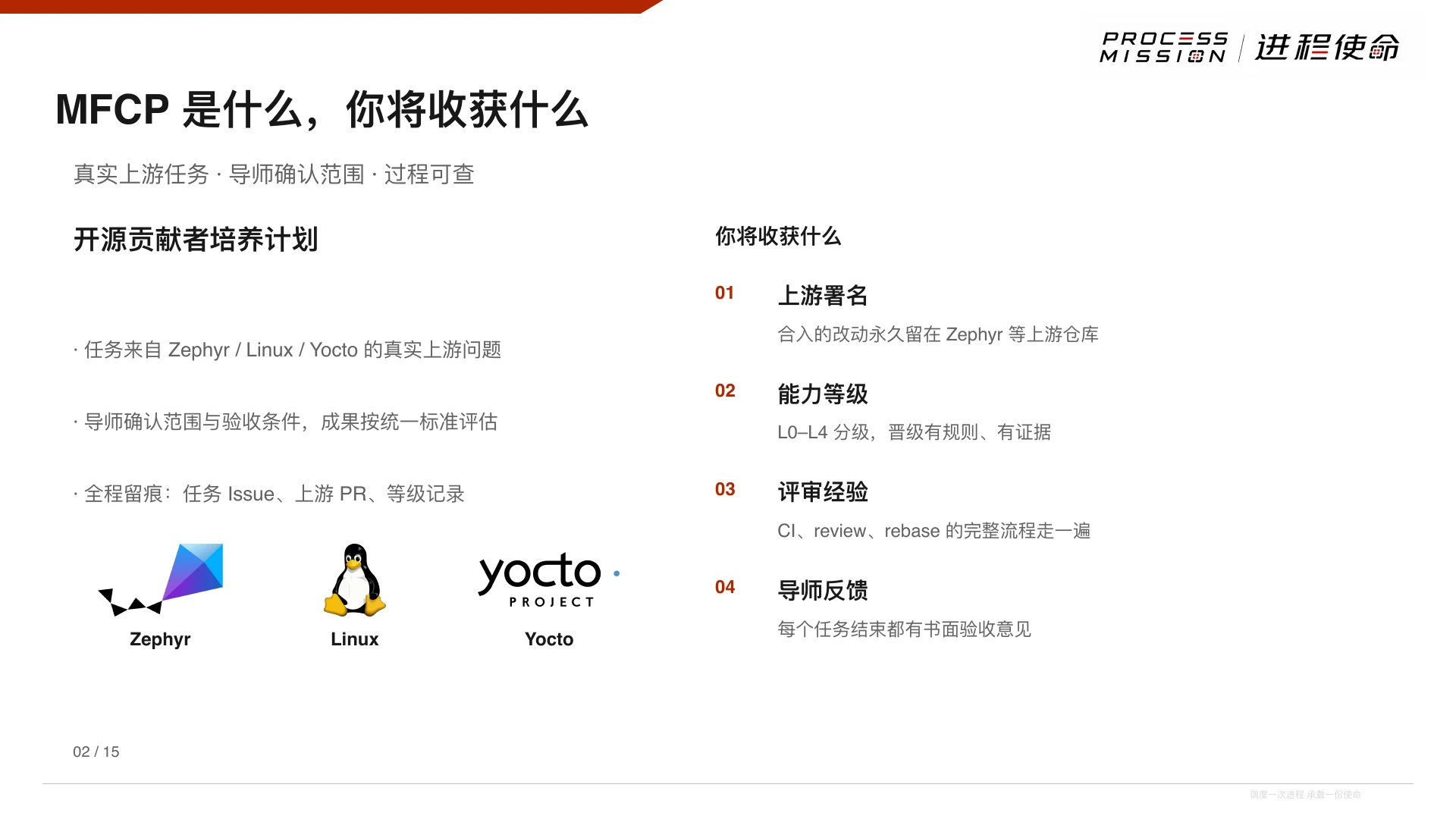
进入 Agent 时代后,大量基础、重复的编码工作正逐渐被智能体工具接管,这带来了一个很现实的问题:初学者过去用来打基础、攒经验的练手机会变得越来越少。与此同时,顶级开源社区依然保有大量真实且开放的工程实践场景。正是出于这个背景,我们发起了 MFCP(Mission Forge Contributor Program):它以真实上游任务为驱动,由经验丰富的导师带领大家参与 Zephyr、Linux、Yocto 等顶级开源项目,在平等协作中锻炼工程能力与社区协作能力。
之所以把 Zephyr 选为开源实践的第一站,主要有三点原因:
- 现代化协作体验:Zephyr 虽然是一个实时操作系统(RTOS),却把现代应用开发的协作方式完整带入了嵌入式领域,拥有非常完善的 CI/CD 基础设施;
- 对 Agent 工具友好:依托强大的自动化检查体系,参与者可以顺畅借助智能体辅助分析与开发,不必受限于传统嵌入式流程中的繁琐人工约束;
- 社区反馈高效:Zephyr 社区非常活跃,通常提交 PR 后一两天内就会收到维护者或评审者的反馈,正循环来得很快。
在 MFCP 中,所有任务均源自 Zephyr、Linux、Yocto 等上游仓库的真实问题,通过仓库 Issue 统一跟踪,开做之前由导师确认范围与验收条件,最终带来四项清晰可见的收获:
- 上游永久署名:合入后的改动与署名永久保存在 Zephyr 等上游仓库的提交历史中;
- L0–L4 能力等级:按年度规则自动记录晋级历程,每一步都有公开证据可查;
- 完整评审经验:亲手走通 CI、代码评审(Review)与变基(Rebase)全套上游协作流程;
- 导师书面反馈:每个任务结项后都会获得导师按统一标准给出的验收意见。
从加入计划到完成贡献
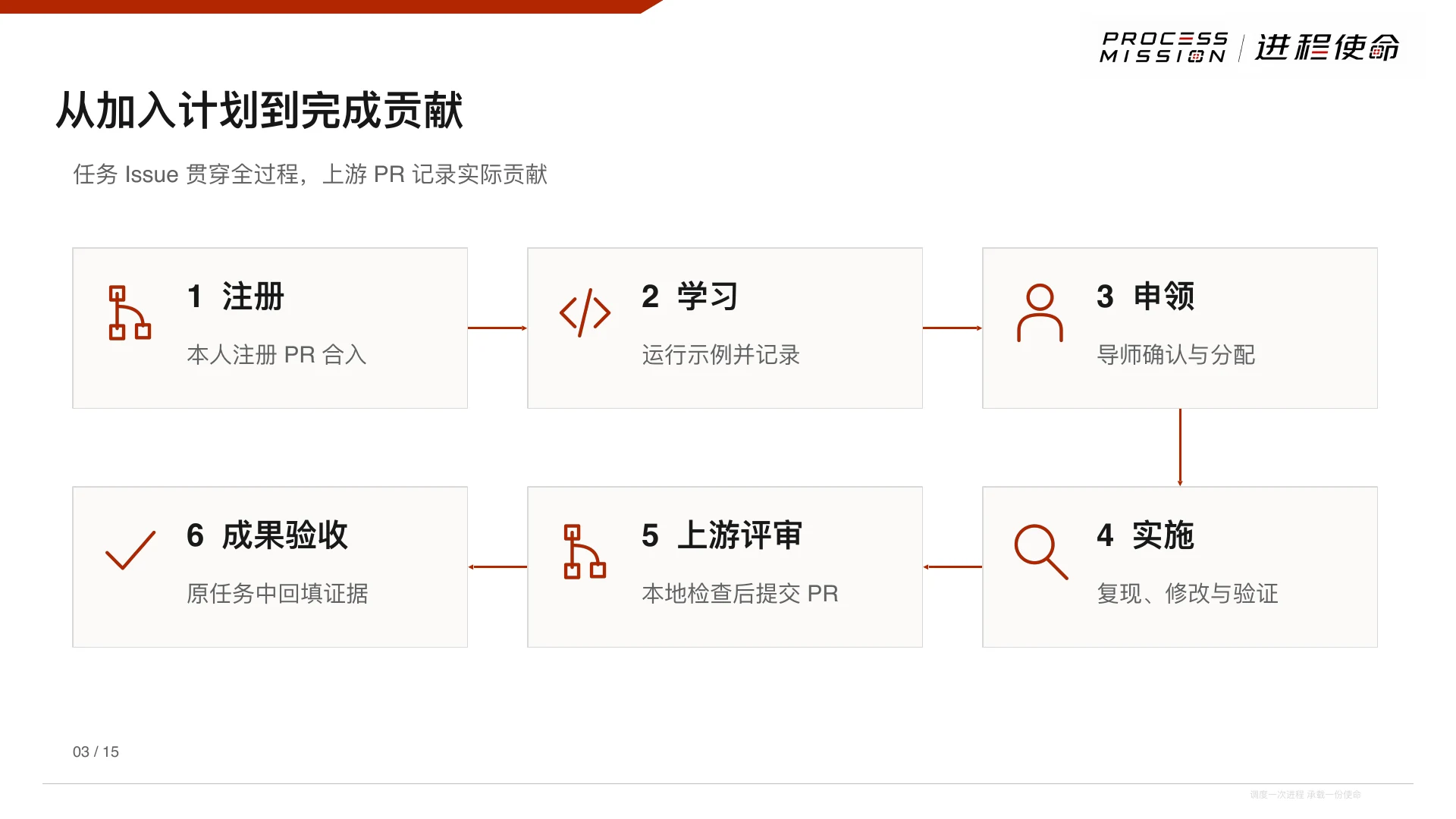
整条贡献链路围绕任务 Issue 展开,分为 注册 → 学习 → 申领 → 实施 → 上游评审 → 成果验收 六个阶段:所有过程透明记录在 GitHub Issue 上,实际代码与文档贡献直接提交到上游仓库。
环境、时间与基础准备
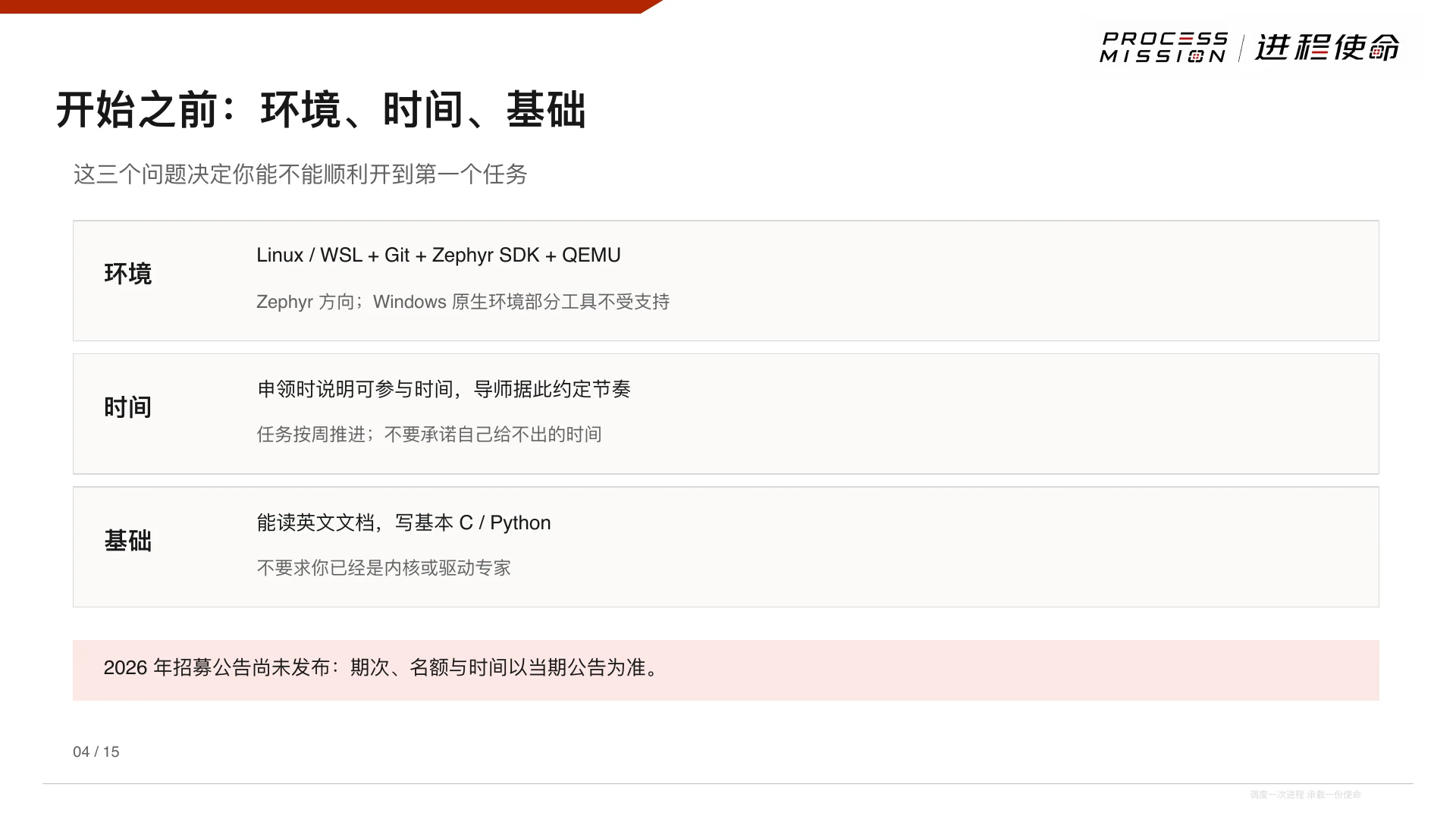
正式动手之前,有三项准备工作决定你能否顺利开启第一个任务:
- 开发环境:Zephyr 方向推荐使用原生 Linux 或 WSL2,提前配置好
Git、Zephyr SDK与QEMU。Windows 原生环境对部分构建和测试工具存在兼容性问题,使用 Linux / WSL2 可以避开大多数环境坑; - 时间投入:任务按周推进,申领时如实说明自己每周可投入的时间,方便导师据此安排节奏,不要承诺自己无法兑现的时间;
- 知识基础:能够读懂基本英文文档、编写基础 C 或 Python 程序即可起步,不要求提前成为内核或驱动专家。
第一步:注册参与者
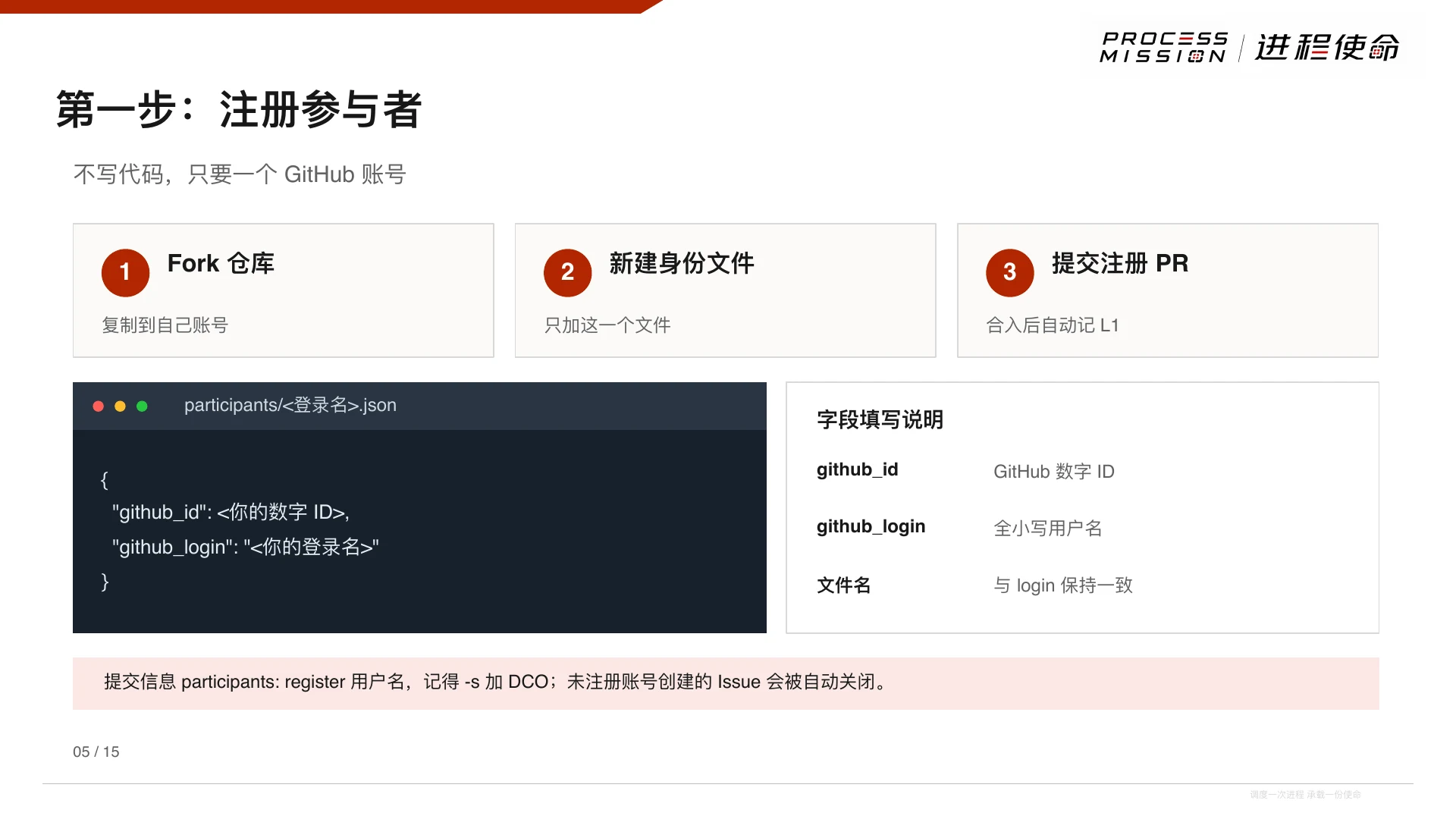
加入计划不需要先写代码,只要有一个 GitHub 账号即可完成注册:
- Fork MFCP 仓库到自己的 GitHub 账号下;
- 新建唯一的身份文件
participants/<登录名>.json,写入自己的 GitHub 数字 ID(github_id)与全小写用户名(github_login),确保文件名与github_login保持一致; - 使用
participants: register 用户名作为提交标题,记得加上-s添加本人 DCO 签名,推送后提交注册 PR。
注册 PR 合入后,系统会自动将账号记为 L1。需要注意,未注册账号在仓库中创建的 Issue 会被自动关闭,因此务必先完成注册这一步。
第二步:在 QEMU 上跑通 Hello World
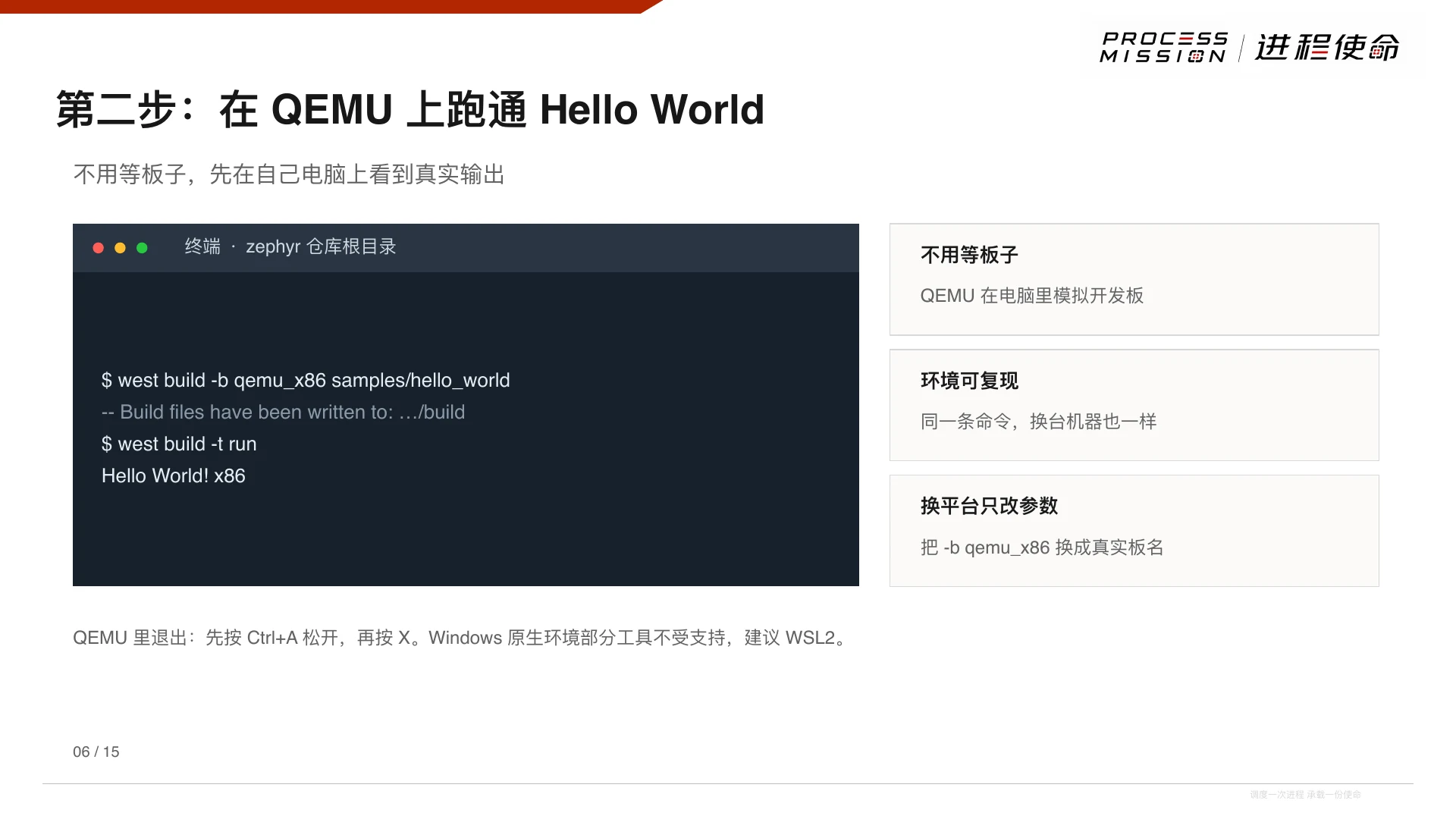
如果此前没有接触过 Zephyr,完成注册后先在已搭好的环境中用 QEMU 跑通官方 hello_world 示例:
west build -b qemu_x86 samples/hello_world
west build -t run
终端输出 Hello World! x86 即说明构建工具链与仿真环境均已就绪(退出 QEMU 的快捷键是先按 Ctrl+A 松开,再按 X)。QEMU 作为指令级模拟器,可以在没有实体开发板的情况下将目标架构指令翻译到宿主机运行,既保证了同一条命令跨机器可复现,以后切换到真实开发板时也只需把 -b qemu_x86 换成对应板卡名称即可。
第三步:选任务与导师确认
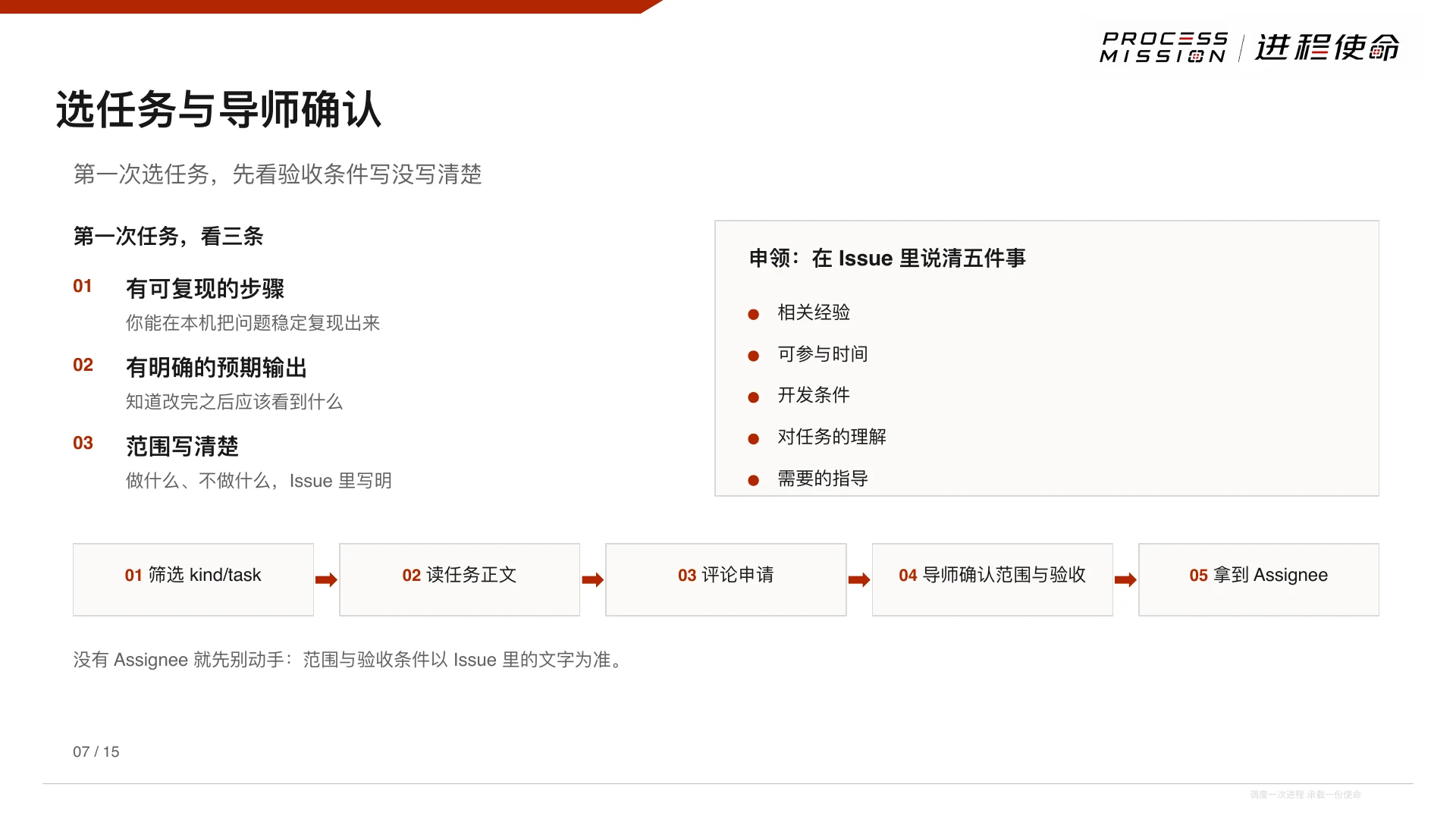
跑通示例后,就可以在仓库里筛选带有 kind/task 标签的任务 Issue。首次选题建议重点看三条:本地有可复现的步骤、有明确的预期输出、任务正文把做什么和不做什么写清楚。
看准合适的任务后,在原 Issue 下评论申请,把五件事说清楚:
- 相关经验;
- 每周可参与的时间;
- 本地开发条件(系统、仿真器或硬件板卡);
- 对这个任务问题的理解;
- 希望导师提供哪方面的指导。
流程按 筛选 kind/task → 读任务正文 → 评论申请 → 导师确认范围与验收条件 → 获得 Assignee 顺序推进。在尚未拿到 Assignee 之前不要贸然开始编码,后续范围与验收条件均以 Issue 中的书面文字为准,实施期间遇到疑问也全部留在原 Issue 下公开讨论。
案例:MFCP #1 上游合入
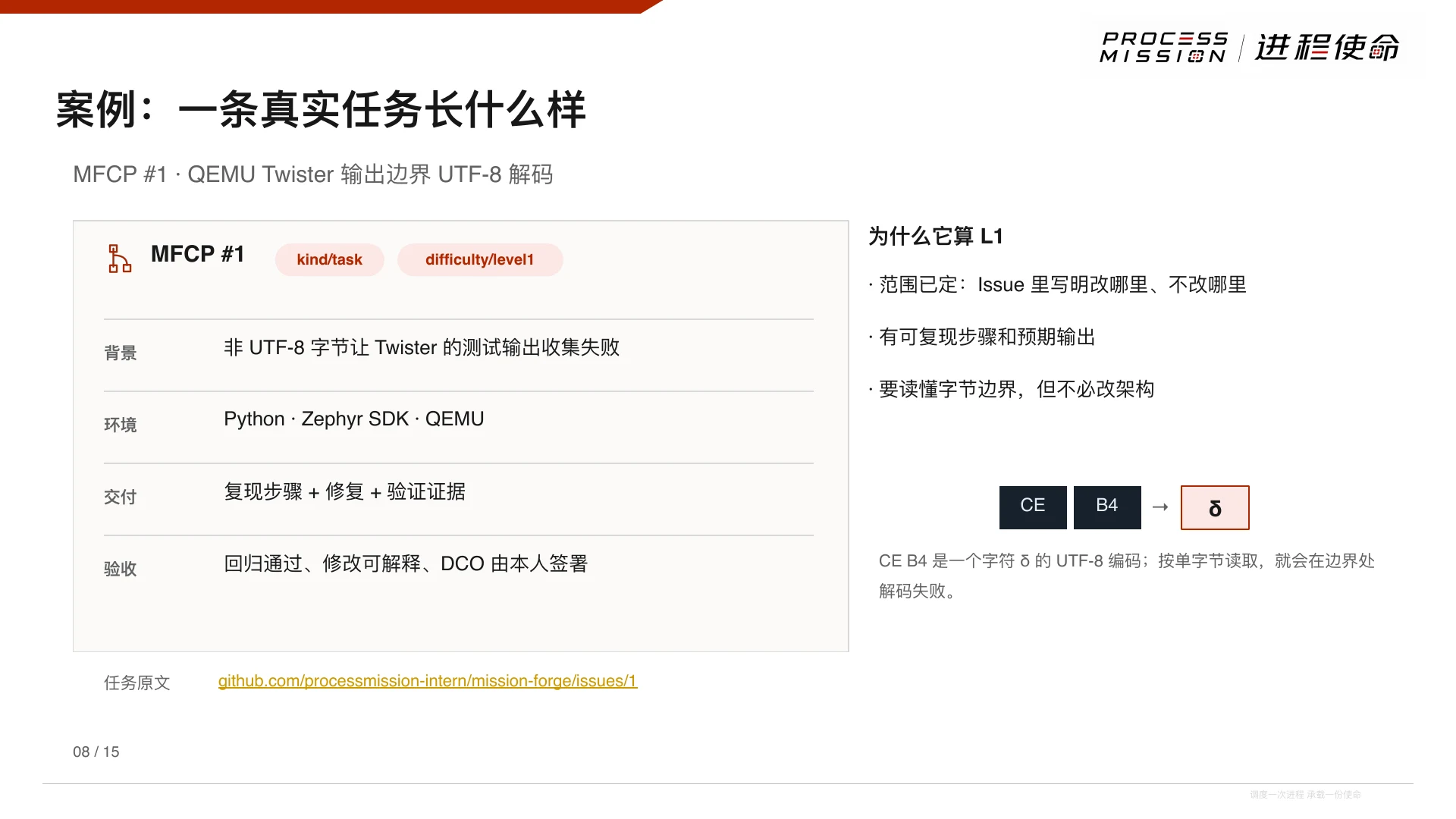
为了让整个流程更具体,下面以仓库中的 1 号真实任务 MFCP #1(QEMU Twister 输出边界 UTF-8 解码) 为例,拆解从问题分析到合入 Zephyr 主线的每一步。
任务拆解与难度评定
这个任务的背景很直观:在 Zephyr 的测试框架 Twister 中,程序收集 QEMU 输出时按单字节读取并直接解码;而 UTF-8 属于可变长编码——例如希腊字母 δ 由 CE B4 两个字节组成,按单字节切分会在字节边界处触发解码失败,进而导致测试输出收集异常、CI 意外退出。
任务所需环境为 Python、Zephyr SDK 与 QEMU,交付物要求包含复现步骤、修复改动与验证证据,验收条件则是回归测试通过、改动逻辑可解释且由作者本人签署 DCO。之所以将它评定为 L1,是因为该任务范围边界清晰(明确说明改哪里、不改哪里)、给出了可复现步骤与预期输出,需要读懂字节边界处理却无需改动整体架构。
规范提交与本地合规自检
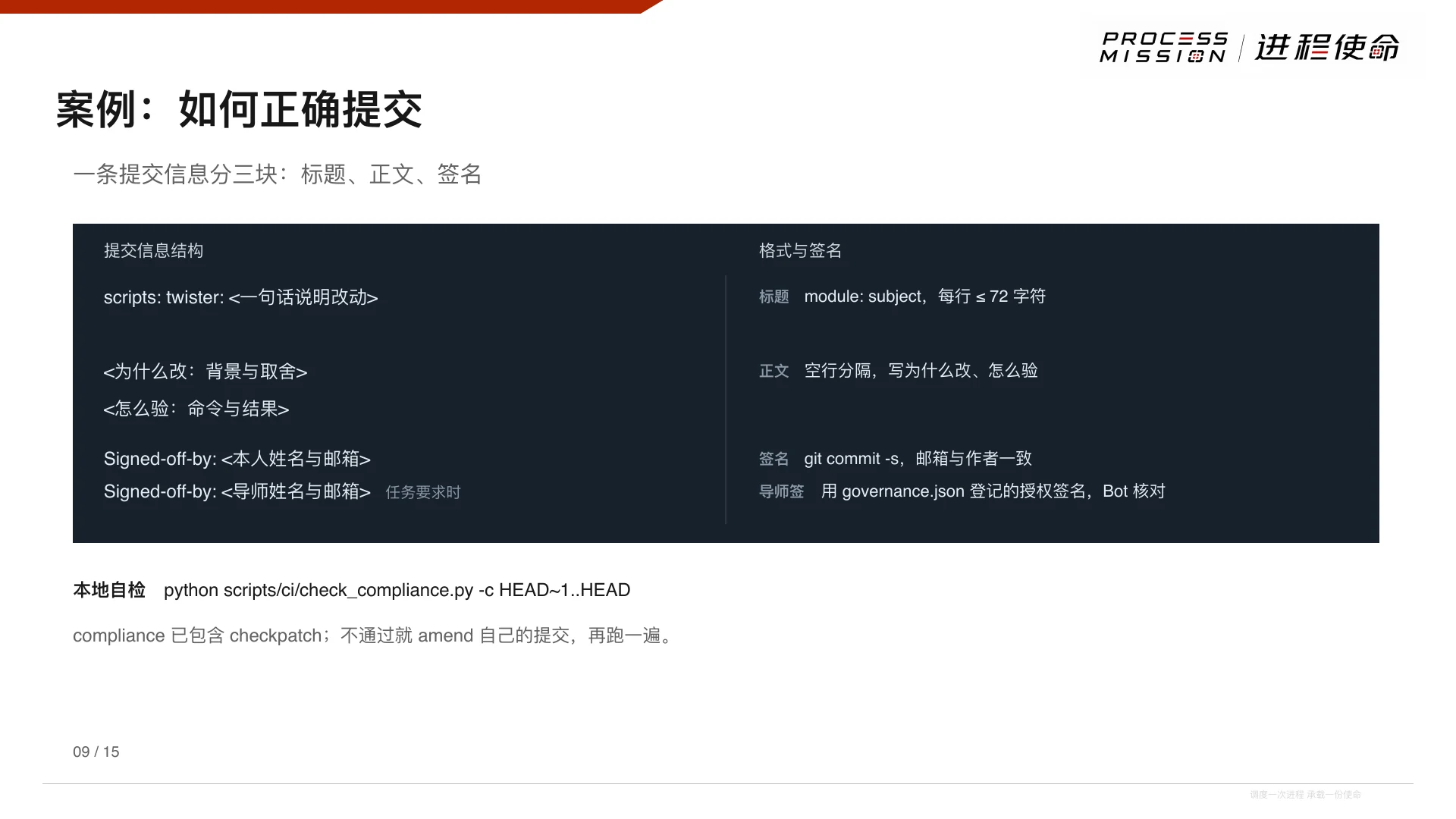
解决完问题准备提交时,务必严格遵循 Zephyr 上游的提交信息格式,整体分为标题、正文与签名三块:
- 标题:采用
module: subject形式(例如scripts: twister: ...),精准标明改动模块与目的,每行不超过 72 个字符; - 正文:与标题空一行,写清问题背景、方案取舍以及具体的验证命令与结果;
- 签名:空一行后附上作者本人的
Signed-off-by(使用git commit -s自动生成,确保邮箱与提交作者一致);若任务另有要求,按登记信息附加导师签名。
正式推送前,一定要先在本地运行 Zephyr 自带的合规检查脚本:
python scripts/ci/check_compliance.py -c HEAD~1..HEAD
check_compliance.py 已经内置 checkpatch 与提交格式检查。如果跳过本地自检直接提 PR,往往要等上游 CI 跑很久才暴露格式问题,来回修改徒增时间成本;本地不通过时直接 git commit --amend 修正后再跑一遍即可。
提交上游 PR 与回任务报成果
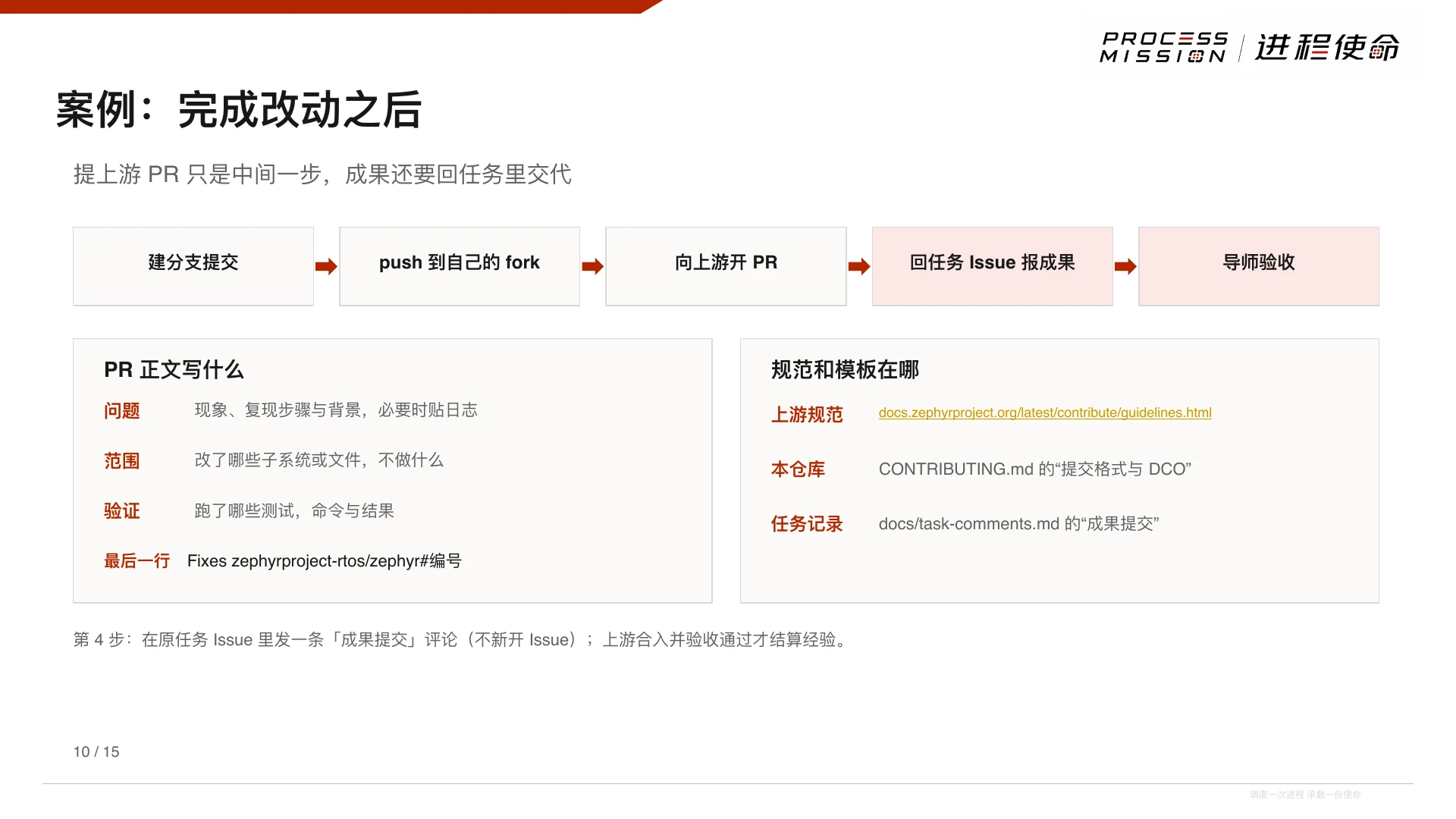
本地自检通过后,按照 建分支提交 → push 到个人 Fork → 向上游开 PR → 回任务 Issue 报成果 → 导师验收 的顺序推进。向上游提交 PR 时(尤其是包含测试、修复、文档的多补丁系列),在 PR 正文中写明四个部分:
- 问题:故障现象、复现步骤与背景,必要时附上关键日志;
- 范围:改动了哪些子系统或文件,明确不涉及哪些内容;
- 验证:运行了哪些测试、具体命令与实测结果;
- 关联编号:在最后一行写上
Fixes zephyrproject-rtos/zephyr#<编号>,便于上游维护者合入时自动关闭对应 Issue。
开出上游 PR 只是中间一步,完成后还需要回到原来申领的 MFCP 任务 Issue 下发表一条「成果提交」评论(不要新开 Issue),等上游正式合入并经导师验收后才会结算经验。
CI 检查、多轮评审与最终合入
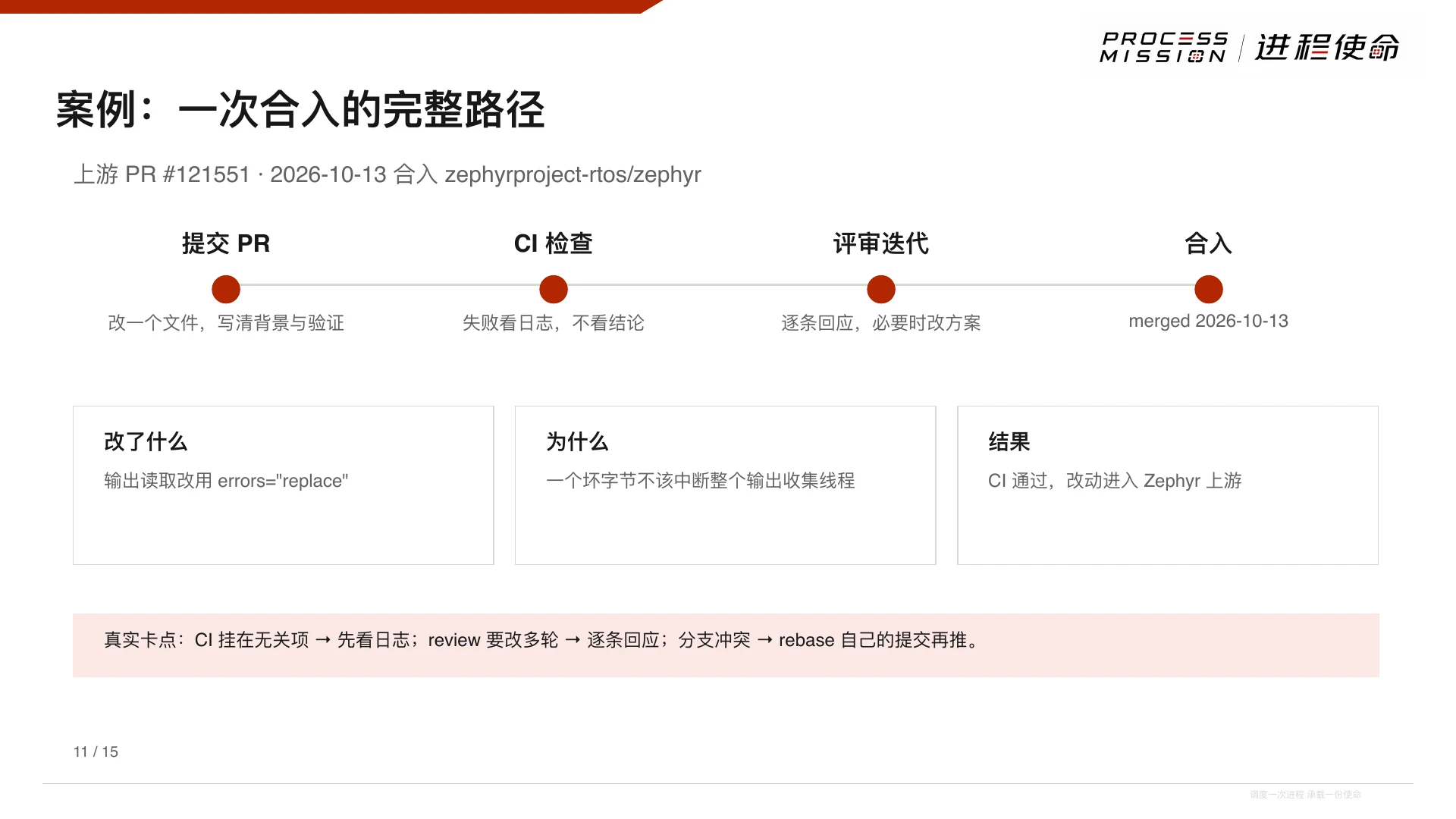
回到 MFCP #1 对应的真实上游 PR #121551:改动聚焦在一个文件,核心是在输出读取处改用 errors="replace",避免单个坏字节中断整个输出收集线程。提交 PR 后依次经历 CI 检查、多轮评审迭代,最终于 2026 年 10 月 13 日成功合入 zephyrproject-rtos/zephyr。
在实际参与上游评审时,经常会遇到三个卡点:
- CI 失败在无关项:不要只看红叉结论,先点开具体日志确认是否与自己的改动相关;
- 评审意见需要多轮修改:针对每条意见修改并重新推送后,务必在对应评论下逐条回复说明改了什么;如果一段时间无人响应,可以礼貌抄送相关模块的 Maintainer 或 Reviewer;
- 主干更新导致分支冲突:及时同步上游并
rebase自己的提交后重新推送。
值得一提的是,在 Zephyr 社区首次有 PR 合入后,还可以申领官方颁发的贡献者徽章,展示在领英等个人主页上,作为参与顶级开源项目的长期记录。
成果验收与 L0–L4 成长路径
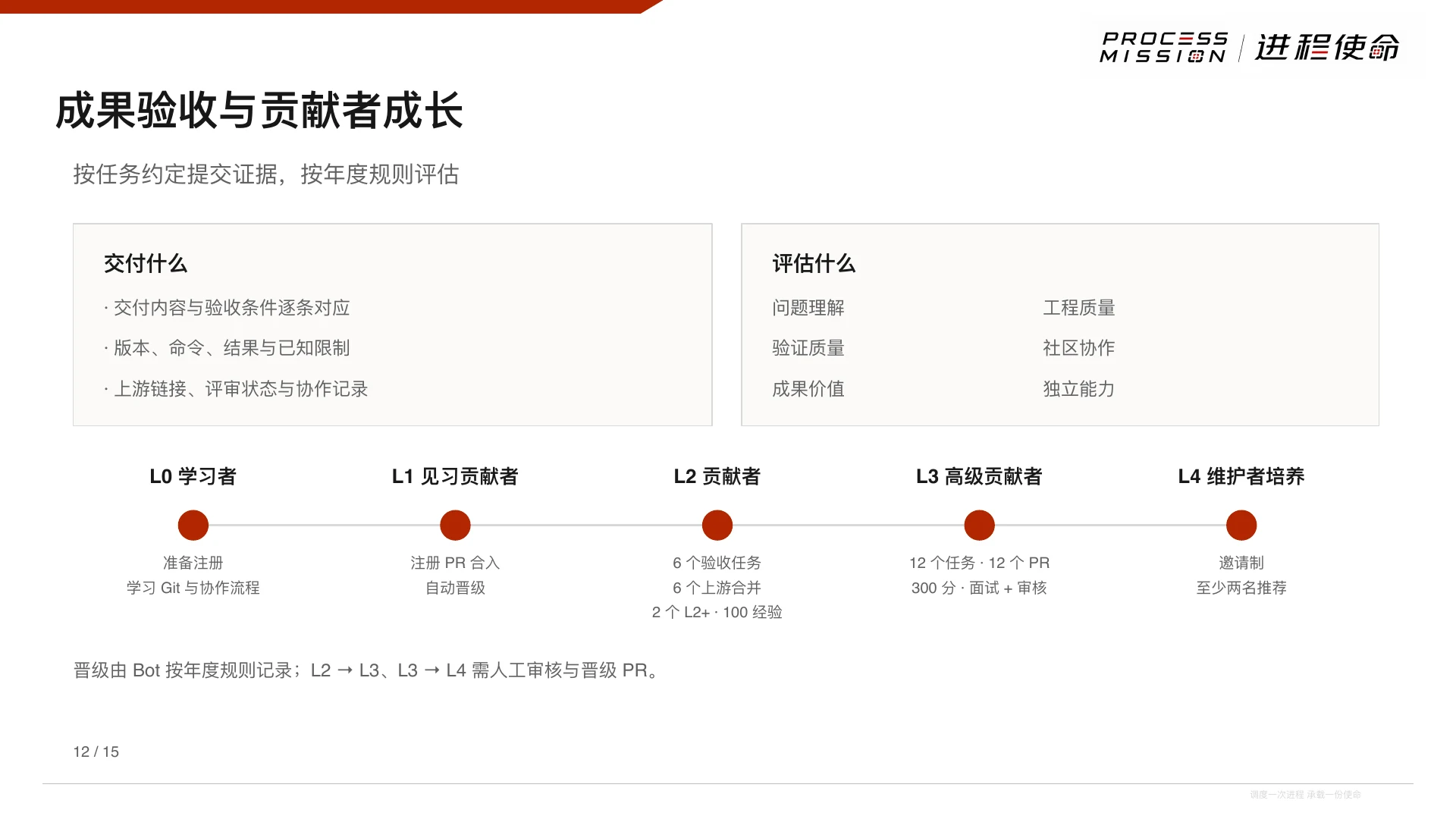
上游合入后,回到原任务 Issue 按约定核对交付证据(逐条呼应验收条件、写明版本、命令、结果与已知限制,并附上上游链接与评审记录),导师会从问题理解、工程质量、验证质量、社区协作、成果价值与独立能力六个维度进行综合评估。
MFCP 将贡献者成长划分为 L0 至 L4 五个等级:
| 等级 | 名称 | 核心要求与晋级方式 |
|---|---|---|
| L0 | 学习者 | 准备注册,学习 Git 与开源协作流程 |
| L1 | 见习贡献者 | 注册 PR 合入后自动晋级 |
| L2 | 贡献者 | 完成 6 个验收任务、6 个上游合入、至少 2 个 L2+ 任务并累计 100 经验,由 Bot 自动记录 |
| L3 | 高级贡献者 | 完成 12 个任务与 12 个上游合入、累计 300 经验,通过面对面复盘面试与人工审核 |
| L4 | 维护者培养 | 邀请制,需至少两名核心成员推荐并通过审核 |
泽文在分享中特别补充了这套等级体系的设计初衷:等级本身只是一种激励路径,核心目标是帮大家沿着清晰台阶成长,减少摸索弯路:
- L0 → L1 检验基础开源工具使用(Git、Fork、PR、回复规范),跨过这一步就具备了参与开源的基础工程能力;
- L1 → L2 鼓励大家在多个模块、子系统甚至不同项目间广泛探索,在真实任务中拓展技术视野、锻炼动手与协作能力;
- L2 → L3 转向深度投入,聚焦两到三个感兴趣的方向持续深耕,从修小补丁成长为既能攻克子系统开发、也能帮他人评审 PR 的活跃贡献者;
- L3 → L4 则迈向社区影响者与维护者角色,通过面对面沟通复盘经验教训,并依靠在真实社区中的持续投入赢得同行认可——正如 Linux Plumbers Conference(LPC)等顶级开源盛会上广受尊敬的社区明星贡献者一样。
整个 L0 到 L2 的接任务、交任务与经验结算均由 CI 自动化驱动,像游戏升级一样提供即时正反馈;而持续深耕所积累的社区沟通、公开评审与工程判断力,也是 Agent 长期难以替代的核心软技能。
行动清单与学习资源
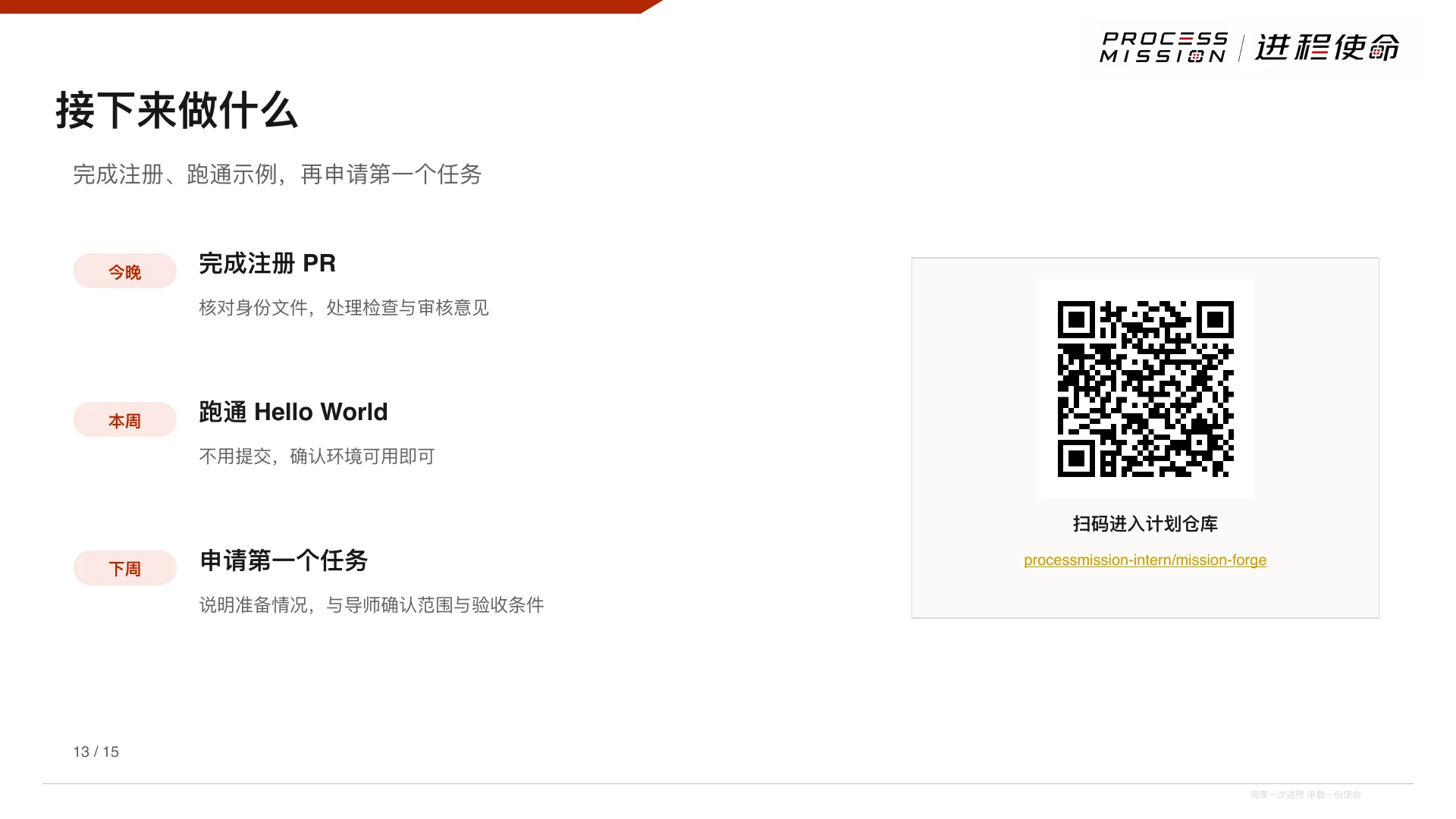
如果你准备现在就开始,可以按三周节奏稳步推进:今晚完成注册 PR,本周在本地跑通 QEMU hello_world 确认环境可用,下周挑选并申请你的第一个任务。
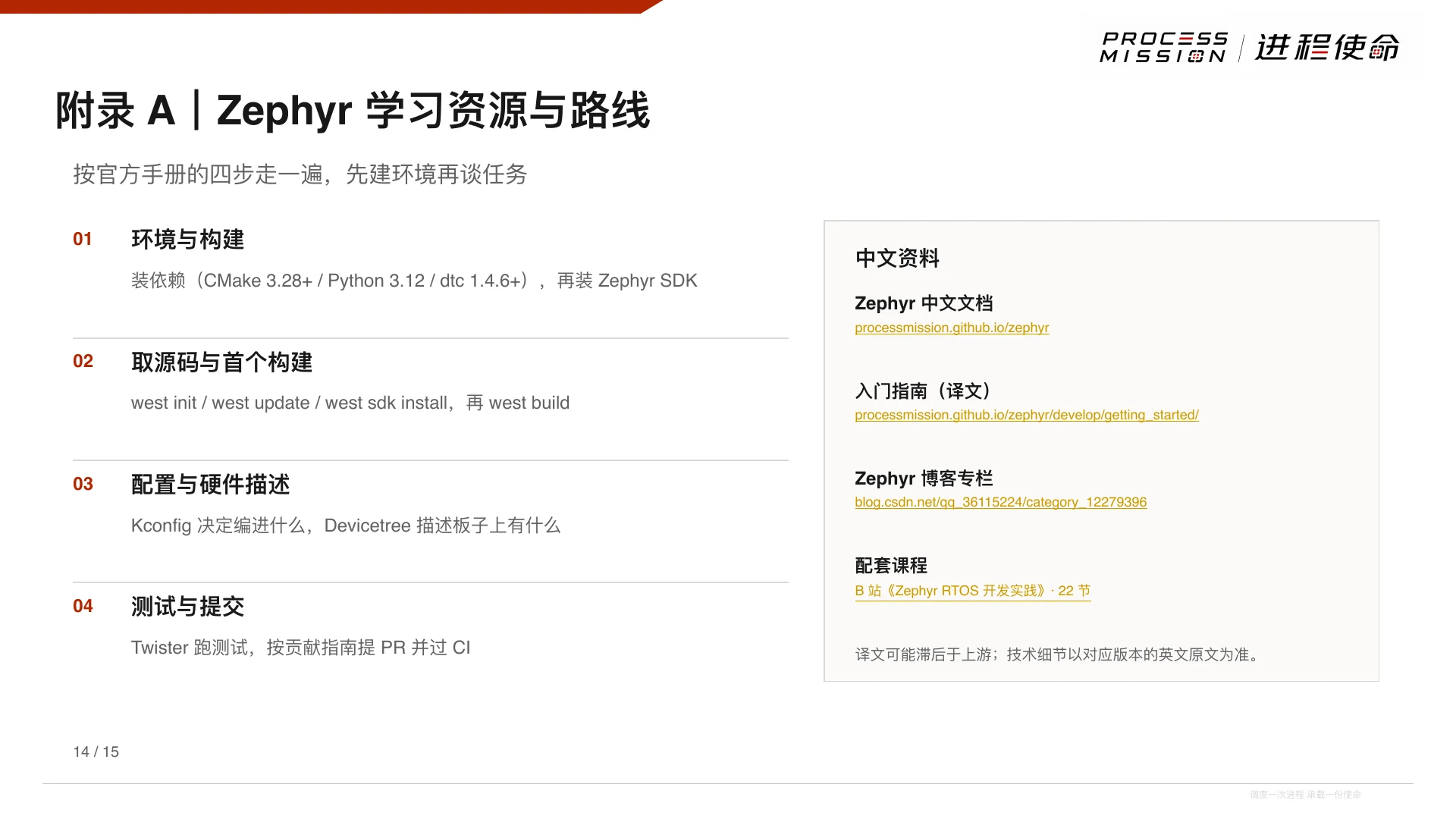
Zephyr 官方文档随源码仓库自动同步构建,非常详尽。建议顺着官方手册的四步路线先建环境再谈任务:
- 环境与构建:安装基础依赖(
CMake 3.28+、Python 3.12、dtc 1.4.6+)及Zephyr SDK; - 取源码与首个构建:执行
west init、west update、west sdk install后运行west build; - 配置与硬件描述:理解
Kconfig(决定编进哪些模块)与Devicetree(描述板卡硬件资源); - 测试与提交:用
Twister运行测试套件,按贡献指南提交 PR 并通过 CI。
社区同步维护了中文文档、入门译文、博客专栏以及泽文录制的 22 节 B 站《Zephyr RTOS 开发实践》系列教程供大家参考(译文可能略滞后于上游,关键技术细节仍以对应版本英文原文为准)。
导师协作与 AI 辅助规范
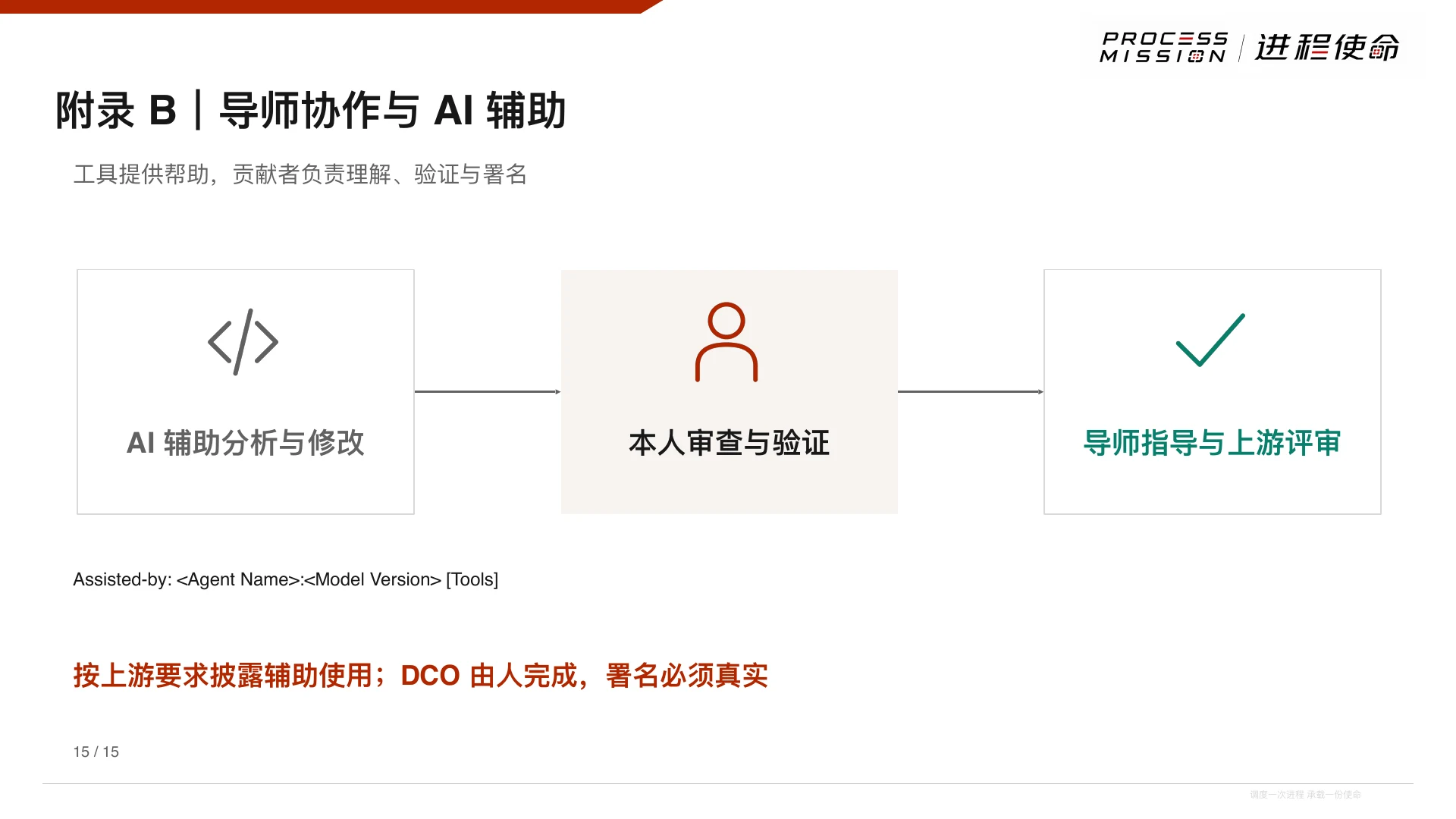
在 Agent 普及的背景下,我们非常鼓励合理使用 AI 工具辅助分析源码、定位问题和起草修改,但整条协作链路必须守住 AI 辅助分析与修改 → 本人审查与验证 → 导师指导与上游评审 这道底线。对于初学者而言,亲自动手复现、调试和修改才能真正沉淀理解,让 AI 充当建议者而非替代品。
同时,Zephyr 上游明确要求在提交信息中如实披露 AI 辅助工具的使用情况,格式为:
Assisted-by: <Agent Name>:<Model Version> [Tools]
无论是否借助了 AI 辅助,最终的 DCO 签名必须由人类贡献者本人确认并真实签署,对所提交的每一行代码负责。
现场问答
面向人群与上游公开协作模式
问题(曹俊杰):MFCP 活动是只面向在校学生开放,还是社会开发者也可以参与?具体协作方式是不是把上游需求集中到 MFCP 仓库、导师评审后再提交给上游?
泽文:MFCP 面向全社会所有开发者开放,不限于在校学生,也不属于企业实习。
具体协作分为两层:我们会把上游已有的合适 Issue 和有趣特性按难度整理到 MFCP 仓库,供大家挑选和学习;但真正进入实施与评审阶段时,导师会直接和参与者一起在上游项目对应的公开平台(如 GitHub PR 或邮件列表)协作,避免在私下或封闭通道里闭门造车。公开互动既能持续维持 PR 的活跃度,吸引社区里不同技术背景的维护者参与讨论、给出意想不到的好建议,也能在流程出现阻塞时由导师及时推动;任务完成后再回到 MFCP 仓库通过 CI 自动化完成经验结算与记录,帮助业余时间做开源的开发者保持节奏和成就感,实现个人工程成长与社区影响力提升的双赢。
社区交流群规划
问题(刘恺):后续是否会建立飞书群方便大家日常交流?
泽文:专门的飞书交流群已经在规划推进中,建立后会第一时间贴在 GitHub 仓库并通过社区渠道通知大家。
相关资源
- 本次分享完整回放(B 站):Zephyr 开源贡献流程介绍
- MFCP 计划仓库:github.com/missionhub-oss/mfcp
- Zephyr 官方贡献指南:docs.zephyrproject.org/latest/contribute/guidelines.html
- Zephyr 中文文档与入门指南:processmission.github.io/zephyr · 入门指南
- Zephyr 博客专栏:blog.csdn.net/qq_36115224/category_12279396
This post is adapted from the October 23, 2026 MFCP Open-Source Practice Sharing session, Zephyr Contribution Workflow, co-presented by Zevorn and upstream Zephyr contributor Hongquan Li.
In this session, we introduce how the Mission Forge Contributor Program (MFCP) works and walk through the complete upstream contribution workflow for Zephyr RTOS—from registering as a participant and booting your first QEMU sample to passing local compliance checks, iterating through upstream code reviews, and earning L0–L4 contributor progression using a real merged pull request as our case study.
Why Start with Zephyr
As AI coding agents take over routine, repetitive coding tasks, beginners face a real dilemma: many of the entry-level exercises developers once used to build engineering intuition are disappearing. Open-source communities remain one of the best places to learn by doing. That motivated us to launch MFCP—not as a lecture course or a traditional internship, but as a task-driven contributor program where mentors work alongside participants on real upstream issues in Zephyr, Linux, Yocto, and other leading projects.
We chose Zephyr as the first stop for three reasons:
- Modern engineering workflow: Although Zephyr is a real-time operating system (RTOS), it brings modern software engineering practices and CI/CD pipelines straight into embedded development.
- Agent-friendly tooling: Thanks to strict, automated CI verification, contributors can pair effectively with AI agents without hitting the manual bottlenecks common in legacy embedded workflows.
- Fast community feedback: Zephyr's upstream community is highly active; PRs routinely receive maintainer or reviewer feedback within one or two days.
Every MFCP task tracks a real upstream issue in GitHub, with scope and acceptance criteria confirmed upfront by a mentor. Along the way, contributors gain four tangible outcomes:
- Permanent upstream attribution: Merged patches stay forever in the upstream git history of Zephyr and partner repositories.
- Transparent L0–L4 progression: Levels follow published annual rules backed by public evidence on GitHub.
- End-to-end review experience: Hands-on mastery of CI checks, code review iterations, and rebasing.
- Written mentor feedback: Structured evaluation at the end of every completed task.
Six-Step Contribution Workflow
Every contribution moves through six stages—Register → Learn → Claim → Implement → Upstream Review → Acceptance—tracked transparently inside a GitHub task issue while actual code lands upstream.
Prerequisites: Environment, Time, and Skills
Before claiming your first task, three fundamentals set you up for a smooth start:
- Development environment: Use native Linux or WSL2 with
Git,Zephyr SDK, andQEMUinstalled. Native Windows lacks support for several Zephyr build and test utilities, so sticking to Linux or WSL2 avoids unnecessary friction. - Weekly commitment: Tasks progress on a weekly cadence. State your realistic availability when claiming a task so your mentor can plan accordingly—never promise hours you cannot deliver.
- Baseline skills: Comfort reading English technical documentation and writing basic C or Python is enough to begin; you do not need to be a kernel or driver expert beforehand.
Step 1: Register as a Participant
Getting started requires zero application code—just a GitHub account:
- Fork the MFCP repository to your personal GitHub account.
- Add a single identity file at
participants/<login>.jsoncontaining your numericgithub_idand lowercasegithub_login(matching the filename). - Commit with the subject
participants: register <username>and a-sDCO sign-off, push, and open your registration PR.
Once merged, you automatically advance to L1. Note that issues opened by unregistered accounts are automatically closed, so always complete registration first.
Step 2: Run Hello World on QEMU
If you are new to Zephyr, validate your toolchain by building and running the hello_world sample on QEMU before picking a task:
west build -b qemu_x86 samples/hello_world
west build -t run
Seeing Hello World! x86 confirms your environment works (to exit QEMU, press Ctrl+A, release, then press X). Because QEMU emulates target instructions on your host machine, you need no physical board to get started, the exact same commands reproduce cleanly across machines, and targeting real hardware later is often as simple as swapping -b qemu_x86 for a board name.
Step 3: Pick a Task and Align with a Mentor
Next, browse open issues labeled kind/task. For your first task, look for three hallmarks: reproducible local steps, clear expected output, and an explicit scope stating both what to change and what to leave untouched.
Leave a concise application comment covering five points:
- Relevant experience;
- Available weekly hours;
- Development setup (OS, emulator, or hardware);
- Your understanding of the task;
- Where you would like mentor guidance.
Wait until the mentor confirms scope and acceptance criteria and you are assigned as the issue's Assignee before starting implementation. Keep all questions and progress updates inside the original issue thread.
Case Study: MFCP #1 to Upstream Merge
To see every piece in action, let's trace MFCP #1 (UTF-8 boundary decoding in QEMU Twister output) all the way into upstream Zephyr.
Task Breakdown and L1 Scope
In Zephyr's twister test runner, QEMU output was read and decoded byte by byte. Because UTF-8 uses multi-byte sequences—for example, the Greek letter δ is encoded as two bytes CE B4—splitting on a single-byte boundary caused decoding to fail, aborting output collection and failing CI.
The task requires Python, Zephyr SDK, and QEMU, with deliverables covering reproduction steps, the fix, and verification evidence under a real DCO sign-off. It is graded L1 because its boundaries are explicitly defined, reproduction and expected output are straightforward, and the fix handles byte boundaries without requiring architectural redesign.
Commit Formatting and Local Compliance Checks
Upstream Zephyr enforces a clean three-part commit message structure:
- Subject:
module: subject(e.g.,scripts: twister: ...), summarizing the change within 72 characters per line; - Body: Separated by a blank line, explaining why the change is needed, trade-offs, and exact verification commands and results;
- Sign-off: Separated by another blank line, containing your
Signed-off-bytrailer (git commit -s, matching your commit author email), plus a mentor sign-off when required by the task.
Always run Zephyr's local compliance checker before pushing:
python scripts/ci/check_compliance.py -c HEAD~1..HEAD
This script already wraps checkpatch and commit formatting rules. Running it locally saves long CI wait cycles; if anything fails, amend your commit and re-run until clean.
Opening the Upstream PR and Reporting Results
Once local checks pass, follow the five-step handoff: commit on a branch → push to your fork → open the upstream PR → report deliverables in the MFCP task issue → mentor acceptance. Write your upstream PR description clearly around four items:
- Problem: Symptoms, reproduction steps, background, and relevant logs;
- Scope: Which subsystems or files changed, and what is intentionally out of scope;
- Verification: Tests executed, exact commands, and observed output;
- Issue link: End with
Fixes zephyrproject-rtos/zephyr#<number>so merging automatically closes the upstream issue.
Remember that opening the upstream PR is only an intermediate step—post a deliverable submission comment back on your original MFCP issue (never open a duplicate issue). Experience points settle once the patch merges upstream and passes mentor review.
CI Checks, Review Iterations, and Merge
In our real case study—upstream PR #121551, merged into zephyrproject-rtos/zephyr on October 13, 2026—the fix updated output decoding in a single file to use errors="replace" so a stray byte never tears down the entire output collector thread.
Three practical tips for surviving real-world upstream reviews:
- Unrelated CI failures: Inspect the raw CI logs rather than stopping at a red status icon.
- Multi-round reviews: After pushing updates, reply inline to every review comment explaining what changed; if a PR sits idle, politely ping the relevant subsystem maintainer or reviewer.
- Branch conflicts: Rebase your commits onto latest upstream
mainand force-push cleanly.
After your very first merged Zephyr PR, you can also claim an official Zephyr Contributor badge to showcase on LinkedIn and developer profiles.
Acceptance and L0–L4 Progression
When reporting completion back in the MFCP issue, map your evidence directly against every acceptance criterion (versions, commands, test output, known limitations, and upstream review links). Mentors evaluate six dimensions: problem understanding, engineering quality, verification rigor, community collaboration, deliverable value, and autonomy.
MFCP organizes contributor growth across five levels (L0–L4):
| Level | Title | Criteria and Progression |
|---|---|---|
| L0 | Learner | Prepare registration and learn Git and open-source workflows |
| L1 | Apprentice Contributor | Automatic upgrade once your registration PR merges |
| L2 | Contributor | 6 accepted tasks, 6 upstream merges, at least 2 L2+ tasks, and 100 XP (automated via Bot) |
| L3 | Senior Contributor | 12 tasks, 12 upstream merges, 300 XP, plus a review interview and manual approval |
| L4 | Maintainer Track | Invitation-only, requiring at least two nominations and review |
As Zevorn highlighted during the session, the level ladder is designed to guide long-term growth rather than serve as a rigid exam:
- L0 → L1 verifies baseline open-source fluency (Git, forks, PRs, and issue etiquette).
- L1 → L2 encourages exploring across multiple subsystems—and even multiple projects—to broaden skills and discover what excites you.
- L2 → L3 shifts from isolated bug fixes to deep ownership across two or three subsystems, where you become known in the community and start reviewing peers' PRs.
- L3 → L4 transitions from individual contributor to community maintainer and mentor, validated through face-to-face retrospective discussions and peer recognition—the same path that creates respected voices at flagship gatherings like the Linux Plumbers Conference (LPC).
Progression from L0 through L2 runs automatically via CI—giving rapid, game-like feedback as you claim tasks, merge patches, and accumulate experience—while cultivating the community collaboration and engineering judgment that coding agents cannot easily replace.
Action Plan and Learning Resources
A simple three-week ramp-up gets you moving immediately: tonight, open your registration PR; this week, run hello_world on QEMU to verify your environment; next week, apply for your first task.
Zephyr's documentation is built directly from its source repository. Follow the official four-step path before diving into tasks:
- Environment & Build: Install prerequisites (
CMake 3.28+,Python 3.12,dtc 1.4.6+) andZephyr SDK. - Source & First Build: Run
west init,west update,west sdk install, andwest build. - Configuration & Hardware Description: Learn how
Kconfigcontrols what gets compiled and howDevicetreedescribes board hardware. - Testing & Submission: Run
Twistertest suites and submit CI-clean PRs following the contribution guidelines.
For Chinese-speaking developers, the community maintains translated Zephyr documentation, blog walkthroughs, and Zevorn's 22-episode Bilibili video series Zephyr RTOS Development Practice (keep in mind translations can lag slightly behind upstream, so always check the English docs for exact version details).
Working with Mentors and AI Tools
We encourage smart use of AI tools for reading code, diagnosing bugs, and drafting patches, provided contributors respect a three-stage workflow: AI-assisted analysis and drafting → personal inspection and verification → mentor guidance and upstream review. Especially for newcomers, getting your hands dirty builds far deeper retention than handing the wheel over completely.
Zephyr upstream also requires disclosing AI assistance explicitly in commit messages using the trailer:
Assisted-by: <Agent Name>:<Model Version> [Tools]
Regardless of tooling, the DCO sign-off must always be made by a real human contributor who understands and stands behind every line submitted.
Live Q&A
Eligibility and Upstream Collaboration Model
Question (Junjie Cao): Is MFCP only open to university students, or can industry developers join too? And does mentoring happen privately in the MFCP repo before submitting upstream?
Zevorn: MFCP is open to everyone across the community—not limited to students and not a company internship.
We curate upstream issues by difficulty in the MFCP repository so newcomers can browse and pick tasks easily. Once you start working on a task, however, mentors collaborate with you directly on the upstream project's public channels (GitHub PRs or mailing lists), rather than behind closed doors. Public reviews keep your PR active, invite valuable feedback from maintainers across diverse backgrounds, and let mentors step in whenever reviews stall. Once merged, MFCP's CI automates settlement and credit tracking so part-time contributors stay motivated and build a verifiable open-source track record.
Community Group Planning
Question (Kai Liu): Will there be a Feishu group where participants can chat day to day?
Zevorn: Yes—a dedicated community Feishu group is already in the works and will be announced on the GitHub repository and community channels shortly.
Resources
- Full Session Replay (Bilibili): Zephyr Contribution Workflow
- MFCP Repository: github.com/missionhub-oss/mfcp
- Zephyr Contribution Guidelines: docs.zephyrproject.org/latest/contribute/guidelines.html
- Zephyr Chinese Docs & Getting Started: processmission.github.io/zephyr · Getting Started
- Zephyr Blog Series: blog.csdn.net/qq_36115224/category_12279396